





Captain vs Build: Why We Split the AI Agent in Two
Most AI coding tools treat planning and execution as one move: you prompt, it writes. That feels fast, until it is not. Capy splits the work into two specialized agents because planning is where quality is won or lost, and a crisp spec is usually the difference between shipping once and rewriting three times.
A dedicated planner forces clarity up front, cuts down wasted iterations, and gives the executor everything it needs to ship clean code in one pass.
"Every ambiguity in your specification becomes a problem in implementation."
TL;DR
- Single agent systems make humans do the orchestration work.
- Captain plans, Build executes. The split forces real specs.
- Better specs mean fewer loops and higher quality output.
The bottleneck in single agent coding
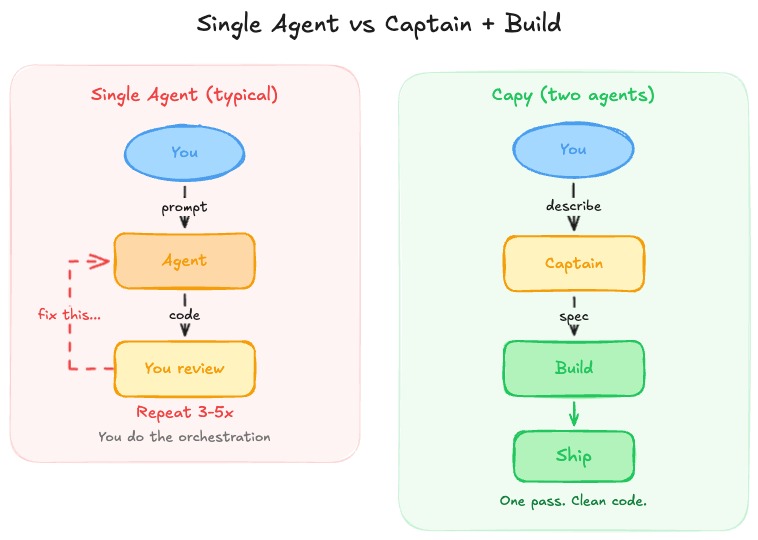
The loop is familiar. You prompt an agent, it writes code, you scan the diff, and you ask for changes. The agent is quick, but it can only follow what you asked for, not what you meant.
Experienced engineers already know the workaround: pause and plan. They skim the codebase, map the constraints, and jot down a spec. In other words, the human does the architecture work before the agent starts typing.
We asked a simple question: what if the system did that orchestration for you?
Meet Captain and Build
Capy uses two distinct agents that work in sequence.
Captain is the technical architect. It reads codebases, researches, asks questions, and writes exhaustive specs, but it never writes production code.
"You are a technical architect who PLANS but never IMPLEMENTS."
Build is the executor. It receives the spec, spins up an Ubuntu VM, edits files, runs commands, and ships the work.
"You are an autonomous AI agent with access to an Ubuntu virtual machine to complete the user's coding and research tasks independently and asynchronously."
| Captain | Build | |
|---|---|---|
| Role | Architect | Executor |
| Code | Reads code | Writes code |
| Research | Explores | Full VM access |
| Interaction | Asks questions | Ships PRs |
| Output | Creates specs | Runs commands |
The planning step that changes outcomes
Before Build touches a file, Captain runs the same routine a good staff engineer uses at the start of a project - explore the codebase, clarify ambiguities, write a concrete spec, and hand off a zero-guesswork brief.
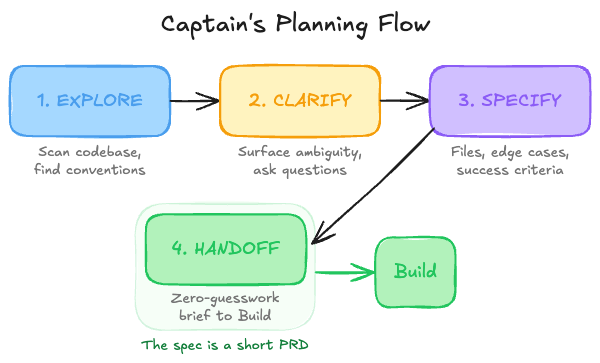
Think of the spec as a short PRD, not a loose prompt. A real example might read: "Add Google and GitHub OAuth. Sessions live in src/auth/session.ts, follow the existing token refresh pattern, rate-limit failed logins, and make sure existing sessions survive re-auth." It names the files, the constraints, and the success criteria so Build has nothing left to guess.
If something is missing from the spec, it shows up later as churn. Captain's job is to make the intent explicit so Build can move straight to execution.
The handoff in practice
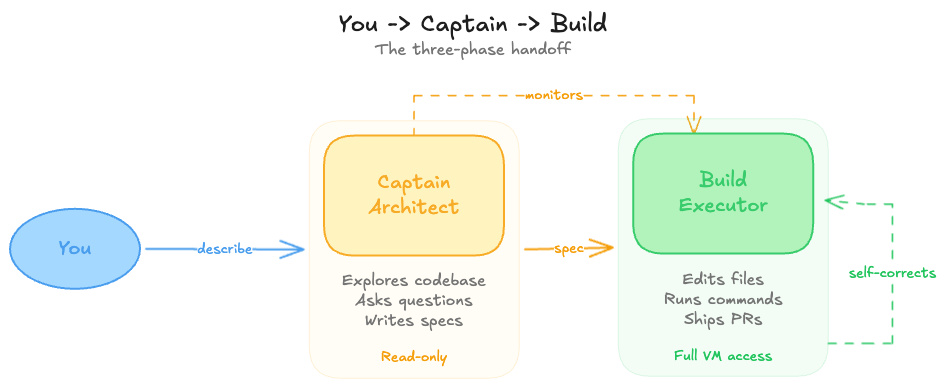
You describe the task in plain language - no need to polish it. Captain reads your codebase, identifies the patterns and constraints, and closes the gaps. If something is ambiguous it will ask: "Should failed logins return 401 or 403?" or "Do you want rate limiting on auth endpoints?"
Once the spec is tight, Build takes over. It edits files, installs dependencies, runs tests, and opens a pull request - all autonomously. If Build drifts off track, you can step in through Captain or let Captain follow up on its own.
Guardrails: what each agent can and cannot do
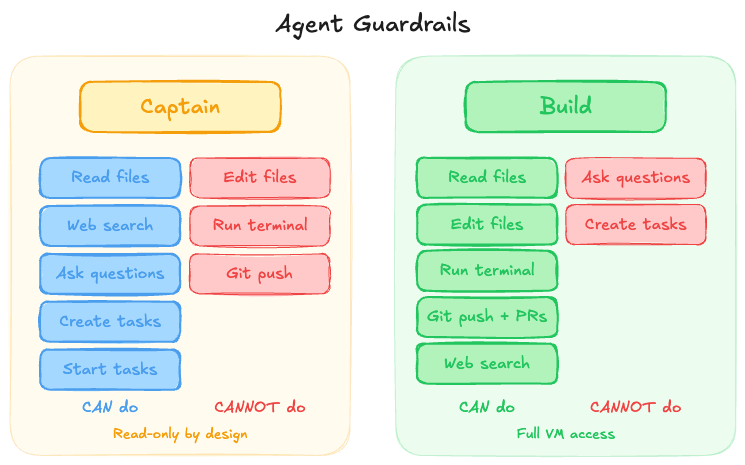
Captain is intentionally read-only. It can scan any file and search the web, but it never edits code, runs terminals, or pushes commits. It plans, hands off, and gets out of the way. We keep its system prompt and toolset tightly curated for reliability.
Build is the opposite - it gets a full Ubuntu VM with sudo, whatever runtimes you need, and full git access to branch, commit, push, and open PRs. It often touches many files in a single pass and will run the tests itself, see what fails, and fix it. The trade-off is that Build never asks you clarifying questions mid-task. It only sees the spec and the codebase, which is exactly why the spec needs to be good.
Where the split pays off most
The two-agent split pays off most when the work is wide or messy. Feature development like "add real-time notifications" touches the database, backend, WebSocket layer, and UI all at once. Large refactors like migrating from REST to GraphQL require mapping every endpoint and test before any code changes. Bug investigations like "users see stale data" could live anywhere from caching to queries to UI state. In each case Captain narrows the surface area first so Build can move in a straight line.
For tiny edits - renaming a variable, fixing a typo, tweaking a string - you can skip Captain and go straight to Build. The planning step only pays off once tasks are bigger than a quick human edit.
The counterintuitive latency trade
Two agents sound slower on paper.
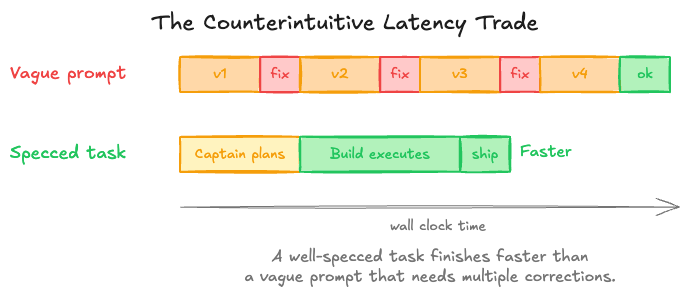
In practice the back-and-forth costs more than a single planning pass. A well-specced task finishes faster than a vague prompt that needs multiple rounds of correction, and because Build runs asynchronously your wall-clock time stays low even when the task itself is long.
Try it
Start a chat, describe what you want, and let Captain explore and spec it. When the plan looks right, start Build and let it ship.
You may find you enjoy the planning step more than you expected. We do.
Ship your next feature with Capy
Plan, build, and merge with parallel coding agents.