





Capy 0.10.0
Issues board, Drive editing, and a faster Capy
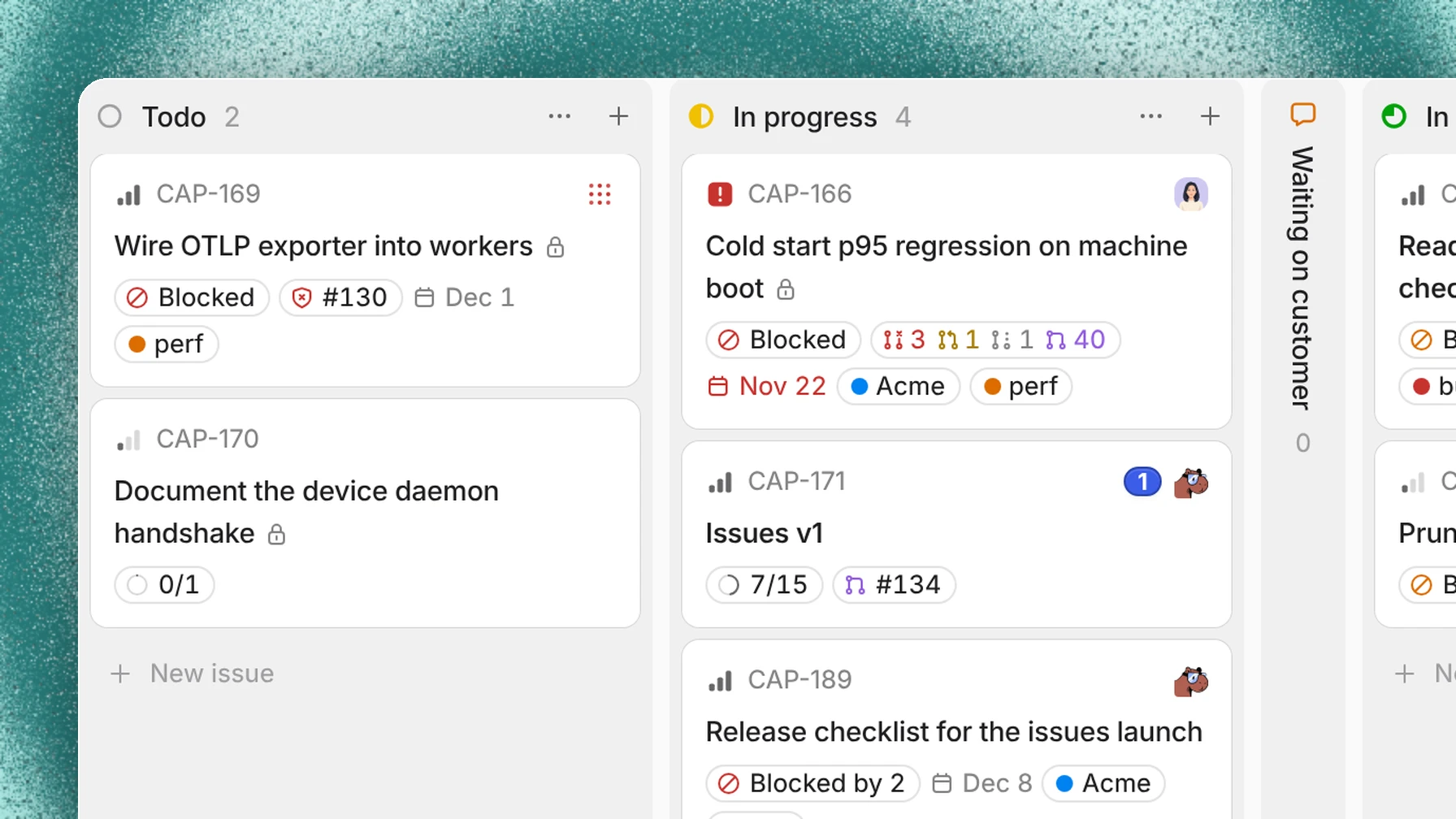
Issues now have a board. See every issue in a column for its status, and drag cards between columns to change their status. Drive files open for editing in a thread's side pane, and Capy is faster across threads, cloud machines, and the desktop app.
This release also adds more from Capy in Slack, and fixes across threads, issues, the desktop app, and Slack.
Issues board
Pick Board under Layout on the Issues page to see a column for each status. Drag a card to another column to change its status, or select several cards and move them together. Each move can be undone, and you can also move a card from the keyboard.
Save view keeps the filters you use as a view, the way the Threads list does. The issue page also has a new layout, with properties in one row under an editable title. Anyone who can read an issue can reply to a comment in place or edit it.
Drive
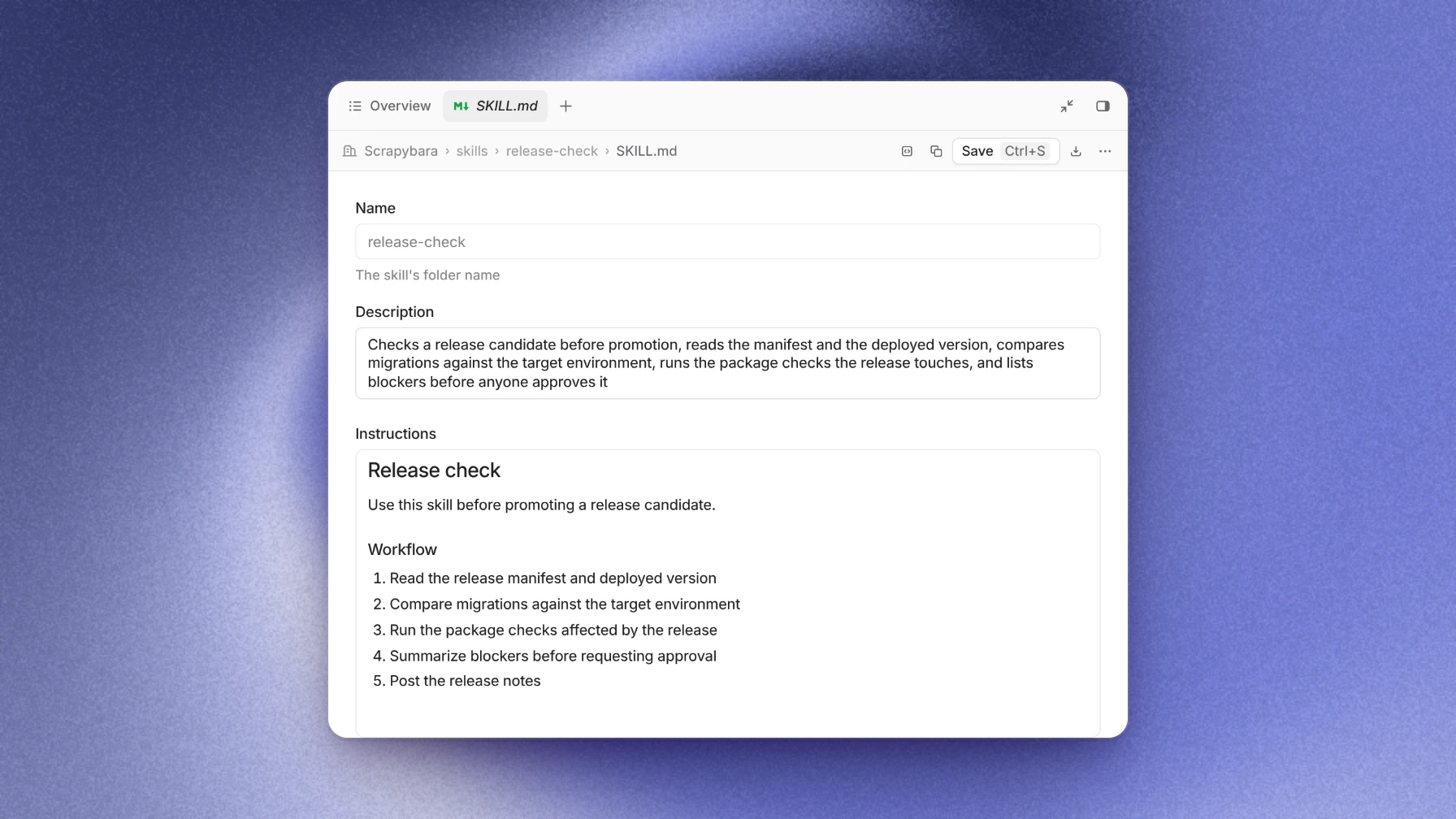
Open a Drive file in a thread's side pane, then edit and save it there with the same editor as the Drive page. Markdown files show an outline of their headings on wide panes, and each heading has a link you can share. The image viewer zooms in real pixels and has a 1:1 toggle.
When two threads add lines to the same file, both keep their lines instead of one making a conflict copy. A thread's edit no longer overwrites a newer version that another machine saved, and links to a renamed file follow it to its new name. On a thread's machine, a large drive's folders appear in a fraction of a second instead of after the whole drive loads. Typing in Drive search and the tree filter stays responsive, and archived drives move behind the Archived only filter on the Drive page.
Faster
On a Mac, the desktop app uses about 80 MB less memory at rest, and its GPU process uses about half as much as before. Cloud machines are ready for a thread sooner after they boot or wake, each step of a thread starts sooner, and a very large repository's first clone resumes where it stopped.
Long threads open with far fewer requests, stream replies with less work, and load older messages without a long freeze. Threads with many subagents, or many threads on one Claude subscription, no longer stall for up to 20 seconds at a time. Capy picks up finished CI in about 12 seconds instead of about 22. The Desktop tab also lags less on a slow connection.
More from Capy in Slack
Capy can send you a direct message in Slack, and your replies in that message reach the thread. A thread can wait for reactions on a Slack message, such as a vote, and shows who reacted. Capy can also edit and delete the messages it posted, and send a thread reply to the channel too.
Merge on a Slack pull request card turns on auto-merge while checks still run, and the card offers a way to turn it off. Drive share links and Explore links to plugins, skills, and themes show in Slack as cards with the file or listing.
Models
You can add a catalog model to one of your connections under a name of your own. When you connect or edit a key, endpoint, or gateway in Settings → Models, pick Add model in its Models card and choose the model under Model ID. It keeps that model's limits and reasoning, takes the name you give it, and can have its own Default reasoning. It shows by that name in the model picker and in usage, and it runs only on that connection, so a turn never falls back to Capy credits, a seat, or another key. That keeps DeepSeek V4.1 Flash on Fireworks apart from the same model on Together, or a second Claude key apart from your main one.
This works on an Anthropic, OpenAI, Google, or xAI key, and on any connection that speaks the OpenAI API, such as OpenRouter, another gateway, or a custom endpoint. On an endpoint or gateway, you can type the id it uses and pick the catalog model it serves under Same model as. A subscription, such as a Claude, Codex, or Copilot seat, can't hold these models. Organization admins add them on the organization's connections, and anyone can add them on their own.
- Gemini 4 Neon is available, GPT-6.2 Astra, GPT-6.2 Sol, and Claude Fable 5.2 run on a GitHub Copilot seat, and Daybreak models show in the model picker as soon as you connect. GPT-6 Cyber and GPT-5.6 Cyber run on an OpenAI key whose Daybreak Red approval includes them, and Settings → Models names the models that Daybreak Blue and Daybreak Red each cover on a key or a Codex seat.
Also in this release
- After single sign-on, you can finish two-step sign-in with a passkey. You can name a passkey when you add it, and rename it later with Rename passkey on the Security page.
- Audio mode gives each track a compact header and its own waveform color, and Levels is on by default.
- The public API reads a pull request's review state and sets the triage status of each finding.
- DeepSeek V4.1 Flash and GLM-5.3-Flash with ads are now also available in the United Kingdom, Australia, New Zealand, and Ireland.
- Large Captain crews, and threads with hundreds of subagents, open without freezing the browser.
Fixes
Threads
- A streamed reply no longer disappears right after it finishes.
- Copying a whole message copies the entire answer, and the button on each section says it copies a section.
- When a message numbers its points #1, #2, and so on, they stay plain text instead of linking to old pull requests.
- Question cards render Markdown and keep line breaks, and answers no longer break the question's bold text.
- Pressing Down after recalling an earlier prompt brings back your unsent draft.
- Typing a character in a text field never runs a shortcut, on any keyboard layout, and model shortcuts can be remapped.
- Digits typed into the model picker's search are typed, not taken as a favorite pick.
- Jump to sidebar thread 1–9 works while you type when it's bound to a ⌘ or Ctrl chord, and the Shortcuts page says when each shortcut works.
- On a new thread, picking a paired computer and opening the @ menu no longer freezes the page.
- The quote comment box keeps your text when you click outside it, and stays on screen as it grows.
- Messages from other people and agents no longer repeat their time in the hover actions.
- Copy image works on images hosted outside Capy, on web and in the desktop app.
- Downloading a file that a preview already showed, such as a PDF, no longer fails with a network error.
- A terminal card keeps taking keys when the same session is open in a Terminal tab.
- A terminal, remote desktop, or phone connection that the browser blocks fails with an error instead of waiting forever.
- Code block and diagram toolbars use the app's usual copy and open-in-window icons.
- The composer's voice and attachment buttons say when a feature isn't available there, instead of "coming soon".
- The "Exposed a preview" card fades the machine label instead of running it under the status dot.
- Old threads no longer jump to the top of the thread list as just updated when Capy cleans up their sleeping machine.
- Archived threads in the Threads list keep their owner's picture, with the archive mark after the title.
- In the sidebar, the Slack or Linear mark sits beside the model and machine icons instead of looking like part of the project name.
- The avatar at the bottom of the sidebar stays in place when Settings opens.
- When two projects share a name, project pickers and lists show the project code to tell them apart.
- The command menu keeps results in place while slower results load.
- Capy opens the organization you last chose in this browser.
- Nested AGENTS.md files and rules files apply again on Claude and GPT-6 models when Capy reads or edits matching files.
- Threads on a Claude plan keep following the repository's rules after Capy rebuilds their session.
- A page that keeps the browser busy no longer makes Capy report that it lost the browser, especially while it fills in forms.
Panes
- Dragging the chat tab to an edge of its own pane splits the pane.
- On a phone or a narrow window, closing the last pane tab goes back to the chat, and reloading doesn't reopen Overview.
- Letting go of a pane tab over a browser tab ends the drag instead of leaving the drop preview stuck.
- A working pinned tab keeps even padding around its face.
- On a phone, side sheets such as Add connection keep scrolling after the first swipe.
Issues
- Issues turn unread only for comments, mentions, and assignment, not for every status or description edit.
- An issue's activity folds long runs of updates into one row you can expand, so comments stay visible.
- Changing an issue's status, priority, label, or assignee moves it to its new group and updates the counts at once.
- Issue status sections show exact counts, and issue codes keep their width instead of overlapping.
- An open issue page updates when a linked thread, pull request, or sub-issue changes, and new comments move the issue up the Updated list.
- Quoting text on an issue adds the quote to the comment box instead of posting a comment right away.
- Images and videos on an agent's issue comment show as a gallery instead of small file chips.
- The fold of closed sub-issues under a parent says how many it holds and looks like a toggle.
- The Issues list loads with many filters combined, even in an organization with thousands of projects.
Pull requests
- The pull request view always names the repository.
- The @ menu in pull request comment boxes lists the pull request's GitHub people.
- The pull request view's Overview, Guide, and Diff tabs keep the same spacing on a phone and in a narrow pane.
- On a phone, the review drawer lists Comment, Request changes, and Approve as full-width rows instead of cutting Approve off.
- A thread working in a linked folder on your computer can open a pull request.
Files and Drive
- When a thread writes a temporary file and renames it over a Drive file, the drive keeps the new file and the edits made to it afterwards.
- drive:// links open automation drives and drives whose names use non-Latin characters, and never open the wrong drive.
- Drive share links whose id ends in "_" open correctly when pasted into chat or Slack.
- Drive version history shows which thread wrote a version only to people who can see that thread.
Desktop tab
- The Desktop tab keeps reconnecting through outages and no longer shows a dead connection as live.
- One slow viewer no longer freezes the Desktop tab or lowers its quality for everyone else watching.
- Mouse wheel notches, precise clicks, pinch zoom, and Firefox's Back and Forward buttons reach the remote desktop.
- Text typed in the remote desktop viewer comes through correctly across Caps Lock, keyboard layout changes, line endings, and the keypad, and holding Shift or Ctrl no longer changes what Capy types.
Desktop app
- Creating a project lets you pick the clone folder first, and never clones inside a linked repository.
- Window tab shortcuts such as Ctrl+Tab and ⌘1–9 switch tabs while a terminal or a menu has focus.
- The Linux tray icon is visible on dark and light panels.
- The desktop app no longer keeps a CPU core busy when the program that launched it closes its console.
- On Windows, background commands on your computer no longer leave a hidden console process behind.
- On a Windows computer, force-stopping a command no longer leaves the thread stuck on "the database was unavailable".
Moving threads between the cloud and your computer
- Moving a thread to your computer works when its repository was renamed on GitHub.
- Moving a thread onto a Mac with an older Apple git works.
- Moving a thread to your computer works when the computer can't fetch the base branch but has it as a remote branch, and a failure says why.
- A thread that started in a one-repository folder and gained a second repository in the cloud moves back to your computer in a worktree.
- Moving a thread from the cloud to your computer no longer fails with a "partial clone" error.
- Moving a thread whose repository has no tracked files no longer fails.
- When creating a worktree on your computer fails, the move shows git's real error.
- A move refused because a submodule has changes names the submodule and its first changed file, and says how to clear it.
- Continue in cloud works for a thread whose folder on your computer hasn't changed in over a day.
Sign-in and security
- When an organization requires single sign-on, the desktop app, Slack, and Linear say to sign in with SSO instead of asking for two-step verification.
- An account that requires a passkey, on a work domain with single sign-on, can sign in with SSO instead of getting locked out.
- Signing in with single sign-on no longer dead-ends on a passkey step, and the Security page explains when company SSO already covers the passkey requirement.
- On macOS, the desktop app uses Apple's passkey sheet, so 1Password passkeys and security keys work for sign-in and when Capy asks you to confirm it's you.
- A test sign-in through a new SAML or OIDC connection marks the connection as tested right away.
- Domain verification accepts a correct DNS record from a zone that is signed but not delegated for DNSSEC.
- Disconnecting a Codex, Copilot, or SuperGrok account clears its sign-in, and Codex signs out at OpenAI too.
- AWS and Vault cloud credential targets refuse an audience that is reserved or used by another target, and the form says why.
Slack
- Slack-linked threads keep posting replies to Slack when you write from the app, and pause only after three app messages in a row, with a button to resume.
- A thread started in a Slack group DM can post messages and reactions back into it.
- With no Slack default model set, Slack threads use the organization's default model instead of the one you last picked on the web.
- Capy answers an @Capy mention promptly even while threads are reading Slack.
- Slack channel links from Capy open the channel in Slack.
- Slack notifications show titles and names with &, <, or > as written, and never turn them into @channel.
- Canvases Capy writes show real mentions and labelled links instead of raw text.
- An organization can disconnect a Slack workspace that needs reconnecting, and connecting a workspace held elsewhere says which side to disconnect.
Models
- Reasoning models on an OpenRouter key, such as Gemini, no longer end with an empty reply.
- Gemini models show their reasoning while they think.
- A Gemini reply that runs into Google's deadline retries once instead of failing.
- Kimi with thinking on, through Moonshot's own API, keeps working in long threads.
- Mistral reasoning models on a custom endpoint no longer fail on their first thinking output.
- Models with ads can be saved as a default model, and places that can't show ads say so clearly.
- The ad above the composer goes away once the thread runs on a model without ads.
- Send now on a queued message works in threads on models with ads.
Settings
- Turning on push notifications in Settings works again in every browser, including the iPhone Home Screen app.
- The wallpaper Overlay slider in Appearance dims the wallpaper on web again.
- In the background crop dialog, ratio presets fit the image instead of shrinking the box.
- Enter applies the picture crop dialog.
- On the Models page, connection names and badges no longer run under the controls on narrow screens.
- The feedback approval card shows the report you're about to send.
- A Setup snapshot build that is cut off midway is retried or marked failed, instead of showing as building for hours.