





Capy 0.9.0
A Captains-first sidebar and a model picker with favorites
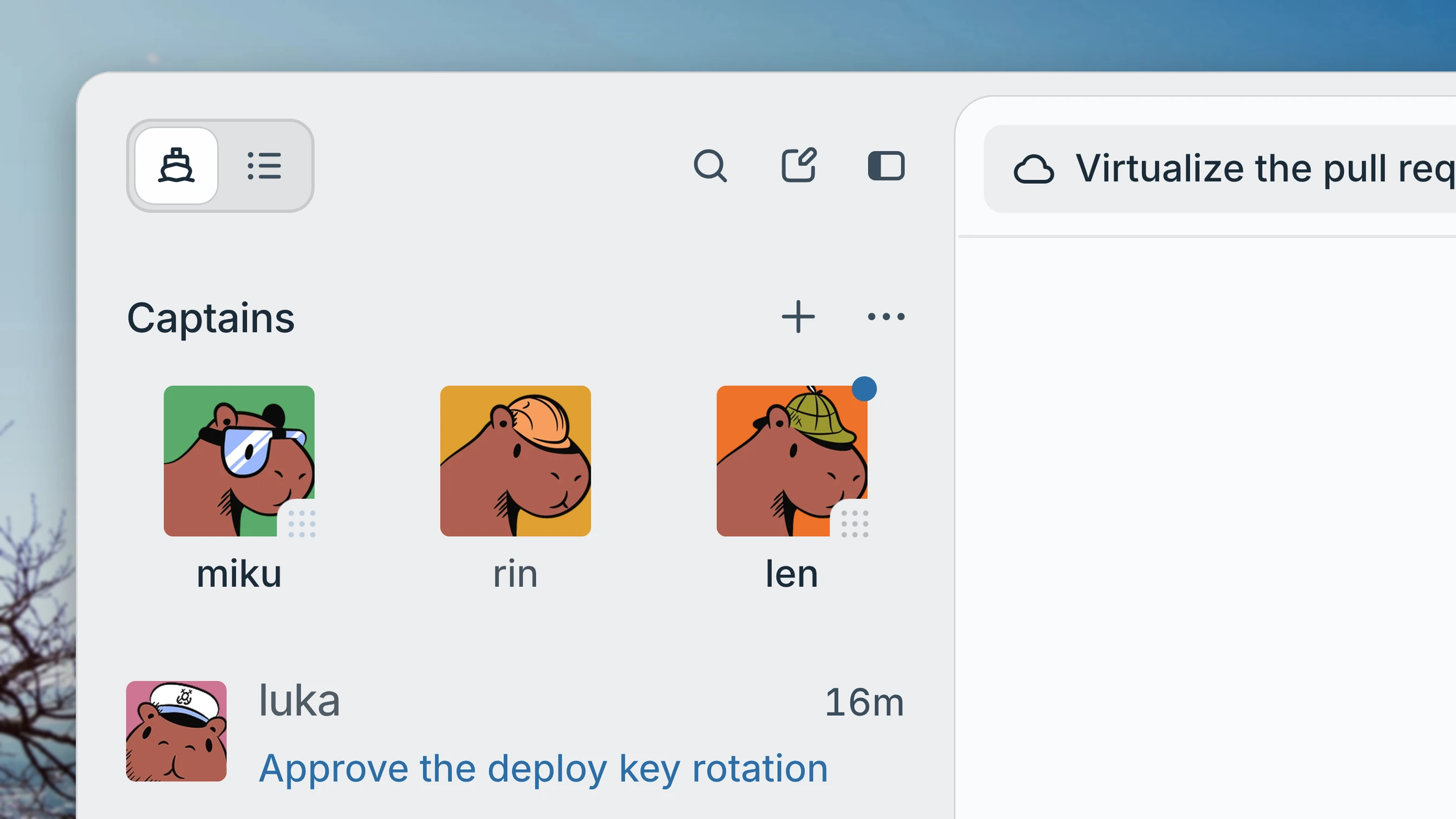
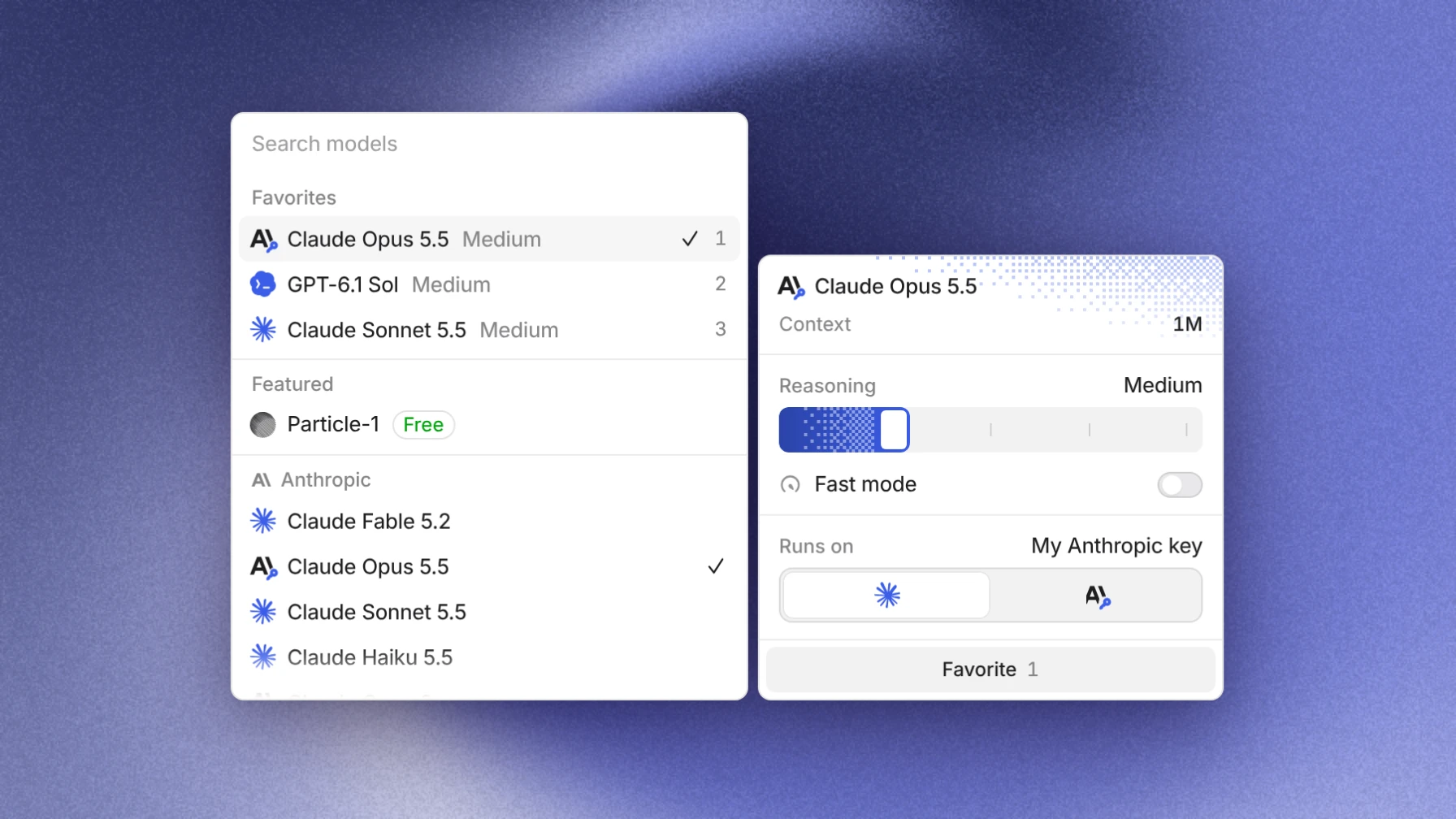
The sidebar now opens on your Captains, each with the question it's waiting on you for or its latest message, and your threads are one click away. The model picker now starts with your favorite models, and you can switch between them from the keyboard.
This release also moves threads between the cloud and your computers, and adds SAML single sign-on that admins set up themselves and accounts that only a passkey can open.
A Captains-first sidebar
If you have Captains, the sidebar opens on Captains and lists only them. Pin the Captains you work with most to keep their faces in a row at the top, and file the rest into folders or group them by project. Each row shows the question a Captain is waiting on you for, or the newest message it sent, and that message stays in place while the Captain works. A blue number counts the open questions across its crew, and a pinned Captain shows a dot when something is waiting on you. Crew threads stay with their Captain: open them from the Captain's Overview, and drag a thread onto a Captain to add it to the crew.
Switch to Threads at the top of the sidebar for the rest of your threads. Running threads gather under Working, and threads that are read, have nothing waiting on you, and are merged or quiet move to Settled. Hover a thread and choose Settle to put it away yourself; new activity brings it back. Scheduled runs have their own Automations line. In both views, Threads, Issues, Pull requests, Drive, and your other pages are icons along the bottom, and you can drag them into the order you want.
A model picker with favorites
The model picker in the composer starts with your Favorites, each at the reasoning level you use. Press ⌥1 to ⌥9 to pick one without opening the menu. Highlight any model to set its Reasoning, turn on Fast mode, and choose which of your subscriptions or keys it Runs on, in a panel beside the list.
Move to a device
Move a thread between the cloud and your computers from the machine menu in the composer. Move to a device lists your computers with the online ones first, and on a thread that runs on a computer, Move to another device takes it straight to the next one. A thread can also start on a computer that doesn't have the project's folder: Capy clones the missing repositories with that computer's own git credentials.
Single sign-on and passkeys
With the SSO add-on, an admin can now add Google Workspace SAML, Okta, Microsoft Entra ID, JumpCloud, OneLogin, Keycloak, Auth0, or any other SAML 2.0 provider on Identity & access in organization settings. Pick a verified domain, copy Capy's values into your provider, give Capy the provider's metadata, and turn the connection on. After one test sign-in through the provider, you can require single sign-on for that domain.
When you add a passkey on the Security page, you can also turn on Require a passkey to sign in, so a password or an email code alone no longer opens your account.
Charts and diagrams in the thread
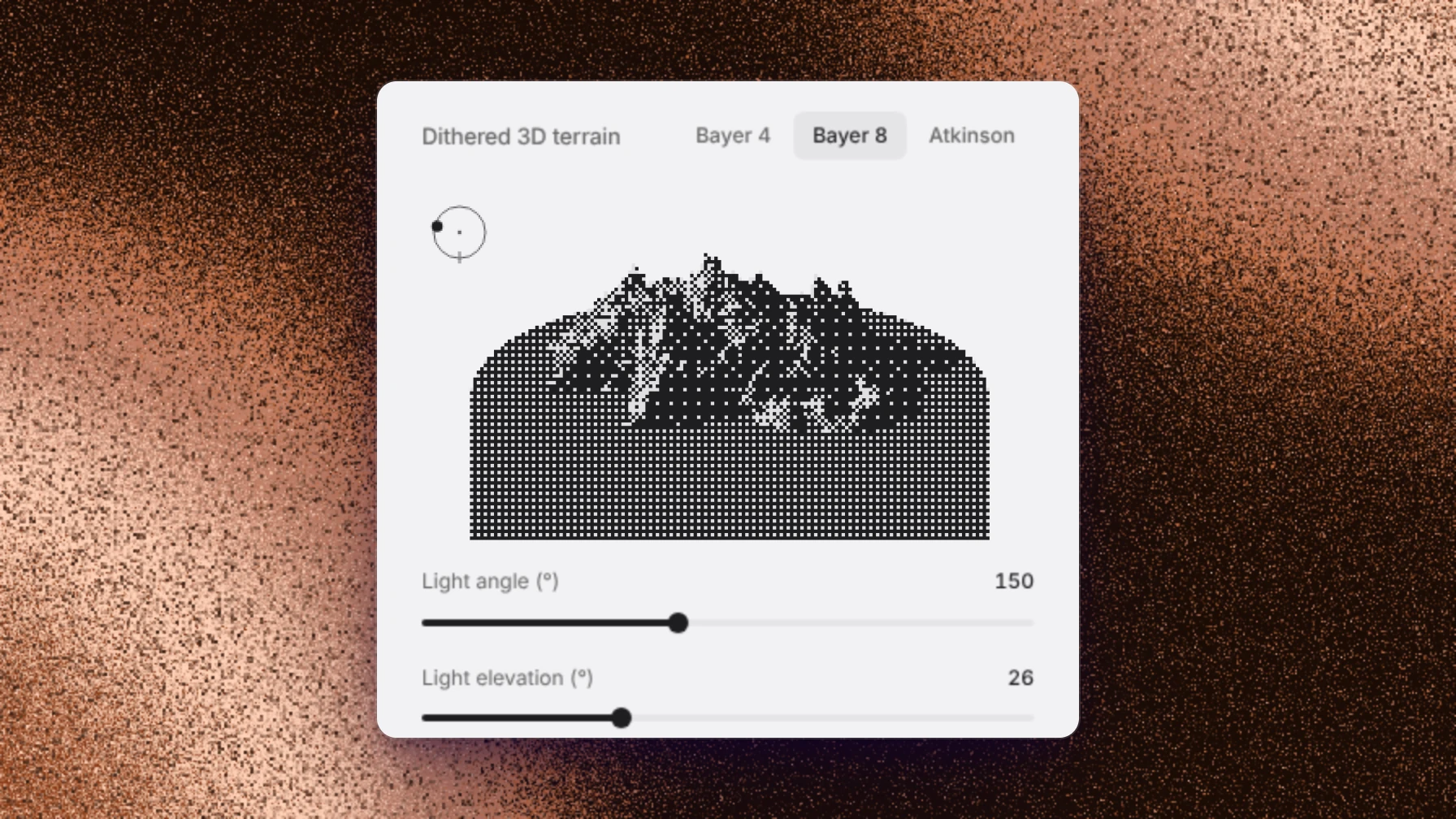
Ask Capy to chart some numbers, draw how something works, or build a small interactive model, and it shows the result in the thread. Tabs, dropdowns, sliders, toggles, and buttons in a visual work, and a chart animates to its new data. Hover a chart to see the value of each series at that point. Visuals follow light and dark mode and respect reduced motion. Capy draws them in threads you start from the web or desktop app, the CLI, or an automation.
Also in this release
- Token totals on the Usage page and in thread reads no longer count cached tokens twice, and when you ask Capy or a Captain what a thread cost, it shows tokens by kind, model turns, and what you were charged, in dollars.
- Files and images open faster, tool calls that read a drive start sooner, and the Files search keeps up as you type.
- Threads on Claude keep their prompt cache from the first step, so resuming a long thread is faster.
- The app does less work while others in your organization are active, and long replies stream more smoothly.
- On a cloud thread, the Files tab shows the workspace as of the last finished turn while the machine sleeps, without waking it.
- A Word document opens as pages in the thread pane, in Drive, and on a shared link.
- When Drive can't save or mount something, the thread shows a card that says what happened and what to do next.
- Start a message with /plan, and Capy explores and asks first, then changes nothing until you approve its plan. It works from Slack, Linear, and the API too.
- Request cards in a thread have Dismiss beside Later, so a request you won't answer stays closed on every device.
- A Captain's chat gathers its crew's open questions in one menu, with Dismiss all.
- Comment on a 3D model: press Annotate, or C, and pin notes to the model that stay in place as you turn it. Several notes on one image, video frame, or 3D view go to Capy as one picture with numbered notes.
- Click an issue's status icon in the Issues list to change its status.
- Open a Mermaid diagram in its own window.
- Double-click a thread title in the sidebar to rename it.
- A rendered Markdown diff shows which words, table rows, or code lines changed, and View final file shows the finished document.
- Links in a terminal can be clicked.
- Capy issue links unfurl in Slack with their status and assignee.
- Pick the default model for Slack mentions and Linear threads, and a personal default, on the Models page.
- A Slack direct message tells you when a pull request a thread opened merges, if you turned on Slack messages.
- The Security page shows how you sign in, in the desktop app too.
- Change your email from Profile in one step, on web and desktop.
- The public API can read, edit, run, and cancel automations, list their runs, and rotate a webhook URL.
- The archive notice says how many open pull requests the archived threads leave unwatched.
- Image wallpapers with the dither effect move like the default background.
- A Captain can have a photo you upload or one from your organization's library.
- Keiki is in the plugin marketplace, and Gemini 4 Carbon is in the model picker.
Fixes
Threads
- A subagent or crew thread that waits for a Claude session reads as queued, not idle.
- The live status line under a running thread no longer shows the machine's startup phase.
- Sending a message no longer shifts anything already on screen.
- When a model provider refuses a step, the thread shows the provider's reason and when to retry.
- When your own subscription or key stops serving a thread's model, Capy asks before it switches to Capy credits.
- When a model's host runs out of capacity, the step moves to a standby host instead of failing.
- If a server fails while waking a thread's machine, another one picks up the wake right away instead of minutes later.
- A Claude Code thread no longer mistakes a message you send while it works for tool output.
- The time, reply, and copy buttons over a short message no longer get cut off at the edge of the chat.
- An image opened from the new-thread composer dims the app behind it.
- Sending to a thread whose device was removed says which device refused it, instead of "Something went wrong".
- Expanding, restoring, opening, or closing the side pane no longer flashes or stalls.
- Explore no longer jumps sideways when the sidebar loads.
- The sidebar no longer lists threads you left or unsubscribed from.
- The sidebar's options button no longer shows a dot that looked like an unread notice while a filter is on.
- Rename thread selects the current title, so typing replaces it.
- A stray tag such as
<code>in a message no longer turns the rest of the message into code. - An image in an interrupted message shows the unavailable card instead of a broken image.
- Annotating an image attached in the composer, such as an iPhone HEIC photo, adds the comment.
- Notes on an image or video in a thread opened inside another thread go to that thread.
- A send failure you need to act on, such as connecting a subscription, stays on screen until you dismiss it.
- A thread whose cloud machine went to sleep no longer warns that it is running without its git and GitHub credentials.
- The composer's subagent list shows each subagent under its parent.
- Dropping a thread on a Captain's crew list adds it to the crew.
Files and Drive
- A Drive save that loses a race with another save now merges over it instead of staying unsaved.
- A thread's Files tab keeps its open folders and its filter when you switch tabs and come back.
- Switching between file tabs keeps the files tree on screen.
- The pane's tab menu no longer lists Drive twice.
- A machine whose Capy server is out of date says so, instead of saying it can't be reached.
- When a drive can't mount on a cloud machine, files still save, the thread says which drive and why, and it warns you if files written there aren't being saved.
- Drive files that hadn't synced are kept when a machine is replaced or stops, and the thread names any it couldn't keep. Files written in a drive folder before the drive mounted are moved into the drive.
- Two agents writing to one drive at the same time both land, in one version.
- A file on a drive keeps the modified time it was written with, so tools such as rsync and make work as expected.
- Writing to a drive no longer fails with an I/O error when the connection drops for a moment, and a late sync never replaces a newer edit.
- Reading a drive while Capy restarts a server no longer fails.
- Drive keeps older versions that a session, one of your computers, or a review still needs.
- A bulk deletion that a drive holds goes through only after it is explicitly confirmed.
- A system skill or plugin file edited on a machine no longer blocks newer versions: Capy restores it and says what it discarded.
Pull requests and reviews
- A pull request open beside a thread shows the same state as its chip in the chat.
- Pull request status in tab previews, the threads filter, and the quit dialog updates as soon as checks finish.
- A push that only merges the base branch no longer starts a new review.
- A video linked in a pull request plays inline, an image can be copied to Drive, and Retry shows its progress.
- Long repository names on the Review settings page show in full on hover.
Issues
- A comment someone adds to an issue while you're elsewhere shows when you come back, without a reload.
- The Issues status filter starts with every status checked, so your first pick no longer hides the others.
- The Issues page no longer crashes with "Something went wrong" when a refresh fails.
- An issue's one-letter shortcuts work only in the pane you're in, so typing after selecting chat text starts a quote.
- Issues is a page you can hide or move in the sidebar.
- A Drive file attached to an issue opens in Drive instead of downloading a copy.
- Images and videos attached to an issue can be annotated.
- An issue's opened pull request row no longer shows a green icon that reads as ready.
- A parent issue shows which sub-issue holds its mention.
Machine desktops
- Typing on a machine's desktop handles dead keys, AltGr, input methods, and paste shortcuts, and a key no longer repeats after you let go.
- Only one cursor shows over a machine's desktop.
- A machine's desktop stays connected when the machine wakes and when you switch pane tabs, and it restarts in place if it crashes.
- On a touch screen, a long press or a scroll on a machine's desktop acts under your finger.
- Apps that Capy opens on a machine show on its desktop.
- A screen recording that fails says so, instead of hanging or reporting success.
Desktop app
- On a Mac, the window buttons follow Capy's light or dark mode instead of the system's.
- When another Capy app is already using your computer for threads, the desktop app names it and tells you to quit it.
- Copy report on a desktop error card includes the app's recent log.
- Moving a thread from the cloud to your computer works on projects that use Tailscale MagicDNS.
- A pinned tab stays on its page however you navigate.
- ⌘W closes the tab when the conversation has focus.
Slack
- A
captain=reply under the Captain picker answers it. - A reply is never posted twice when sharing its file fails.
Settings and organization
- The wallpaper stays centered on the panel as the sidebar opens, closes, or resizes.
- An invitation sent to any verified email on your account finds you, and onboarding can verify the invited address.
- Joining an organization by your email's domain works on your first sign-in.
- Sign-up has room for the security challenge, so a challenged sign-up no longer stalls.
- The plan step in onboarding fits on a laptop screen, and the profile photo no longer jumps.
- Entering a two-step code no longer flashes a "wrong code" error before signing you in.
- Setting up an authenticator app asks you to confirm once, and a slow connection no longer reports a working code as invalid.
- Setting up an authenticator right after removing one asks you to confirm it's you instead of failing.
- You can add another passkey after confirming with a passkey you already have.
- A domain's Set up button on Identity & access starts the Google Workspace connection, and the switches unlock as soon as you add a second factor.
- Emails that confirm a new passkey or a new second step, or warn that a domain's verification lapsed, arrive.
- A plugin's or MCP server's page opens with its on and off switch, so a disabled one is easy to turn back on.
- When an MCP server needs approving again, the setup dialog picks the owner it belongs to.
- Add a connection lists coding plans such as Kimi Code and GLM Coding Plan in their own section, apart from API keys.
- A Claude token that Claude refuses shows Claude's reason instead of "Couldn't reach Claude".
- The Usage page's token totals no longer count cached tokens twice.
- Revoked API keys fold away behind a toggle on the API keys page.
- A snapshot build shows each Setup phase's progress and live output, so a long script no longer looks stuck.
- Installed as an app on Android, Capy's system bars match the app's background.
API
- An unknown
/api/v1path answers with a 404 that names the error. - The public API lists Captains page by page with a cursor.