




How to work through a bug backlog with coding agents

To work through a bug backlog with Capy, connect Linear and create a Captain for the bug queue. Delegate the issues in Linear, and each one starts a thread in the mapped project with the issue as its first prompt. Add those threads to the Captain's crew. The Captain runs one thread per bug, reads their reports, and keeps a list of what needs you. People still review and merge every pull request.
How the pieces fit
A Captain is a long-lived agent that runs other threads for you. The threads it runs are its crew. Each crew thread is a full thread, with its own machine, conversation and pull requests. The Captain hears from a crew thread each time that thread finishes a turn or needs something.
Linear is where the bugs come from. Delegating an issue to Capy opens a native agent session in the issue, and that session maps one-to-one to a Capy thread. Progress, questions and the thread link show up in the issue.
Together, a person picks the bugs in Linear, each bug becomes a thread, and the Captain keeps track of all of them.
Before you start
- Connect Linear in Settings → Integrations, and map each Linear team to a Capy project. Routing fails closed: a team with no mapping and no default project gets a visible error in Linear, not a guess.
- Link your Linear account to your Capy account. Capy asks the first time you delegate, and it never matches accounts by email or name.
- Make the project's machines able to run the tests. A bug fix is only as good as the check that proves it. Set up the environment first.
- Turn on Capy review for the repository, so each fix gets a review at its exact head.
Set up the Captain
- Create a Captain with New Captain. Pick the project the Linear teams map to, because a Captain takes crew threads from its own project only.
- Tell it what it's for in the first message. It writes your answer into its rules and plan. The docs' triage example is a good start:
You handle the bug backlog for the web app. Never do the work yourself.
Run one crew thread per bug. Every thread reproduces the bug first and opens
a pull request with a test that fails before the fix. Ask me first if a bug is
unclear or bigger than a day. Stack bugs that touch the same files instead of
running them side by side. Nothing merges without my word.
- Check the rules it wrote. Rules for every crew thread live in
CREW.mdin the Captain's Drive. To change one, tell the Captain, for example "From now on, run the e2e suite before calling a PR ready."
Hand it the bugs
- Delegate the issues in Linear. Assign or delegate each one to the Capy agent. Each starts a thread in the mapped project, with the issue's identifier, title, description, URL and labels attached as context.
- Add the threads to the crew. Drag them onto the Captain, use Move to, or ask the Captain with their thread codes: "Take CAPY-412 and CAPY-415 into your crew." Each thread keeps its project, machine and model.
- Or paste a list instead. For bugs that aren't in Linear, paste them into the Captain's chat. It starts one crew thread per item. Those threads have no Linear session, so their progress shows in Capy only.
Start with five or ten bugs, not the whole backlog. The first batch shows whether the rules and the environment hold up before you add more.
Work the queue
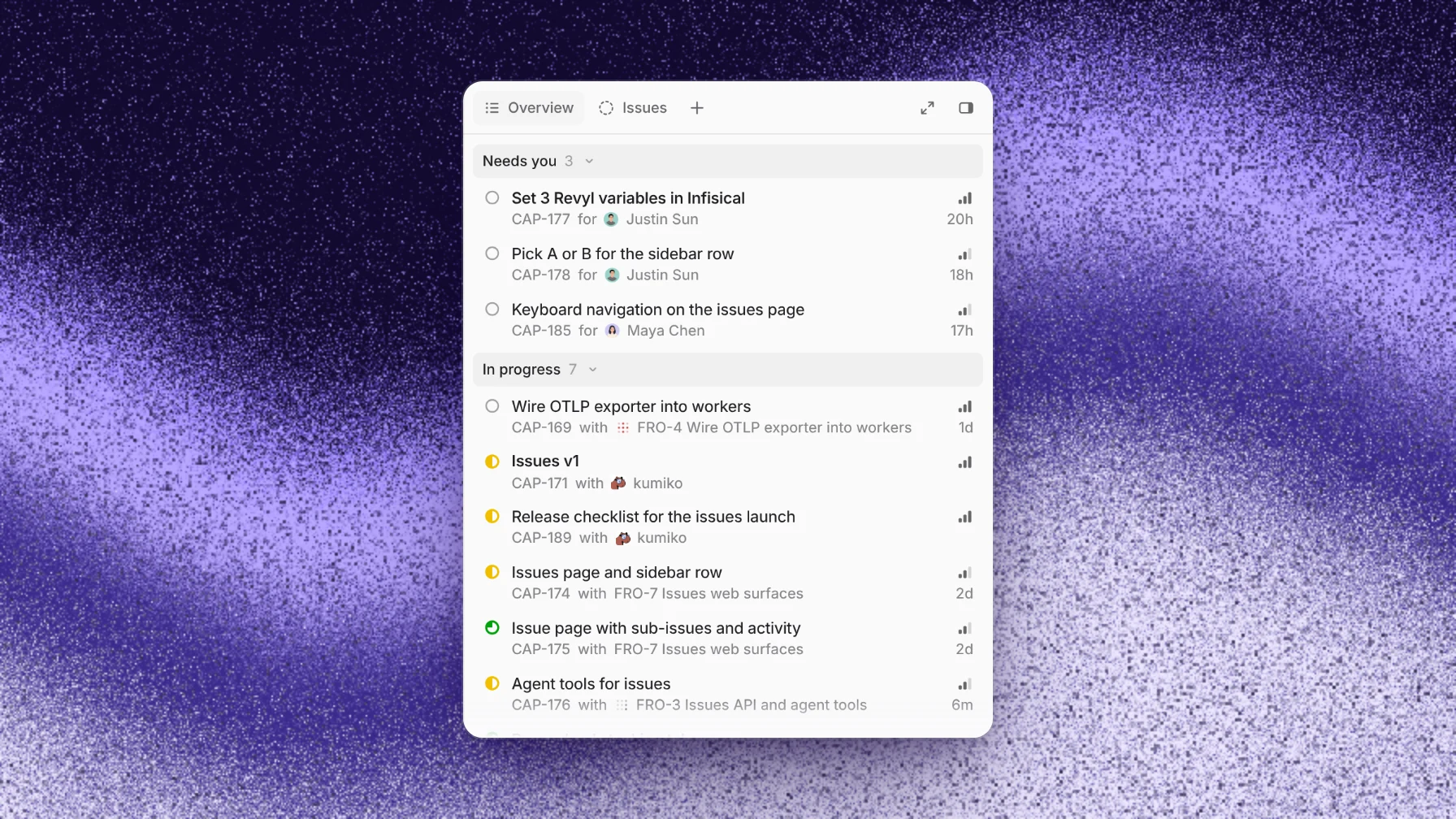
The Captain's Overview lists the issues waiting on you under Needs you, with the crew's threads and the rest of its issues below. When a decision is yours, the Captain moves the issue to Needs you, comments the question and tags you.
Answer in the Captain's chat, for example "merge capy#3780" or "hold the migration until Monday". If a crew thread asked you a question itself, answer in that thread, or in the Linear issue's agent session.
Each crew thread follows its own pull request. A failing check wakes the thread, and so do review findings and comments. The Pull requests page, filtered by Captain, shows every pull request the crew opened.
If something goes wrong
- A bug went to the wrong project. Fix the team mapping in the Linear connection settings. A session that already started keeps its project, so the fix applies to the next issue you delegate.
- Two fixes conflict. Separate machines keep agents from overwriting each other's files, but two fixes to the same code still conflict when the second one merges. Ask the Captain to stack them: the second thread starts from the first one's branch.
- A thread is stuck on a vague bug. It asks in its thread or in the Linear session and waits. Add the missing detail there, or tell the Captain to drop it.
- Too many threads at once. Give the Captain a rule, such as "Ask before starting more than three threads at once." Your plan's limits also cap how many cloud machines run at the same time.
Limits
- Parallel work isn't conflict-free. The Captain can order and stack the work, but fixes to the same files still need to merge one at a time.
- Someone still reviews and merges every pull request.
- Each crew thread on a cloud machine uses machine time in Capy credits, including the Captain's own machine.
- One Linear workspace connects to one Capy organization, and the work happens in GitHub.com repositories.
For the idea behind an orchestrator and its workers, see What is an agent swarm for engineering?. Goblins, one of our customers, merges 5x more pull requests a week, and Capy builds or reviews 98% of them.
Follow-up questions
Can the Captain pick bugs from Linear on its own?
The documented start is delegation: a person assigns or delegates each issue. You can also send a Captain new work by mentioning Capy with captain=<name>, on a Linear issue or in Slack, or from an automation.
Does the Captain write code itself?
Tell it not to. The triage setup above says "Never do the work yourself", so every fix happens in a crew thread with its own pull request.
Can crew threads use different models?
Yes. Crew threads use the Captain's model unless you or the Captain pick another, so a cheaper model can take simple bugs.
Who can see the Captain and its crew?
A Captain has an owner and an access setting, like a thread. Crew threads have the same access as their Captain, and the Captain always acts as its owner.
Ship your next feature with Capy