





From a Linear ticket to a reviewed pull request

A coding agent in Linear takes an issue, does the work in your repository, and reports back inside the issue until a pull request is ready for review. In Capy, you start it by delegating the issue to Capy or by mentioning @Capy in a comment on it. Either one opens an agent session, which maps to one Capy thread. It works best on issues with a clear done condition, and people still review the pull request and decide the merge.
How agents work in Linear
Linear has an agent platform. A workspace admin installs an agent and chooses which teams it can access. After that, people work with it much like a teammate: they delegate an issue to it or mention it in a comment, and the agent reports progress in an agent session on that issue. Installed agents don't count as billable users in Linear.
What the agent does with an issue is up to whoever built it. Coding agents turn it into a change in a repository and a pull request.
What happens when you delegate an issue to Capy
- You hand over the issue. Delegating it to Capy, or mentioning @Capy in a comment, opens an agent session in Linear. That session maps to exactly one Capy thread.
- Capy checks who asked. Each person links their Linear account to their Capy account once. If you haven't, Capy asks you to link from Linear, then delivers your request as soon as you do.
- Capy picks a project. It uses the Linear team's project mapping, then the connection's default project. If neither works, it posts an error in Linear rather than guessing.
- The thread starts with the issue. The first prompt carries the issue's identifier, title, description, URL and requester, plus the comments already in the session.
- Progress shows up in the issue. Short updates, the agent's replies and a link to the full thread appear in the agent session. When the agent needs an answer, it asks there.
- A pull request opens on GitHub. CI results and review feedback go to the thread, and the thread works through them.
- The conversation continues in the session. A comment in the agent session reaches the same thread, and Linear's stop button interrupts the current run.
A worked example: a bug in the digest email
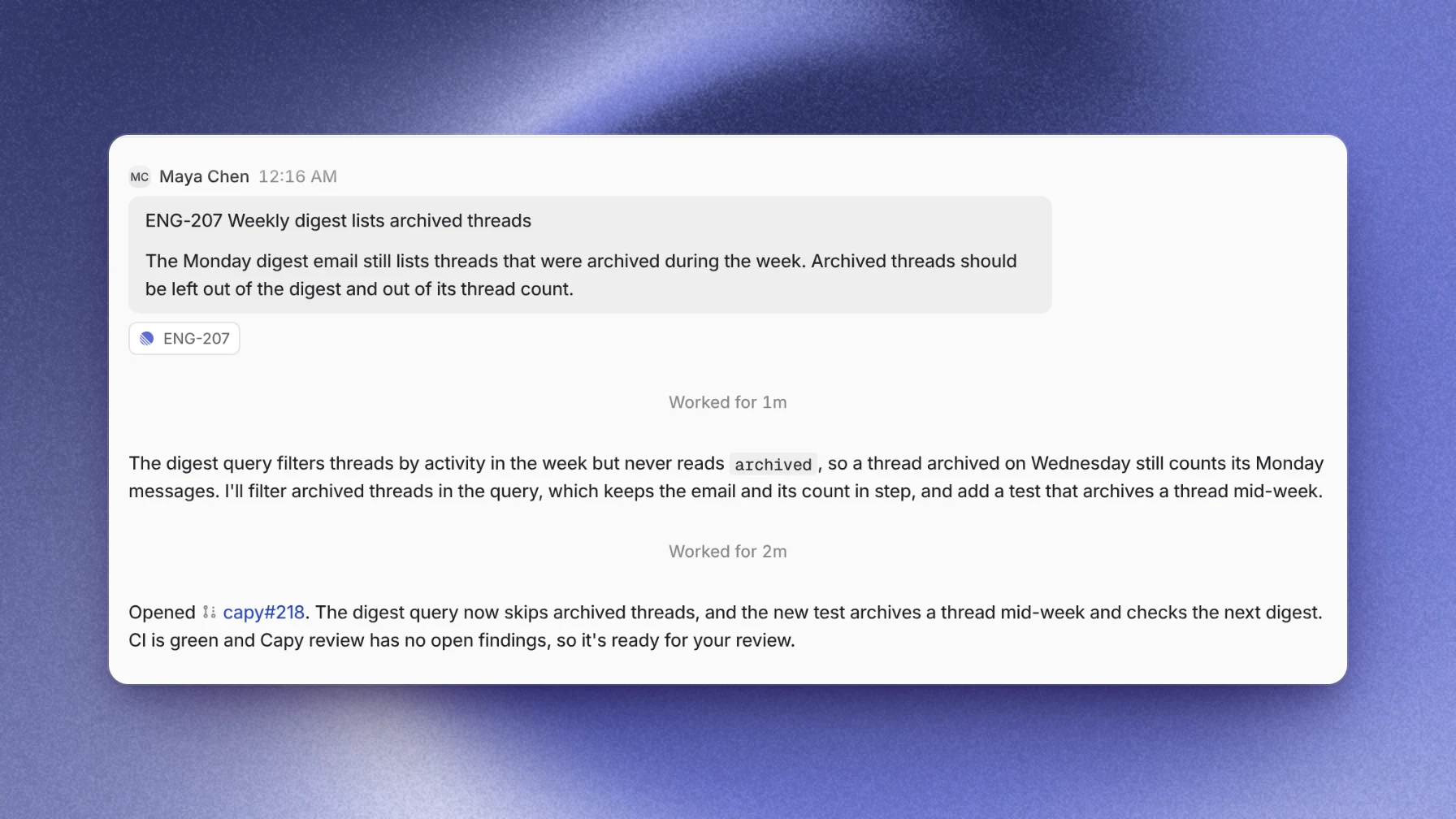
Issue ENG-207 says the weekly digest email lists archived threads. The image above shows the Capy thread it started. The issue's team maps to a Capy project that holds the repository with the digest code.
- An engineer delegates the issue to Capy. A thread starts in the mapped project with the issue's identifier, title and description as its first prompt.
- The agent finds the query behind the digest. It filters threads by activity during the week and never checks whether a thread is archived. The agent posts in the session that it will fix the query and add a test.
- The agent fixes the query, adds a test that archives a thread mid-week, and opens a pull request. The link appears in the issue.
- CI passes and Capy review finishes with no open findings, so the agent reports the pull request ready for review.
- The engineer reads the diff and merges. The issue keeps the whole history: the request, the agent's plan and the pull request.
Delegating versus mentioning
Both start the same kind of run. Delegating hands the whole issue to Capy, the way you'd assign it to a teammate. A mention brings Capy in from a comment, so the text of that comment becomes the instruction, for example "@Capy reproduce this on staging and propose a fix." A comment that doesn't mention Capy does nothing, so a discussion between people never starts a run. Every run comes from a person whose Linear account is linked to Capy.
What makes a good issue to delegate
An issue goes faster when it names the wrong behavior, how to reproduce it, the area of the code if you know it, and what done looks like. If it needs a product decision first, settle that in the issue before you hand it over. Otherwise the agent asks the question in the session and waits.
Where Capy fits
Capy is a platform that orchestrates agent swarms, and its Linear integration works like this:
- Delegating an issue or mentioning Capy creates a native Linear agent session, mapped one-to-one to a Capy thread.
- Project routing follows fixed rules and fails closed. A stale mapping produces a visible error instead of landing work in the wrong project.
- Threads started from Linear can join a Captain's crew, so one agent tracks a batch of delegated issues. How to work through a bug backlog with coding agents walks through it.
- Admins can set default branches per repository for threads that start from Linear.
- Capy posts progress, replies, questions and the thread link into the session as native Linear activity.
- Every inbound action re-checks the person's identity link and organization membership.
captain=<name>in a mention sends the request to that Captain instead of starting a standalone thread.- The pull request gets Capy review when it's on for the repository, and the thread wakes on CI results and review feedback.
And where it doesn't:
- One Linear workspace connects to one Capy organization.
- An unlinked account has to link before its request runs.
- A running session keeps its project even if you change the team mapping later.
- It works with repositories on GitHub.com. GitHub Enterprise Server and other git hosts aren't supported.
- It doesn't merge. Capy never merges a pull request unless you ask for that merge.
Follow-up questions
Who can delegate issues to Capy?
Anyone in the Linear workspace whose Linear account is linked to a member of the connected Capy organization, on the teams the agent can access. Any member can install the connection. Team mappings, the default project and branch defaults need a Capy admin or owner.
Which repository does the work happen in?
The repositories of the Capy project the issue routes to. The team's mapping picks the project, and the connection's default branches pick the branch in each repository.
What happens if the issue is vague?
The agent asks in the agent session and waits for the answer. Adding the missing detail to the issue before you hand it over is faster.
Can I stop the agent from Linear?
Yes. Linear's stop signal interrupts the thread's current run. The session stays connected, and your next comment in it starts a new run in the same thread.
Ship your next feature with Capy