





Getting coding agents to verify browser behavior

AI coding agents testing a UI change should finish in a browser: open the changed page, use it, and show you a screenshot. That catches what no test asserted, like a hidden button. In Capy, every cloud machine has a Linux desktop with Google Chrome, so the agent starts your app, clicks through the change and attaches screenshots or a video to the pull request. For Safari, the thread attaches a cloud iPhone and opens your site there.
What a browser check catches that tests miss
A test passes when its assertions hold, and the page can still be wrong:
- A CSS change hides the submit button below 400 pixels of width.
- The function returns the right total, and the template rounds it again on the way to the page.
- A request works from the test client and fails in the browser on a missing CORS header.
- The console logs a hydration error that no test reads.
An agent that opens the page finds these before a reviewer does. Its screenshot takes the reviewer seconds to read.
What the agent needs to run your app
An agent can only look at what it can start. Its machine needs three things:
- One command that starts the app, in your setup script or as a named command.
- Data worth looking at, from a seed script or a staging API. An empty table hides most layout bugs.
- A test account whose credentials live in variables, never pasted into a chat.
Then make the browser pass a standing rule instead of a request you repeat: "Before you open a pull request for a UI change, start the app, open each changed page and attach a screenshot."
A worked example: a report total
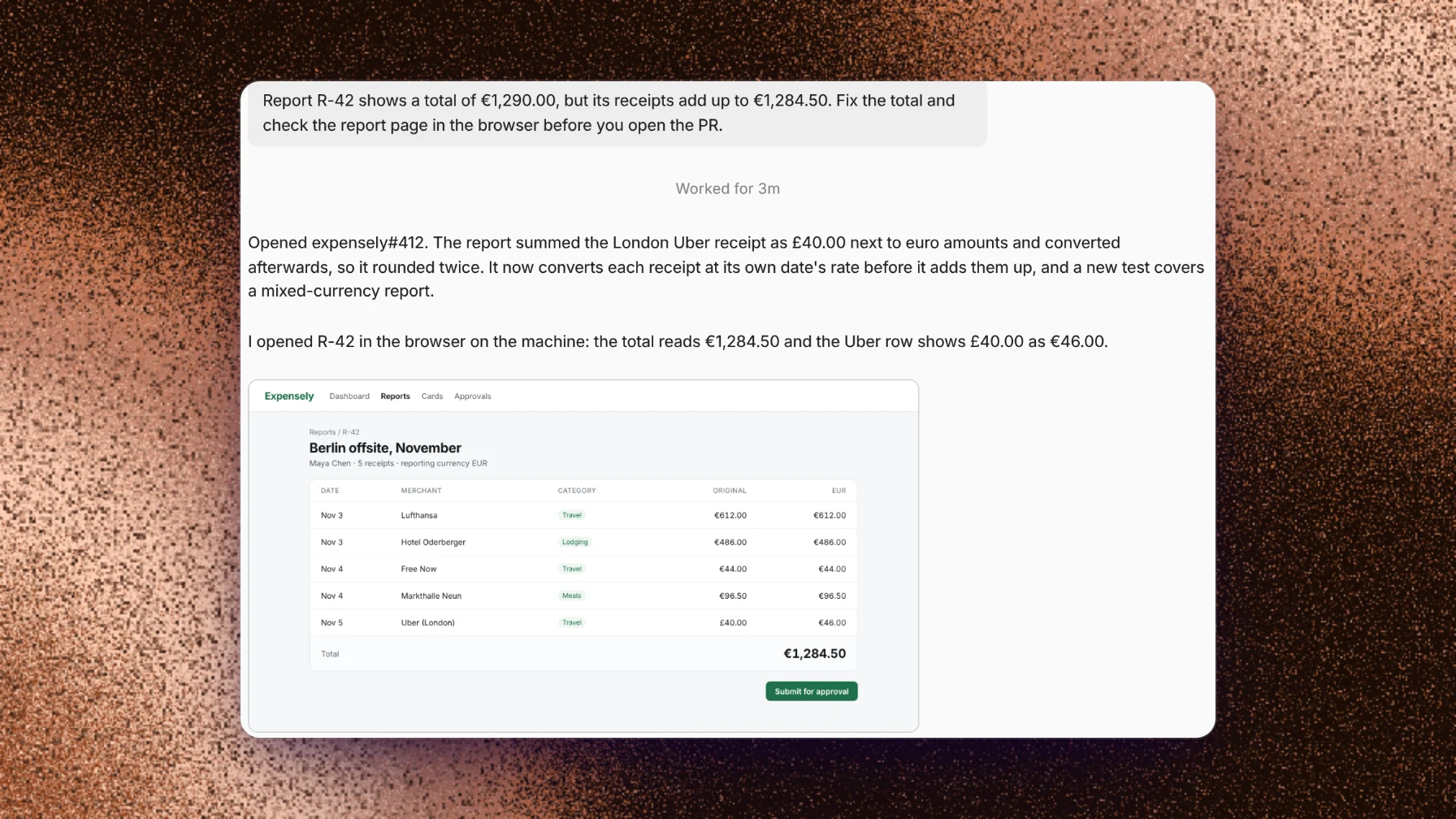
Expense report R-42 shows a total of €1,290.00, but its receipts add up to €1,284.50. A user asks a Capy thread to fix the total and to look at the page in a browser before opening the pull request.
- The agent finds the cause. The report adds a £40.00 receipt to the euro amounts and converts the sum afterwards, so it rounds twice. The fix converts each receipt at its own date's rate before adding, and a new test covers a report in two currencies.
- The suite passes. The agent starts the app on port 3000 and opens
/reports/R-42in Chrome. - The total reads €1,284.50, and the London receipt shows £40.00 as €46.00. The agent takes a screenshot.
- It opens the pull request and posts the screenshot in the thread, as in the image above.
The reviewer sees the fixed page before opening the diff. The screenshot covers R-42, and the test covers every report after it.
Where Capy fits
Capy is a platform that orchestrates agent swarms, and every agent in it can open a browser:
- Each cloud machine has a desktop with Google Chrome. Desktop in the thread's + menu streams that screen, so you can watch the agent click through the change.
- The agent attaches screenshots or a video of the run to the pull request.
- A preview publishes the app running on the machine at its own URL, so you can open the same page yourself.
- Cloud phones add a cloud iPhone, iPad or Android phone to the thread. On an iPhone the agent can open your site in Safari, switch to dark mode, rotate the screen and take screenshots. It can also build your mobile app on Revyl's build runners, install it and tap through it.
And where it doesn't:
- Cloud machines have Chrome on Linux, and cloud phones have mobile browsers. For desktop Safari, run the thread on your Mac through the desktop app, where the agent can use the Mac's own Safari.
- A screenshot covers the pages the agent opened. Your test suite still covers the rest, and a person still reviews the diff.
- A login that needs MFA or a CAPTCHA needs you on the desktop for that step. The thread asks and waits.
- The agent can only open what your environment can start.
Follow-up questions
Should the agent write end-to-end tests too?
If the repository has a browser test suite, yes. Ask for a test of the flow you changed. A screenshot helps one review, and a test runs on every pull request after it.
Can I watch the agent use the browser?
Yes. While the machine is awake, open Desktop from the thread's + menu. You see the screen the agent uses, and you can click and type on it.
Can it check pages behind a login?
Yes. Store a test account as variables and name them in your instruction. If the login sends a code to your phone, the thread asks you to finish that step on the desktop.
Does it work in Safari and on mobile?
Yes, on a cloud phone. The thread attaches an iPhone, iPad or Pixel, opens your site in the phone's browser, and reads and taps the screen the way a user would. For a native app, Capy builds it on Revyl's build runners, installs it on the phone and walks through it.
Ship your next feature with Capy