





How automated code review works in GitHub

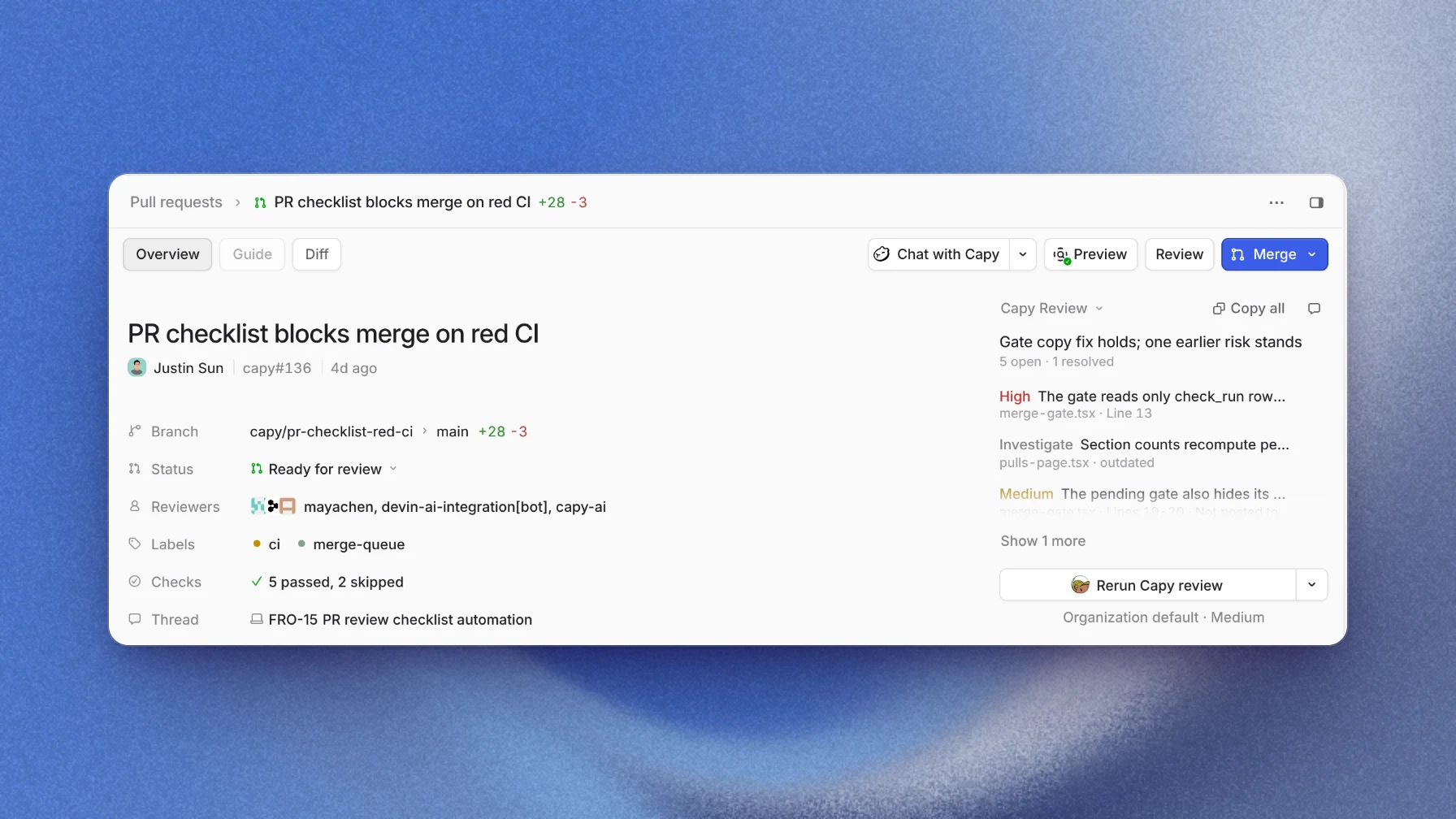
Automated code review is software, often built on coding agents, that reads a pull request on GitHub and posts what it finds as comments on the changed lines. It runs when the pull request opens or gets new commits, alongside your CI, so every diff has been read once before a person opens it. It doesn't approve the change. The people with write access still decide what merges.
Where automated review sits in a pull request
A pull request on GitHub already collects feedback in two places. Status checks report whether builds, tests and scans passed, and a branch protection rule can require them before a merge. Reviews carry comments on specific lines, plus a verdict: comment, approve or request changes.
An automated reviewer posts reviews. CI answers "does it build, and do the tests we wrote pass?" The reviewer answers a different question: "is there a bug or a risk the tests don't cover?"
What a review run does
Most automated reviewers follow the same steps on each run:
- Start on an event. The pull request opens, a commit arrives, or someone asks for a review in a comment.
- Check out the code at the pull request's head. The diff alone is rarely enough. A changed function has callers, and a changed query has a schema it runs against.
- Read the change in context. The reviewer traces what the changed lines touch and compares them with the conventions the repository writes down.
- Write findings. Each one names a file and line, what goes wrong, and how serious it is.
- Post what clears a threshold. Serious findings become inline comments. Minor ones can stay off the pull request, so the comments that do post are worth reading.
- Review again on the next push. A good re-review reads only what changed since the last round and closes the findings the new commits fixed.
What it catches and what it leaves to people
An automated reviewer finds problems that show in the code: a missed edge case, a condition that reads the wrong field, a query built from user input, a convention the team wrote down and someone broke. It gives the 2,000-line pull request the same attention as the 20-line one, which people rarely do.
It can't tell you whether the change is the right thing to build, and it wasn't in the meeting where your team agreed on it. It doesn't replace your tests or CI either. Treat it as one more reviewer whose comments someone reads, not as the approval.
A worked example: one pull request, two rounds
The image above shows an example pull request in Capy. The change disables the merge button while CI is red.
- The pull request opens and the first round posts its findings. The high finding says the merge gate reads only one kind of check result, so a failing check of another kind wouldn't block the merge. Medium and low findings and a note come with it.
- The Capy thread that opened the pull request reads the findings. It fixes the high one, marks one it can show is a false positive as irrelevant, and pushes.
- The push starts a second round. It reviews only the new commits, with the whole pull request as context, and its summary says the fix holds and one earlier risk remains.
- A person reads the open findings, accepts the remaining risk or asks for a fix, and merges.
The reviewer approved nothing. It put the risks in front of the person who merges.
Where Capy fits
Capy is a platform that orchestrates agent swarms, and its review agent is the reviewer in the example:
- It reads the diff in a real checkout of your repository at the pull request's exact head and posts findings as inline GitHub comments.
- Each finding has a category, a severity, a confidence, and a file and line. Findings at or above the repository's posting threshold post to GitHub. The default threshold is medium.
- Each repository's review mode is Off, Once or Every push. You can also comment
@capy reviewon a pull request, with extra instructions after it if you want, or start a round from the app or the API. - Re-reviews cover only the code changed since the last reviewed head. A finding marked irrelevant is never raised again.
- When a Capy thread owns the pull request, that thread triages the findings and fixes the high-severity ones before it reports the pull request ready. For red builds on branches no thread owns, an automation can fix failing CI.
- The review agent enforces the rules in your repository's
AGENTS.mdfiles the same way it flags logic bugs. - Machines that run reviews can read your repository but can't push.
And where it doesn't:
- The review agent never merges, and Capy never merges a pull request unless you ask for that merge.
- It works with repositories on GitHub.com. GitHub Enterprise Server and other git hosts aren't supported.
- Reviews bill your organization's Capy credits for the model and the machine. They don't use the subscriptions and keys you connect for your own threads.
- It doesn't replace CI. Your checks still have to pass.
Follow-up questions
Does an automated review count as an approval?
No. Your branch protection decides what a merge needs, and a person makes the merge. The review hands that person a list of risks to decide on.
How do I stop the same false positive from coming back?
In Capy, mark the finding irrelevant, and re-reviews never raise it again. For a pattern that's always fine in your codebase, write it in AGENTS.md, and the next review follows it.
Should it review every push or only once?
Every push keeps the findings current on a pull request that changes a lot. Once costs less, because each round bills credits. You set the mode per repository.
Can it review pull requests that people opened?
Yes. Automatic review covers ready pull requests in every repository you turn it on for, whoever opened them. Drafts wait until they're marked ready. Any member of your Capy organization with a connected GitHub account can also ask for a round with @capy review.
Ship your next feature with Capy