




How to fix failing CI automatically with a coding agent

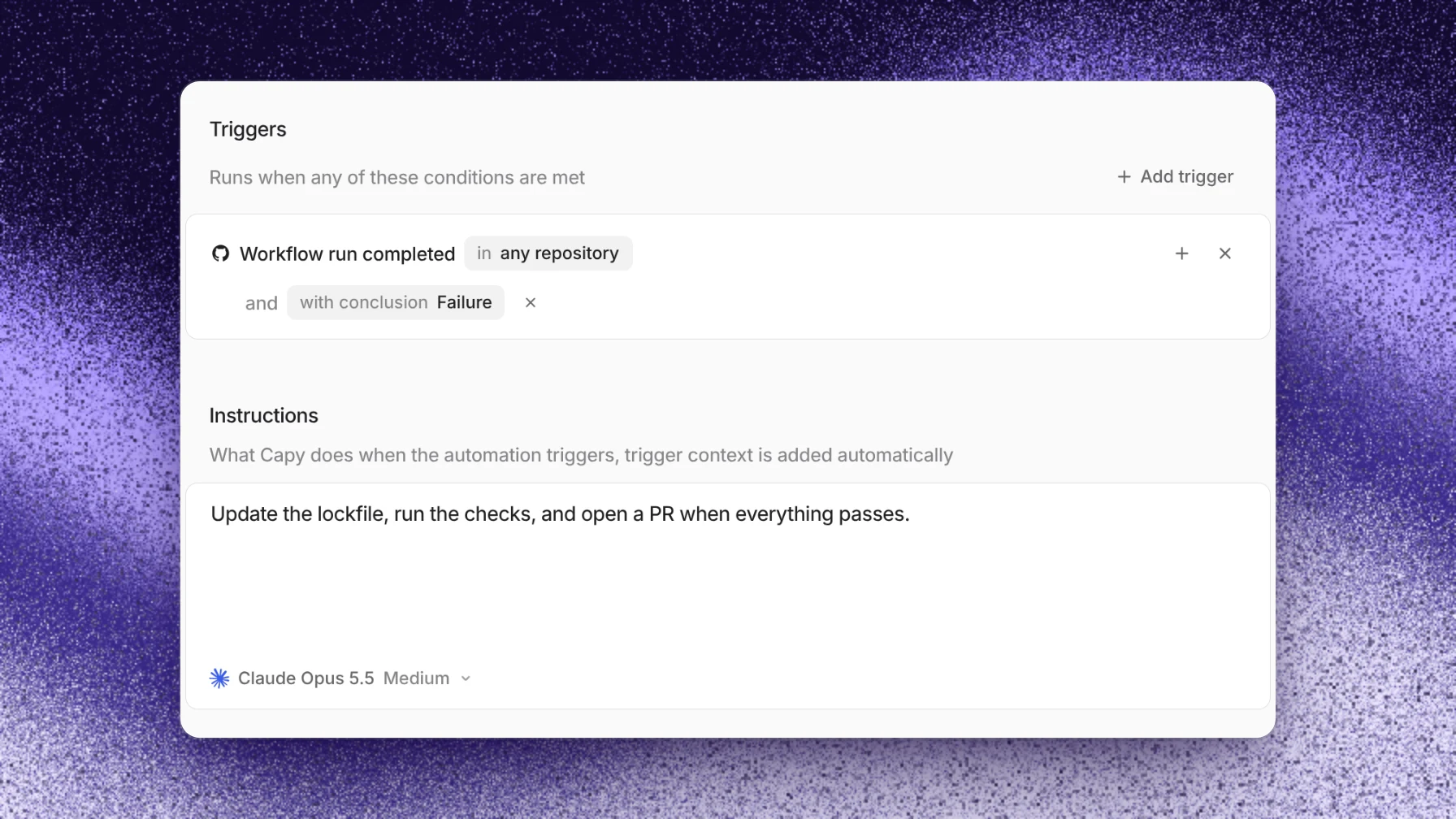
To fix failing CI automatically with Capy, create an automation with a GitHub trigger on workflow runs that conclude in failure, limited to your main branch. Each failure starts a thread that reads the failing job, fixes the cause and opens a pull request. A run-when sentence skips failures you don't want handled, such as scheduled canaries. Pull requests that Capy opened already fix their own CI without an automation.
Which failures need an automation
Capy already handles one kind of red build. The thread that opened a pull request owns it and fixes failing CI: a failing check wakes that thread at once, and it pushes a fix to the same branch. You don't need an automation for that.
An automation covers the failures no thread owns: a workflow that breaks on main after a merge, a release branch that goes red, or a pull request a person opened. For those, a GitHub trigger on workflow_run starts a thread when a run completes with the conclusion you choose.
Before you start
- The Capy GitHub App can see the repository. GitHub events reach Capy through the app.
- The machine can run the failing job's commands. Set up the project's environment so the agent can reproduce the failure and prove the fix before it opens a pull request.
- A service user to run as. Long-lived automations should run as a service user, so they keep working after a teammate leaves.
Set up the automation
- Open Automations and choose New automation. Or ask Capy in a thread: "create an automation that fixes CI failures on main".
- Add a GitHub trigger for workflow runs. Choose Add trigger, then the GitHub workflow run event. The editor shows Workflow run completed.
- Add the conditions. Set the conclusion to Failure, so the row reads Workflow run completed in any repository and with conclusion Failure. Add a branch condition for your main branch, and a repository condition if the project holds more than one repository. A condition matches when the event matches any of its values.
- Add a run-when sentence. Conditions are exact filters. For a fuzzier rule, add a
run_whensentence, for example "The failure is in the main test or build workflow, not a scheduled canary." A fast model checks each matching event against it before the run starts, and you aren't billed for that check. - Write the instructions. See the prompt below.
- Keep Runs in on New thread each run. Each failure gets its own thread and its own pull request.
- Set Max runs per day. A broken
maincan fail on every push. A cap such as 10 keeps one bad afternoon from starting dozens of threads. An event over the cap is recorded as a skipped run that names the cap. - Pick who it runs as and check the model, then save.
To test it, wait for the next failure, or choose Run now from the automation's menu. A manual run has no failing workflow in its context, so it tests only that the run starts and the prompt reads well.
A prompt that works
The trigger passes the workflow run to the agent as context. The prompt says what to do with it:
A GitHub Actions run failed.
- Read the failing job's log and find the first real error.
- Reproduce it on the machine with the same command before you change anything.
- If the cause is in this repository's code or config, fix it, run the job's
  commands again, and open a pull request that names the failing run and the cause.
- If the failure is flaky or outside the repository (a registry outage, an expired
  secret), don't open a pull request. Say what you found and stop.
The last rule matters most. A fix for a flaky test that hides the flake is worse than no pull request.
What you'll see
Each matching failure starts a thread in the project, with the workflow run as its first context. The agent works on its own branch and opens a pull request. From then on that thread owns the pull request: its CI results, Capy review findings and people's comments wake it. Capy never merges unless someone asks for that merge.
If something goes wrong
- No run started. Check that the failure matched every condition: the conclusion, the branch and the repository. Then check the run-when sentence. An event it rejects starts no thread, and the run is recorded as skipped. Ask Capy in a thread to list the automation's recent runs to see each reason.
- Too many runs. Narrow the conditions, tighten the run-when sentence, or lower Max runs per day.
- The agent can't reproduce the failure. The machine is missing something the CI runner has. Add it to the environment, or put the setup in a repository command so both use the same steps.
- The automation turned itself off. The run-as principal was offboarded or can no longer run in the project. Pick an eligible principal under Runs as and turn the automation back on.
- A run failed on the model. The pinned model can't run, for example because an admin turned it off. The automation stays on. Pick another model and save.
Limits
- It works with GitHub.com repositories and GitHub Actions workflow runs. Other git hosts aren't supported.
- Each run uses machine time in Capy credits.
- The agent can only prove a fix with checks it can run on its machine.
- Two failures from the same cause start two threads. A cap and a precise run-when sentence keep that small.
The automations reference covers every GitHub event and condition. For how review fits after the fix opens, see How automated code review works in GitHub.
Follow-up questions
Does this run for every pull request's failing checks?
You can scope it that way with the trigger's conditions, but you rarely need to. A pull request a Capy thread opened is already fixed by that thread. Scope the automation to branches no thread owns.
Can it handle failures from other CI systems?
The GitHub trigger listens to GitHub events such as workflow_run and checks. For a CI system that can send a webhook, use an incoming webhook trigger and pass the failure in the request body.
Will it push straight to main?
No. The agent pushes its own branch and never pushes to main, master, develop, release/* or the base branch. The fix arrives as a pull request.
What if the failure needs a decision?
The prompt tells the agent to stop and report. The run's thread holds the finding, and the run-as principal's notification settings decide who hears about it.
Ship your next feature with Capy