





Roo Code alternatives
Seven coding agents replacing Roo Code after its May 2026 shutdown, comparing VS Code forks, CLIs, Captains, Drive, cloud machines and pricing.

The Roo Code extension shut down on May 15, 2026, when its GitHub repository was archived read-only. Its final release was v3.54.0. Built as an open-source VS Code extension with customizable modes, an Orchestrator and multi-provider BYOK support, Roo Code’s shutdown notice now points extension users to Zoo Code (a community fork) and Cline (the project Roo originated from), while its creators moved on to Roomote.
Pick Zoo Code for the shortest migration with Roo’s modes intact, Cline or Kilo Code for open-source tooling across more editors and CLIs, or Roomote for the single-tenant cloud agent Roo’s creators build now. Pick Capy to move parallel work off one editor onto up to 64 GB cloud microVMs or your own hardware, with Captains, native Issues, Drive, built-in GitHub PR review and $0 per seat. Pick Amp for per-thread orbs with Puck and multi-platform apps, or Aider for terminal git pairing.
Every fact below comes from each tool’s own site, docs or repository, checked on November 23, 2026.
Zoo Code keeps Roo Code’s modes alive in VS Code
Zoo Code is the Apache 2.0 community fork maintained by former Roo Code contributors after the Roo team shifted to Roomote. Development stays active, shipping v3.98.2 on November 23, 2026.
Zoo Code preserves Code, Architect, Ask, Debug and Custom Modes alongside MCP servers. Since forking, it added Semble for semantic code search, parallel task coordination in the Orchestrator, a Destructive Command Guard for longer autonomous runs, and Zoo Gateway; Zoo Pass is piloting a subscription with a free two-week preview, open to anyone with a Zoo Gateway balance while seats last. Per the Roo to Zoo migration guide, export your Roo settings file and run Import Settings in Zoo Code, storing that file carefully because it can contain API keys.
Cline brings the original codebase to more editors and a CLI
Roo Code started as a fork of Cline, which ships one open-source runtime as an IDE extension, desktop app, CLI and embeddable SDK. According to Cline’s overview docs, editor support covers VS Code, Cursor, Windsurf, JetBrains, Antigravity, Zed and Neovim via ACP.
Cline splits work into Plan and Act modes with explicit approval by default (and optional auto-approve), reads .clinerules, supports MCP servers, responds from Slack, Discord, Telegram or Linear, and runs headless in GitHub Actions or GitLab. Its research-preview Kanban web app runs local CLI agents in parallel with a terminal and git worktree per card. Per Cline pricing, individual developers pay no subscription or seat fee and cover only inference, while Enterprise adds SSO, an SLA, centralized billing and RBAC. ClinePass adds $9.99 a month for open-weight models, with quotas of 2x to 5x the usage of standard API rate limits.
Kilo Code spans editors, terminals and cloud agents under MIT
Kilo Code runs across VS Code, Open VSX editors, JetBrains, a CLI, desktop app, cloud agents, Slack and a code reviewer. Licensed under MIT, it uses specialized Code, Plan, Ask, Debug and custom agents plus isolated parallel worktrees locally and in the cloud. Its Roo migration guide maps .roorules to AGENTS.md, .roomodes to .kilocodemodes, preserves MCP config, and auto-converts legacy files on first launch.
Kilo accesses 500+ models at provider rates alongside BYOK and local models. Per Kilo pricing, individuals pay only for usage, Teams is $15 per user a month, and Enterprise is custom with SSO, audit logs and an SLA. Optional Kilo Pass plans start at $19 a month (credit purchases carry a 5% fee), and cloud compute bills per second at $0.60 to $1.20 an hour for Cloud Agent and $0.33 an hour for Code Review.
Roomote is the single-tenant cloud agent from Roo Code’s creators
Visiting roocode.com today brings up Roomote, built by Roo Code’s creators. Roomote is an Apache 2.0 single-tenant cloud coding agent that runs your dev environment, verifies its work, reviews code with a different model, opens pull requests with live previews, runs unlimited parallel tasks and supports scheduled automations across GitHub, GitLab, Azure DevOps, Gitea and Bitbucket, plus Slack, Teams, Discord and Telegram.
Roomote is BYOK and model-agnostic, running on infrastructure you control such as a homelab, your own hardware, Railway or Render, which means Roomote’s docs leave host provisioning, networking, sandboxes and maintenance to you. Its self-hosting guide sets the starting floor at a dedicated Ubuntu 24.04 or Debian 12+ server with 4 CPUs, 8 GB of RAM, 60 GB of disk and a public HTTPS URL.
If you want managed machines above that floor without maintaining servers, Capy’s default Large Firecracker microVM starts at 4 vCPU, 16 GB RAM and 64 GB disk (double Roomote’s starting RAM) and scales to 64 GB Hyper self-serve on Max. When you want execution on your own hardware, Capy’s desktop app and Dock CLI (capy dock) run threads on your own Linux, macOS or Windows machines at $0 machine time. For enterprise controls, every Capy plan includes SOC 2 Type II, and Capy Enterprise adds your own cloud (BYOC) on request, zero data retention on request, SSO/SAML (also a $100/mo add-on on Lite, Pro and Max), an admin audit log, and 24/7 engineering support in Slack Connect backed by an SLA.
Capy replaces editor orchestrators with Captains, Drive, Issues and PR review
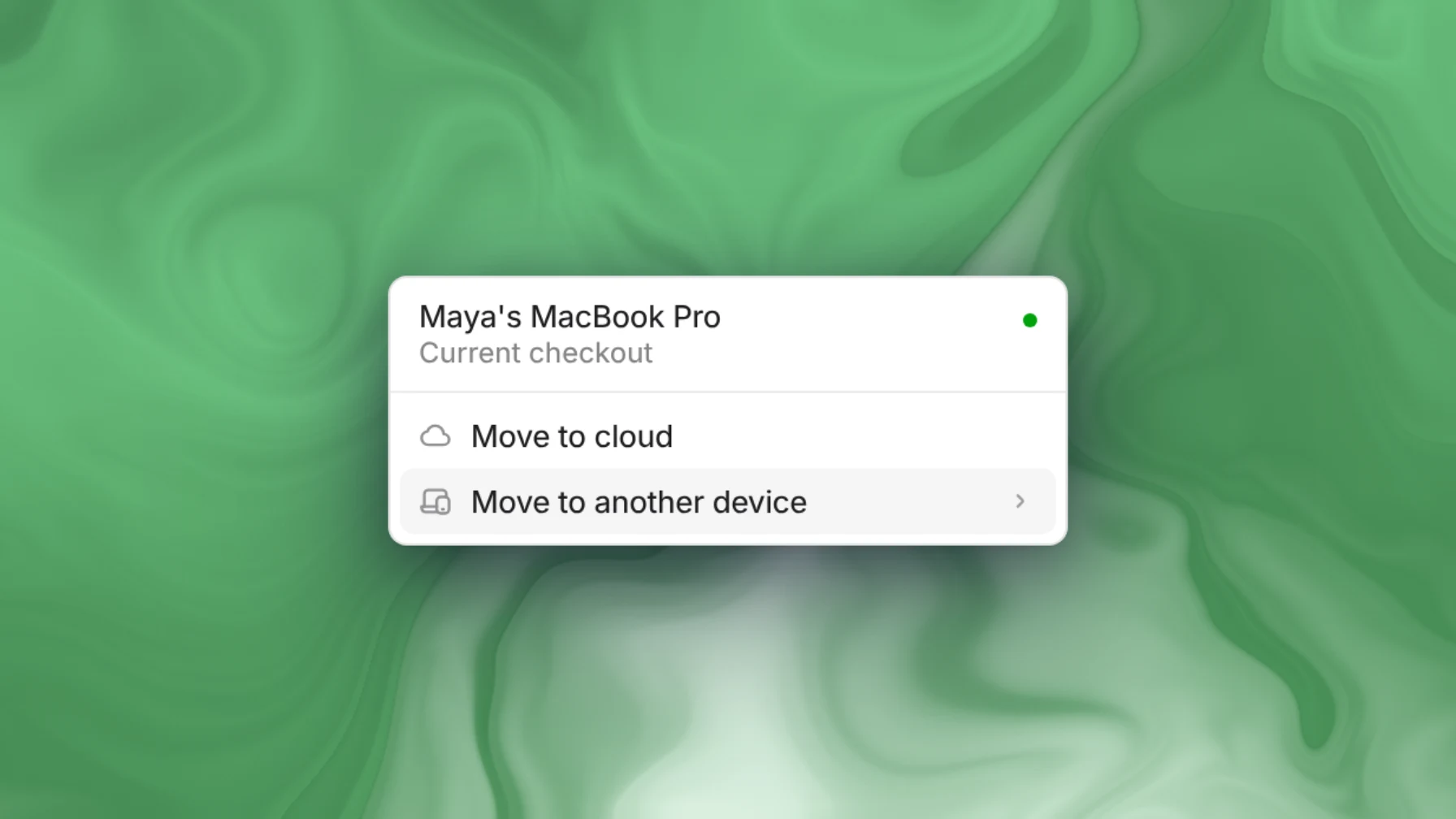
Capy is a closed-source platform built for parallel agent teams on GitHub.com. You start threads from the web, desktop app (macOS, Windows and Linux), Slack, Linear or the API, and threads run either locally on your own computer at $0 machine time (moving smoothly between local and cloud) or inside Ubuntu 24.04 Firecracker microVMs with Docker Compose and sudo.
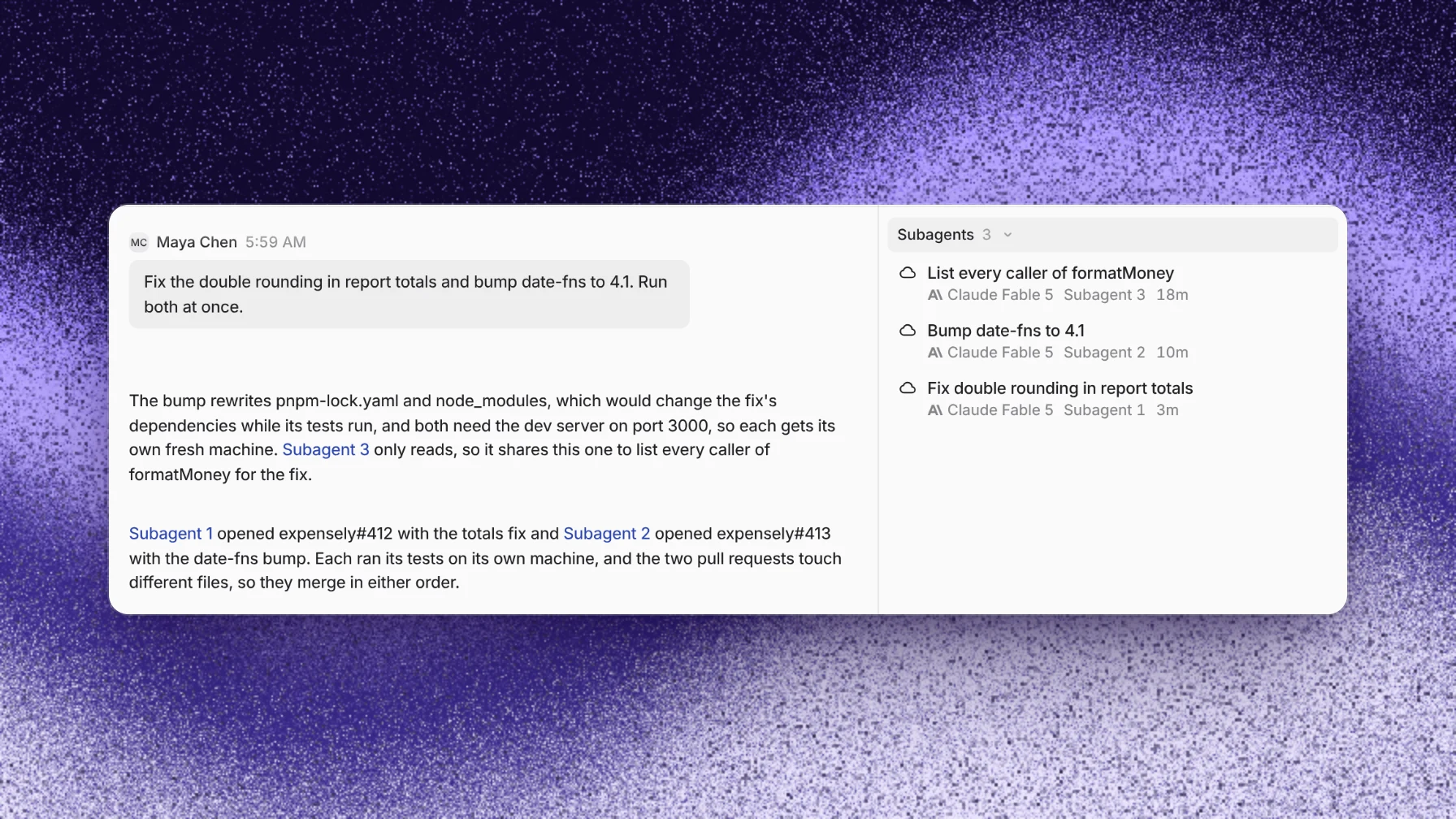
Inside a thread, Capy spawns parallel subagents up to three levels deep: read-only subagents share the parent machine, while writing subagents get isolated machines with clean checkouts.
Captains vs Roo/Zoo Orchestrator and Amp Puck
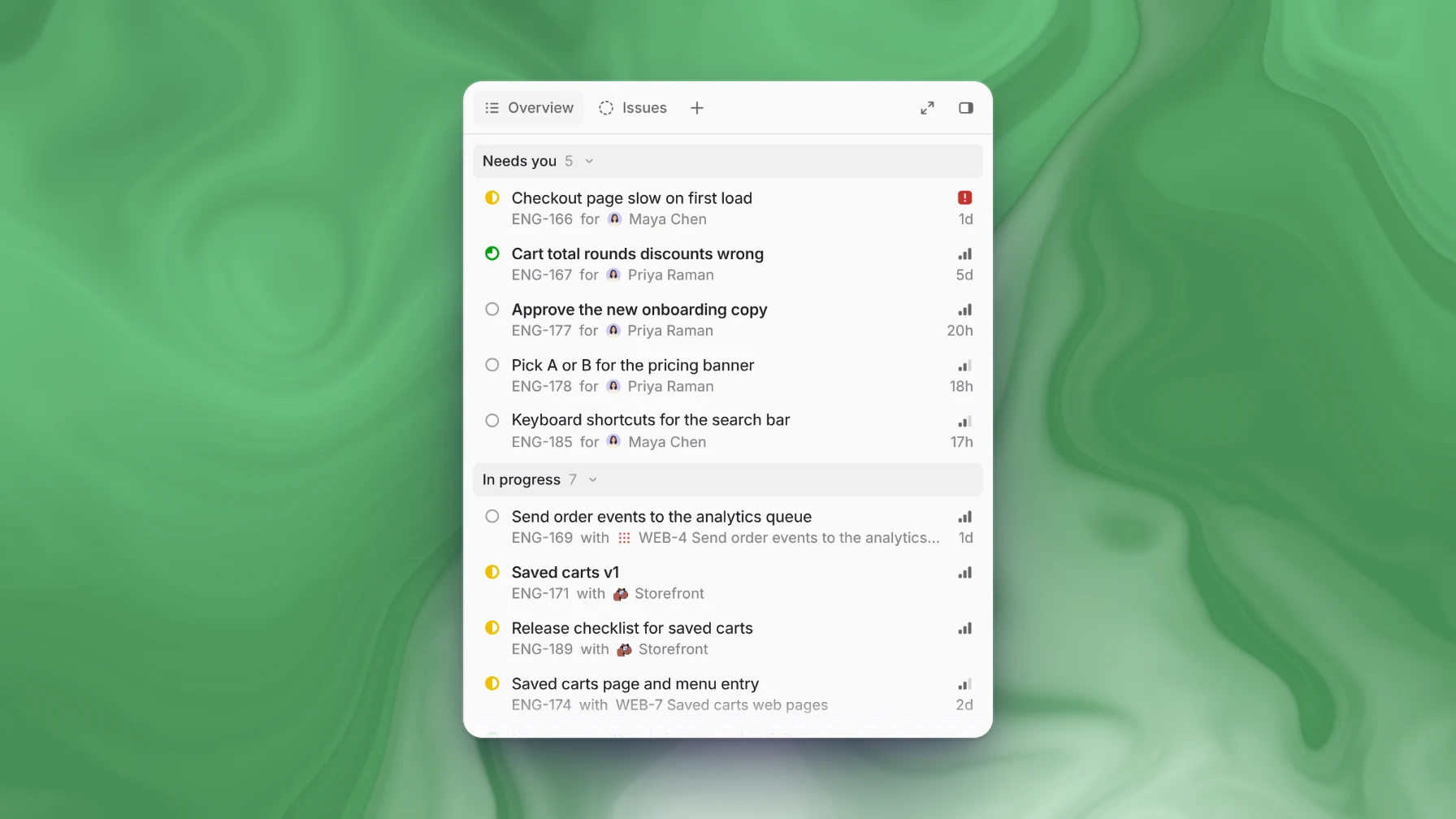
Roo Code and Zoo Code’s Orchestrator splits work across modes inside an editor session, and Amp Puck acts as a personal assistant per user with no orb of its own. Capy Captains are long-lived agents assigned to an area or feature that launch a crew of full threads, each with its own machine, model and subagents. A Captain reads crew reports as turns land and rewrites a digest of what needs you, what is new and what is in progress: its Overview puts the first five “Needs you” decisions above active work, while the Digest tab holds the whole digest. It tags you only for decisions, you steer in chat (“merge #3780”, “hold the migration until Monday”), and every Captain owns a shared crew Drive (AGENTS.md, CREW.md read by every crew thread on every turn, NOTES.md, DIGEST.md, skills/, reports/, renders/, handoffs/).
Drive and native Issues replace per-repo .roorules and mode files
Roo users kept conventions in per-repo .roorules and .roomodes files. Outside git, Capy Drive stores cross-repo instructions, reusable skills, checklists, reference material and automation state across Organization, Personal, Project, Project + personal, Automation and Captain scopes. History tracks saved versions and the threads that wrote them for 24 hours, and Restore brings one back as a new version; storage scales from 1 GB on Free to 10 GB Lite, 25 GB Pro and 50 GB Max. Skills live in repos, Drive or plugins and trigger automatically or via $skill-name in the composer or Slack.
Beside Drive, Capy’s native Issues page tracks work with title, description, state, assignees, custom org labels and attached threads and pull requests. One parent per issue splits work into sub-issues showing how many are closed; Captains and threads create, update, comment on and close issues, and commenting wakes the owning thread. For recurring work, Automations run stored prompts on cron schedules in your timezone, GitHub events, Slack messages, incoming webhooks or on demand, each as a normal thread with run history. On Pro, Max and Enterprise, threads can also attach cloud iOS ($5.40/hr) and Android ($3.60/hr) phones while awake to build mobile apps on Revyl’s runners and tap through them.
Machine sizes and concurrency vs Roomote’s floor
Capy’s cloud machines scale well past Roomote’s 4 CPU / 8 GB starting server without server upkeep:
| Size | vCPU | RAM | Disk | $/hr overage | Plans |
|---|---|---|---|---|---|
| Small | 1 | 4 GB | 64 GB | $0.10 | Lite and up |
| Medium | 2 | 8 GB | 64 GB | $0.20 | Lite and up |
| Large (default) | 4 | 16 GB | 64 GB | $0.40 | Lite and up |
| Ultra | 8 | 32 GB | 64 GB | $0.80 | Pro and up |
| Hyper | 16 | 64 GB | 128 GB | $1.60 | Max and up (self-serve) |
| Big Guy | 16 | 128 GB | 256 GB | $3.20 | On request |
Awake RAM across the org scales from 128 GB on Lite (8 Large) to 512 GB on Pro (32 Large), 1 TB on Max (64 Large), and 1 TB or as agreed on Enterprise.
Built-in GitHub PR review and org pricing with $0 seats
Capy’s review agent checks out the PR’s exact head, enforces AGENTS.md, posts inline GitHub comments and records findings in Capy. Automatic review sets per repo to Off, Once or Every push, plus @capy review. Marking a finding Resolved or Irrelevant resolves the GitHub thread, and incremental re-reviews skip irrelevant findings. Owning Capy threads triage every review, fix high-severity findings, repair failing CI, answer feedback and resolve conflicts before reporting ready. Capy’s Pull requests board lists every PR across projects filterable by Captain, and each PR view pairs Overview, diff, checks and findings with an auto-generated Guide (summary, before-and-after diagram and chaptered diffs; toggleable by admins).
Capy pricing uses one plan per organization with unlimited members and $0 per seat. Free ($0) runs locally with your keys and subscriptions plus 100 monthly review credits. Paid plans return their full price as monthly model usage on top of machine minutes and review credits: Lite ($20/mo, $16 annual; first 7 days $1 with verified card) includes $20 usage, 30,000 machine minutes and 250 review credits; Pro ($100/mo, $80 annual) includes $100, 150,000 minutes and 1,250 credits; Max ($200/mo, $160 annual) includes $200, 300,000 minutes (1,250 Large hours or ~312 Hyper hours) and 2,500 credits; Enterprise is custom.
One machine minute equals one minute of 1 vCPU / 4 GB (Large uses 4/min, Ultra 8, Hyper 16, Big Guy 32). Overage bills $0.10 per 60 machine minutes, and sleeping machines cost nothing. Review credits cover model and machine (Low 1, Medium 5, High 10): Flex defaults to Medium first and Low on follow-ups (50 first reviews on Lite; $0.40 per Medium review on Lite, Pro and Max, no seats), and extra reviews bill Capy credits for actual model tokens and machine time, never your own keys. Your Codex/ChatGPT, GitHub Copilot and SuperGrok subscriptions, API keys and gateways work on every plan with no markup; on Capy credits, models from Anthropic, OpenAI, Google and xAI bill at the provider’s list price, and Capy also lists models such as Kimi, DeepSeek and Qwen in its picker.
Amp pairs per-thread cloud orbs with Puck and cross-platform apps
Amp creates a cloud orb per thread preloaded with your repo and tools so work continues after your laptop closes, coordinated by Puck and available via web, CLI and native apps on Mac, Windows, Linux, iPhone, iPad and Android. Amp’s Android app (distributed as an APK) is a specific advantage on Android phones, while both Capy and Amp have iOS apps on TestFlight and Capy runs in any phone’s browser.
Per Amp’s pricing docs, Hobby is free with pay-as-you-go hosted orbs, Teams adds no seat fee, and Enterprise is custom. On Amp pricing, Megawatt is $20 a month with included Amp credits and 45,000 minutes of Amp-hosted orbs (750 hours on a1.small), and Gigawatt is $200 a month with 480,000 orb minutes. Self-hosted orbs are free on non-enterprise tiers, and your ChatGPT or Claude subscriptions and API keys incur no Amp token fees outside Enterprise, while paid credits pass through providers’ API prices on non-enterprise workspaces.
Aider stays inside your terminal and commits every change
Aider is an Apache 2.0 terminal pair programmer that maps your codebase, works with almost any LLM including local models, writes automatic git commits and runs linters and tests after edits. Check release cadence before adopting: its latest GitHub release is v0.86.0 from August 9, 2025.
Where other Roo Code replacements fit better
No single replacement wins every workflow:
- Drop-in VS Code modes and open source. Capy is closed source; Zoo Code keeps Roo’s exact VS Code modes under Apache 2.0, while Cline and Kilo Code keep open-source runtimes across JetBrains and CLIs (Cline also runs in Neovim).
- Git hosts beyond GitHub.com. Capy supports GitHub.com only. Roomote connects to GitHub, GitLab, Azure DevOps, Gitea and Bitbucket, and Amp orbs support GitLab and Bitbucket.
- Android native app. Amp ships an Android APK alongside its iOS TestFlight beta, whereas Capy runs on iOS TestFlight and mobile browsers.
- Single-terminal git pairing. Aider needs no account and commits every edit cleanly from your terminal.
How to move off Roo Code and try Capy side by side
If you want to keep your VS Code setup and modes intact, export your Roo settings and run Import Settings in Zoo Code (storing the file securely because it may hold API keys). Paying Roo subscribers with billing questions can email billing@roocode.com. Teams moving to Kilo Code can let its wizard convert .roorules and .roomodes automatically, while Cline users translate conventions into .clinerules. If you remember Continue from older lists, it is omitted here because Continue’s site notes it was acquired by Cursor, though its open-source codebase remains available.
If you are ready to move work onto GitHub pull requests and parallel agents, start on Capy Free at $0 locally with your existing keys and subscriptions plus 100 monthly review credits, then test Lite ($1 for 7 days with a verified card) or Pro to run cloud microVMs, Captains, Issues and Drive beside whichever editor you keep.
Frequently Asked Questions
Is Roo Code discontinued?+
What is the best Roo Code alternative?+
Is Zoo Code the same as Roo Code?+
How do Capy Captains compare with Roo or Zoo Orchestrator and Amp Puck?+
How do Roo Code alternatives compare on pricing?+
Can I migrate my Roo Code settings, custom modes and .roorules?+
What is Roomote, and what hardware does it require?+
Sources
- Roo Code docs
- Roo Code on GitHub
- Roo Code releases
- roocode.com
- Roomote homepage
- Roomote docs
- Roomote docs: Self-hosting
- Zoo Code on GitHub
- Zoo Code releases
- Zoo Pass
- Zoo Code docs: Roo to Zoo migration
- Cline homepage
- Cline pricing
- ClinePass
- Cline docs: Overview
- Cline Kanban on GitHub
- Kilo Code homepage
- Kilo Code pricing
- Kilo Code: The Great Roo Migration
- Kilo Code on GitHub
- Amp docs
- Amp docs: Meet Puck
- Amp docs: Apps
- Amp docs: GitHub and Git
- Amp docs: Pricing
- Amp pricing
- Amp docs: Orb sizes and costs
- Aider on GitHub
- Aider releases
- Continue homepage
- Capy docs: Models and pricing
- Capy docs: Machines
- Capy docs: Captains
- Capy docs: Drive
- Capy docs: Dock CLI
- Capy docs: Reviews
- Capy Enterprise
Spotted something out of date? Tell us at support@capy.ai.
Run Capy agents on your repos
Start parallel threads on cloud machines or your own computer, and bring your own keys on any plan.

- Zoo Code keeps Roo Code’s modes alive in VS Code
- Cline brings the original codebase to more editors and a CLI
- Kilo Code spans editors, terminals and cloud agents under MIT
- Roomote is the single-tenant cloud agent from Roo Code’s creators
- Capy replaces editor orchestrators with Captains, Drive, Issues and PR review
- Amp pairs per-thread cloud orbs with Puck and cross-platform apps
- Aider stays inside your terminal and commits every change
- Where other Roo Code replacements fit better
- How to move off Roo Code and try Capy side by side
- FAQ
- Sources