





What is agentic coding, and how does a coding agent work?

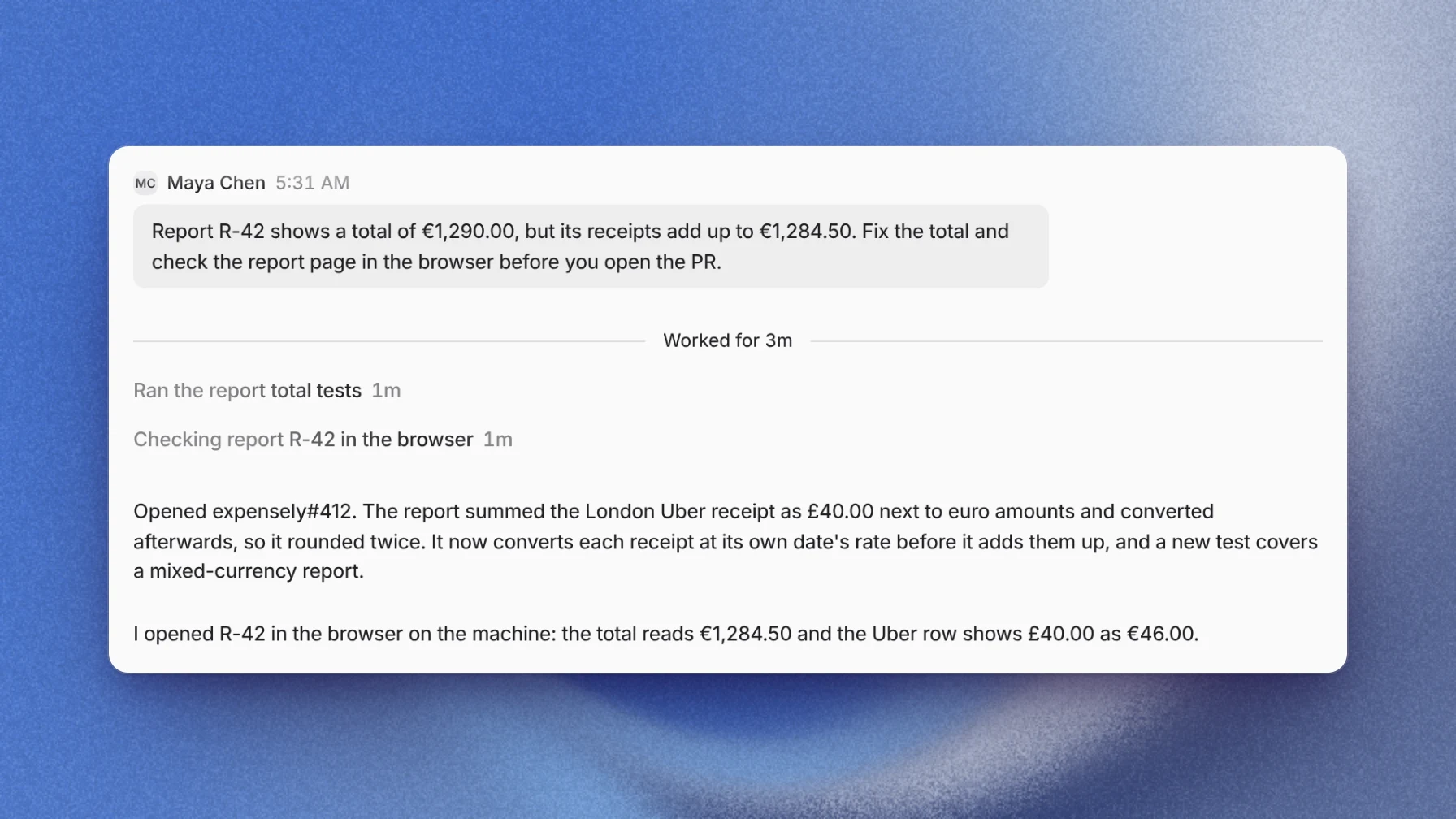
Agentic coding is a software workflow where an AI agent takes a goal, inspects the repository, edits files, runs builds and tests, and returns a reviewable pull request. Unlike autocomplete or a chat window, the agent executes commands in a real environment and iterates when checks fail. In Capy, every thread pairs a server-side agent loop with an isolated Linux VM or a linked folder on your own computer, and the thread keeps working through CI results and review feedback until a person decides to merge. Larger goals split across parallel subagents or a Captain that directs a crew of threads.
How agentic coding differs from autocomplete and chat
Inline autocomplete predicts tokens as you type. A chat panel takes a snippet, suggests a rewrite and leaves you to paste the code, run tests and chase compiler errors yourself. In both workflows, the engineer is still the execution loop.
Agentic coding moves that loop into the tool. You state the outcome, constraints and how to check the result. The agent searches the repo, reads relevant modules, edits files across directories, runs build and test commands, reads real failure output, fixes what broke and opens a pull request. Because it sees actual test errors and stack traces, it catches mistakes before a person reads the diff.
That loop pays off when a task has a clear done condition and an automated check: bug fixes with a reproduction, new endpoints matching an existing pattern, test coverage, schema migrations and repetitive refactors. It slows down when the problem is still fuzzy, when every step needs visual judgment, or when the repo has no fast way to test a change.
What a coding agent system is built from
A model alone can generate code, but shipping reliable changes depends on seven parts around it:
- The agent loop. A turn-based loop reads the goal, calls tools, inspects output and decides whether to continue, wait on an event or ask a person for a decision. Running the loop on a server lets work continue after you close your laptop and lets CI results or review comments start the next turn.
- The machine it runs on. Commands need a real checkout, either an isolated cloud VM or a linked folder and git worktree on your computer. Separate machines stop parallel writers from colliding over the git index, lockfiles, ports or local databases. Running parallel coding agents without shared-tree collisions shows where isolation matters.
- Tools and external connections. File readers, editors, shell execution, git, a browser for UI checks and MCP servers linking the agent to issue trackers, logs or internal APIs.
- Context, instructions and compaction. Repository rules live in
AGENTS.mdfiles and path-scoped rules, while multi-step procedures load on demand as skills. When a long thread fills the context window, the harness summarizes earlier history once context hits a threshold so work continues cleanly. - Verification. Setup scripts, startup services, test suites, linters and type checks give the agent ground truth. A working dev environment matters more than prompt phrasing, because an agent that runs your tests proves its fix while one that can't only guesses.
- The pull request and review boundary. The agent pushes its own branch, stays off protected branches and opens a pull request. CI checks and automated review run on that exact head commit, and failures loop back to the owning thread.
- People deciding merges. Engineers keep architecture calls, product trade-offs and the merge button. Good architecture keeps every change small, inspectable and backed by command output.
When a goal spans independent subsystems, one loop becomes the bottleneck. Splitting work across an orchestrator and isolated workers is covered in What is an agent swarm for engineering?.
A worked example: fixing a duplicate webhook bug
A billing service occasionally creates two invoice rows when a payment provider times out and retries the same webhook delivery. An engineer opens a thread with the failing request log and one acceptance check: replaying the same delivery ID concurrently must produce one invoice row and pass the billing integration suite.
- 10:05 AM. Inspect the codebase. The agent reads the webhook handler, invoice schema, migrations and billing tests. It finds a
SELECT-then-INSERTcheck that leaves a race window under concurrent retries. - 10:11 AM. Edit and add a test. It adds a unique constraint on
delivery_id, updates the insert path to handle duplicate-key conflicts as an idempotent success and writes a concurrency test that fires two identical payloads together. - 10:17 AM. Verify on the machine. It runs the migration and billing suite inside its Linux VM. Two unrelated tests fail because a shared fixture reuses a hardcoded delivery ID. The agent reads the failure output, gives each test case its own ID and reruns the suite until it passes.
- 10:24 AM. Pull request, CI and review. It pushes a
capy/branch and opens a pull request. CI passes, and automated review flags a missing rollback check in the migration script. That finding wakes the thread, the agent fixes the script and pushes, and re-review clears. - 10:36 AM. Human merge. The thread reports the pull request ready. The engineer inspects the diff and test output and merges.
Guardrails for team adoption
Four habits keep agentic coding predictable across a team:
- Keep instructions lean and scoped. Put build, test and PR rules in root
AGENTS.md, package rules in nestedAGENTS.mdfiles and file-type rules in glob rules so threads get the right context without bloat. - Make setup deterministic. Invest in reproducible install scripts, startup services and snapshots so fresh machines run tests from the start.
- Scope credentials to the job. Keep GitHub tokens off cloud machines through server-side auth, prefer short-lived or read-only credentials and keep personal secrets separate from shared project variables. See A security checklist for coding agents.
- Review small diffs. Ask for a written plan before edits on ambiguous work, split multi-part changes into separate pull requests and keep human ownership of every merge.
To compare platforms side by side, see our comparison pages or compare cloud coding agents.
Where Capy fits
Capy is a platform that orchestrates agent swarms for engineering teams, built around the architecture above:
- Every cloud thread pairs a server-side agent loop with its own isolated Firecracker Linux VM, and the desktop app runs threads in a folder on your own computer and moves them to the cloud and back.
- Project environments define
initializeandrefreshscripts, startup services, named commands and optional snapshots that restore in roughly 1 to 2 seconds so agents verify work against real tests. - Repository rules load from root and nested
AGENTS.mdfiles plus glob rules, reusable workflows load on demand as skills and shared non-code files live in Drive. - Long threads summarize earlier history once context fills to the organization's Compact at setting in Settings → Models, and multi-part work splits across subagents or a Captain that directs a crew of threads.
- Agents call external tools through MCP servers and test your iOS and Android apps on cloud phones, while cloud machines hold no raw GitHub token (Git on cloud machines).
- Capy pushes its own branch, opens pull requests, wakes on CI results and Capy review findings, and never merges a pull request unless you ask for that merge.
And where it doesn't:
- Without working setup scripts or tests, an agent can still edit code, but it can't prove the fix before CI runs.
- Cloud machines run Linux only. Tasks needing macOS or a local iOS Simulator run on your Mac through the desktop app, while cloud mobile builds and testing use cloud phones on Pro and above.
- Capy doesn't scrub command output, so a command that prints an environment variable puts that value in the transcript (Secrets). Scope credentials to the job.
Follow-up questions
Is agentic coding only for greenfield projects?
No. It usually works better in existing codebases that already have types, linters, tests and established patterns. The agent reads surrounding code and AGENTS.md rules, matches existing conventions and uses your test suite to prove the change fits.
What happens when a coding agent's context window fills up?
A durable harness summarizes earlier turns instead of stalling. In Capy, admins set Compact at per model in the Models table under Settings → Models to choose how full a thread's context gets before the thread summarizes its history. Handing independent pieces to fresh subagents keeps each context small from the start.
Can I use my own model subscriptions or API keys?
Yes. Every Capy plan lets you connect your own subscriptions, API keys, gateways or custom endpoints in Settings → Models, with no charge or markup from Capy on those tokens. Cloud machine time draws from your plan's included machine minutes first and then Capy credits, while threads on your own computer add no machine-time charge.
How do I stop an agent from pushing to main or merging on its own?
Enforce it in both the platform and GitHub branch protection. Capy pushes its own branch and never pushes to the base branch, the default branch, main, master, develop or release/* (Open a pull request). Capy also never merges a pull request unless you ask for that merge in the thread.
Ship your next feature with Capy