





Keeping coding agents working after you close your laptop

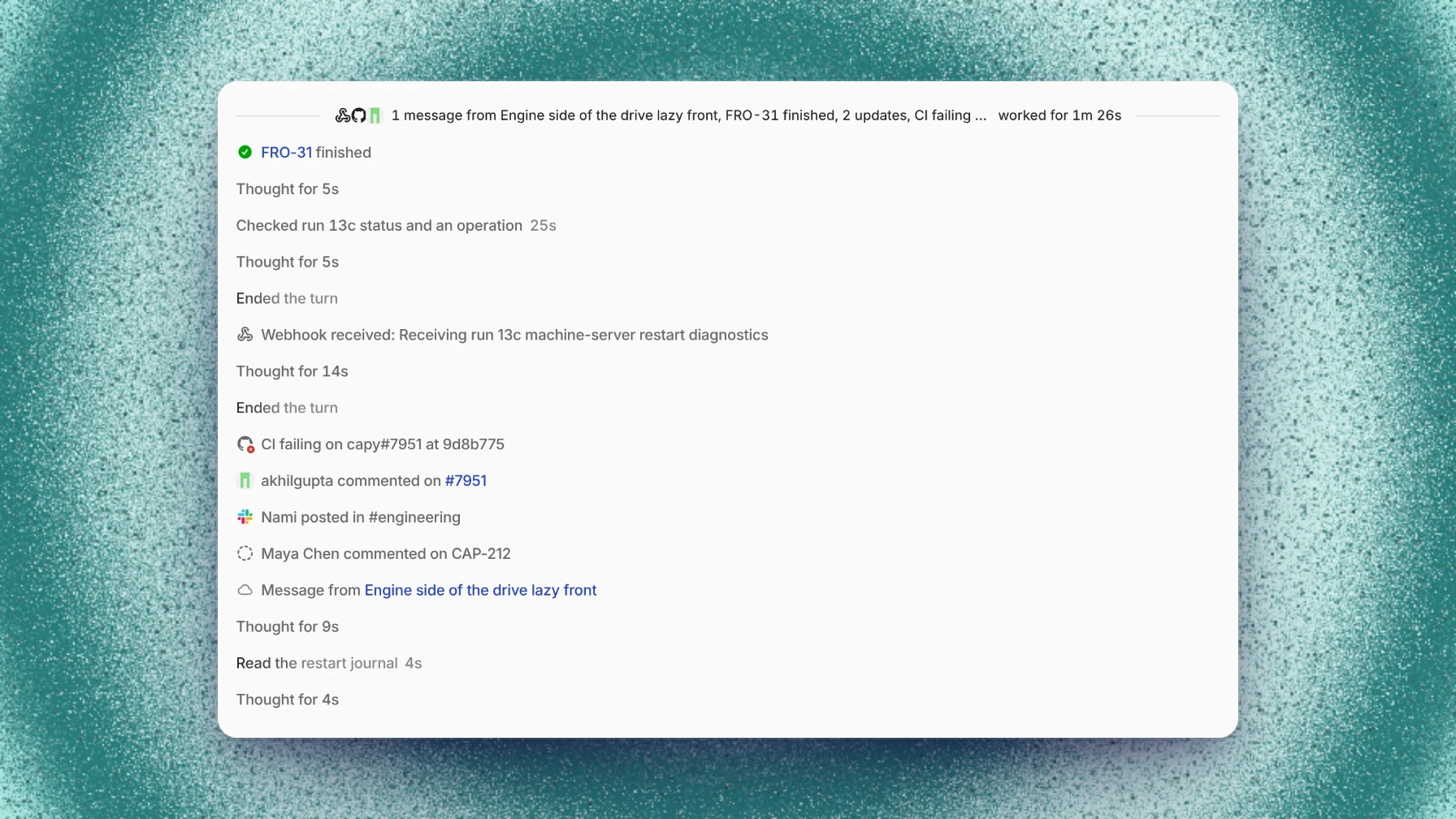
Coding agents keep working after you close your laptop only if the agent and its machine run somewhere else. In Capy, a cloud thread keeps going and wakes itself on CI results, reviews and messages. A thread on your own computer pauses while the computer sleeps, for up to 24 hours, and can move to a cloud machine to keep going. A job that runs for hours needs a command the agent waits on, because a sleeping machine stops its processes.
Three things have to keep running
An agent that works while you're away needs three things to stay alive:
- The agent loop decides the next step: read a log, edit a file, push a fix.
- The machine runs the commands, holds the checkout and keeps the build cache.
- The wake-up signal tells the agent something changed, such as a failing check or a review comment.
An agent in a terminal on your laptop keeps all three on the laptop, so all three stop when the lid closes. A background agent moves them somewhere else. What's left to ask is which events wake it and what survives when its machine sleeps.
What wakes the agent while you're away
Most of a background task is waiting. The agent opens a pull request, then waits for CI, a review or an answer from you. A Capy thread runs in turns, and these events start the next one:
- A message from you, in the app, Slack, Linear, the API or a pull request comment.
- CI results on a pull request the thread owns. A failing check wakes it at once, and passing checks arrive together.
- Reviews and comments on that pull request, including Capy review findings.
- A merge or a conflict with the base branch, when someone wrote in the thread recently (3 days by default).
- A subagent or another thread reporting back.
- Something the agent set up itself: a timer up to 7 days out, a background command, or a watch on a pull request, a GitHub event, a Slack channel or a webhook.
While it waits, the thread shows as Waiting, and its last line names what it's waiting for.
What stops when a machine sleeps
A cloud machine sleeps about 2 minutes after the thread stops working. The disk survives. Memory, running processes and open connections don't. When the agent needs the machine again it wakes it, and Capy refreshes the checkouts and reruns your startup entries.
For a thread waiting on CI, that costs nothing, since nothing has to run in the meantime. It matters for a job that runs for hours, like a long test suite. Ask for that as a background command with an explicit timeout that the agent waits on, and the machine stays awake for up to that timeout, at most 6 hours. A dev server the agent leaves running doesn't keep the machine awake.
A worked example: a Friday evening handoff
At 6 PM you ask a thread to fix a flaky test, open a pull request and get it green. Then you close your laptop.
- 6:20 PM. The agent finds the race, pushes a fix and opens the pull request. Its turn ends, the thread shows as waiting on checks, and the machine sleeps.
- 6:45 PM. One check fails. The failure wakes the thread. The agent reads the log, finds a second test that depends on the same timing, and pushes again.
- 7:10 PM. The checks pass. Capy review lands with one high finding, so the agent fixes it and pushes, and the re-review comes back clean. The thread reports the pull request ready.
- Monday. You read the report and the diff, and you merge.
Nobody kept a laptop open. The image above shows this kind of history: each event that woke the thread, and what the agent did next.
Cloud threads and threads on your computer
A thread can also run in a folder on your own computer through the desktop app. It uses your local tools and credentials, and it costs no machine time. It pauses while the computer sleeps or is offline, for up to 24 hours, and continues when the computer reconnects.
You have two ways around the pause. Capy keeps a cloud checkpoint of your uncommitted work, so the agent can move an offline thread to a cloud machine when that unblocks the work, and Continue on cloud does the same by hand. To keep the computer itself working overnight, turn on Keep awake while agents are running for the device in Settings → Devices.
Where Capy fits
Capy is a platform that orchestrates agent swarms, and background work is the default:
- The agent loop runs on Capy's servers, so a thread keeps working after you close the tab.
- Pull request events go to the thread that owns the pull request, and settings decide whether each event wakes it, waits for its next turn, or is ignored.
- The sidebar shows each thread's status, and notification settings control alerts when a thread finishes or needs you.
- Automations start work on a schedule or an event, so nobody has to send the first message. Two guides set one up: nightly dependency updates and fixing failing CI.
- Capy never merges a pull request unless you ask for that merge, however long it works on its own.
And where it doesn't:
- A pull request opened outside Capy sends Capy no events until a thread pushes to it, you mention
@capyon it, or you ask a thread to watch it. - A single command runs for at most 6 hours. A longer job has to be split into commands that save their results between runs.
- Machine time bills while the machine is awake, including while the agent waits on a command.
- A thread on your computer doesn't run while the computer sleeps, unless it moves to the cloud. How to run coding agents on your own computer and in the cloud covers the move.
Follow-up questions
Do I pay for machine time while a thread waits on CI?
No. The machine sleeps about 2 minutes after the turn ends, and a sleeping machine costs nothing. You pay while it's awake, including while the agent waits on a background command.
Will the agent merge while I'm away?
Not unless you asked it to. Capy merges only when you ask, either for that pull request or as a standing rule in the repository's root AGENTS.md.
How do I know when it needs me?
The thread's status changes in the sidebar, and notifications can alert you when a thread finishes or needs you. You can follow along and reply from any browser, including the one on your phone.
How is this different from an automation?
A background thread continues one task you started. An automation is a stored prompt that runs each time its schedule or event fires, either in a new thread every time or in one standing thread that keeps its context between runs.
Ship your next feature with Capy