





Best cloud coding agents in 2026
Capy, Devin, Cursor, Codex Cloud, GitHub Copilot, Kiro and Jules compared on machine power, team cost, Captains, code review, mobile testing and pricing.

A cloud coding agent clones your repositories into a remote machine, edits code, runs tests while your laptop is closed and opens a pull request. Six active platforms lead in late 2026: Capy, Devin, Cursor cloud agents, Codex Cloud, GitHub Copilot in the cloud and Kiro autonomous mode, while Google Jules stopped running sessions in November and closes on December 31, 2026.
For GitHub teams weighing cost and raw capacity, Capy has the lowest team entry price of any cloud coding agent here ($0 seats, plan price returned as model usage, $0.10 per 60 machine minutes past allowance) and publishes the largest cloud machines (Hyper 16 vCPU / 64 GB RAM self-serve on Max, 1 TB awake RAM, 128 GB Big Guy on request). Competitors win on specific needs: Cursor and Devin cover GitLab and Bitbucket, Devin adds macOS Xcode VMs, GitHub Copilot starts at $10 a month for solo developers, and Codex Cloud rides on existing ChatGPT plans.
Every fact below was verified on November 23, 2026 against each product’s live docs, pricing page or changelog. Email support@capy.ai if something changed after that date.
Cloud coding agents compared on machines, concurrency and pricing
Most cloud coding agents hide either their VM ceilings or their compute rates behind credit pools. The two tables below compare all seven platforms on published figures only; “not published” means the vendor’s live docs and pricing pages state no number.
| Platform | Top cloud VM | Parallel limit | Compute rate |
|---|---|---|---|
| Capy | 16 vCPU / 64 GB | 1 TB RAM (Max) | $0.10 / 60 min |
| Devin | Not published | 10 (Pro/Max) | Not published |
| Cursor | Not published | Unlimited | Not published |
| Codex Cloud | 4 vCPU / 16 GiB | Not published | Not published |
| GitHub Copilot | Not published | Not published | Per vCPU/GiB-sec |
| Kiro | Not published | Not published | Credits ($0.04) |
| Google Jules | Read-only | N/A | Closes Dec 31 |
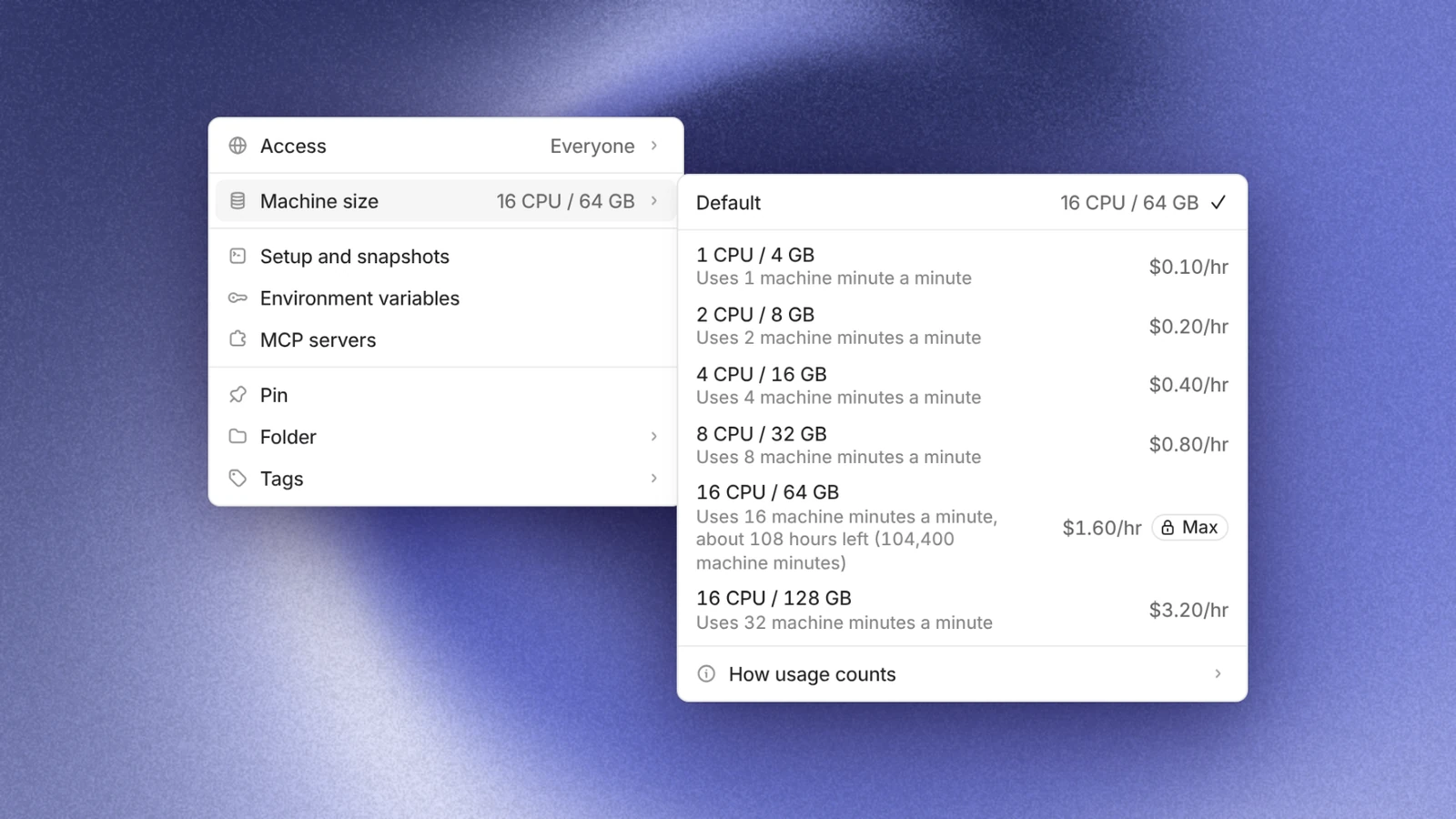
Capy’s self-serve ceiling is Hyper (16 vCPU, 64 GB RAM, 128 GB disk) on Max with 1 TB of awake RAM across the org (128 GB Lite, 512 GB Pro, 1 TB or as agreed Enterprise) and Big Guy (16 vCPU, 128 GB RAM, 256 GB disk) on request, with $0 sleeping cost. Codex Cloud runs 2 vCPU / 8 GiB / 8 GiB disk on Plus and 4 vCPU / 16 GiB / 32 GiB disk by default on Pro, Business and Enterprise, with larger custom VMs through Enterprise sales. Devin raises concurrency from 10 on Pro and Max to unlimited on Teams and Enterprise (with 2 Free SWE-2 sessions per user on Teams), and GitHub Copilot runs multiple parallel cloud sandbox sessions at $0.000024/vCPU-second, $0.000003/GiB-second and $0.005/GiB-month for stopped snapshots (plus larger or self-hosted runners via Actions).
| Platform | Seat model | Team entry | Included usage |
|---|---|---|---|
| Capy | $0/seat org | $20/mo total | $20 to $200 + min |
| Devin | Flat team | $80/mo (100) | $80 shared pool |
| Cursor | Per user | $30+/user/mo | Cursor/Grok pool |
| Codex Cloud | Per user | $20/user/mo | ChatGPT allowance |
| GitHub Copilot | Per seat | $19/seat/mo | 1,900 credits/seat |
| Kiro | Per seat | $20/seat/mo | 500 credits/seat |
| Google Jules | Winding down | N/A | CLI export only |
Capy returns 100% of each paid plan ($20 Lite, $100 Pro, $200 Max) as model usage alongside 30,000 to 300,000 machine minutes and 100 to 2,500 monthly review credits across unlimited members. Devin Teams covers up to 100 users in one $80 shared prepaid credit pool (single-user plans are Free, Pro $20 and Max $200; Enterprise bills in ACUs), Cursor excludes cloud agents from Free and $8 Plus and bills third-party models separately at API list price, Codex Cloud Business is $20 per user annually ($25 monthly), GitHub Copilot scales from $10 Pro to $39 Enterprise per seat, and Kiro Teams pools 500 credits per seat with $0.04 add-ons.
Conductor started as a Mac app for running parallel Claude Code, Codex and Cursor agents in local workspaces, and now also runs them in Conductor Cloud microVMs on your own subscriptions and keys.
Capy is the cheapest cloud coding agent for teams, while solo entry points vary
Per-seat pricing punishes teams where ten engineers open occasional PRs and two run heavy parallel loops. On Capy pricing, every org buys one shared plan with unlimited members and $0 per seat. Free ($0) runs threads locally with your own keys and subscriptions plus 100 monthly review credits. Paid plans return their full monthly price as model usage on top of machine minutes and review credits: Lite ($20 a month, $16 annually, or $1 for the first 7 days with a verified card) includes $20 of model usage, 30,000 machine minutes and 250 review credits; Pro ($100, $80 annually) includes $100, 150,000 minutes and 1,250 credits; Max ($200, $160 annually) includes $200, 300,000 minutes and 2,500 credits.
Compute billing is linear and transparent. One machine minute equals one minute on 1 vCPU / 4 GB, scaling by 4 GB steps (Large uses 4 per minute, Ultra 8, Hyper 16, Big Guy 32), so Max’s 300,000 minutes cover 1,250 hours on Large or about 312 hours on Hyper. Past the included minutes, machine time bills at $0.10 per 60 machine minutes ($0.10/hr Small, $0.40/hr Large, $1.60/hr Hyper, $3.20/hr Big Guy), and sleeping machines cost nothing.
On Capy credits, models from Anthropic, OpenAI, Google and xAI bill at the provider’s list price, and Capy also lists models such as Kimi, DeepSeek and Qwen in its picker. Your own Codex/ChatGPT, GitHub Copilot or SuperGrok subscriptions, plus API keys and gateways, work on every plan including Free with no charge or markup. Review credits cover both model and machine (1 credit Low, 5 Medium, 10 High); under the default Flex mode, a PR’s first review runs at Medium and follow-ups at Low, giving Lite (50 Medium reviews), Pro (250) and Max (500) an effective $0.40 per Medium review with $0 seats. Extra reviews bill usage-based to Capy credits for actual tokens and machine time and never run on your own keys.
Competitors win on three specific billing shapes. A solo developer gets a lower entry price on GitHub Copilot Pro ($10 a month with $15 in AI credits, plus separate sandbox billing after shared included compute). Small teams wanting a low flat starting pool can look at Devin Teams ($80 a month as shared prepaid credits for up to 100 users plus 2 Free SWE-2 sessions per user, though Devin Review and Automations draw from that same pool). Teams already paying for ChatGPT get Codex Cloud under that subscription, whereas Cursor Teams ($30+/user, third-party models separate), Copilot Business ($19/seat) and Kiro Teams ($20/seat) grow with headcount.
Capy offers the largest published cloud machines and 1 TB of awake RAM
Heavy monorepos, Rust builds and Docker test stacks hit VM memory limits quickly. Every Capy cloud thread runs in its own Ubuntu 24.04 Firecracker microVM, and writing subagents spin up on separate machines so parallel edits never collide.
| Machine | vCPU / RAM | Disk | $/hr | Plans |
|---|---|---|---|---|
| Small | 1 / 4 GB | 64 GB | $0.10 | Lite and up |
| Medium | 2 / 8 GB | 64 GB | $0.20 | Lite and up |
| Large (default) | 4 / 16 GB | 64 GB | $0.40 | Lite and up |
| Ultra | 8 / 32 GB | 64 GB | $0.80 | Pro and up |
| Hyper | 16 / 64 GB | 128 GB | $1.60 | Max and up |
| Big Guy | 16 / 128 GB | 256 GB | $3.20 | On request |
Hyper is self-serve on Max and up, with Big Guy available on request. Org concurrency is published too: Capy’s machines allow 128 GB of awake RAM on Lite (8 Large at once), 512 GB on Pro (32 Large), 1 TB on Max (64 Large) and 1 TB or as agreed on Enterprise. Snapshots bake setup scripts and startup entries into an image that restores in about 1 to 2 seconds so threads, subagents and reviews boot warm.
By comparison, Codex Cloud environments publish 2 vCPU / 8 GiB RAM / 8 GiB disk on Plus and 4 vCPU / 16 GiB RAM / 32 GiB disk on Pro, Business and Enterprise (larger VMs require Enterprise sales). Devin, Cursor cloud agents, GitHub Copilot cloud sandboxes and Kiro do not publish maximum managed VM specs.
Competitors win on specialized OS targets and self-operated runners: Devin offers macOS VMs with Xcode and TestFlight uploads plus Outposts workers, GitHub Copilot routes single-repo jobs to larger or self-hosted Actions runners (including Windows), and Cursor supports Self-Hosted Machines. Capy pairs cloud VMs with local and private options: the desktop app runs threads locally in a folder and capy dock pairs Linux, macOS or Windows build servers at $0 machine time, moving threads between local and cloud as needed. Every plan includes SOC 2 Type II, and Capy Enterprise adds BYOC on request, zero data retention on request, SSO/SAML (included on Enterprise; $100 a month on Lite, Pro and Max), an admin audit log and 24/7 engineering support in Slack Connect backed by an SLA.
Capy pairs Captains, native Issues, Drive and built-in PR review
Capy projects organize ordered lists of GitHub repositories (primary repos cloned on every boot, lazy repos cloned on demand and search across hundreds of repos, plus repoless projects for research). Inside a thread, Capy fans out to parallel subagents up to three levels deep, each with its own conversation, model and isolated VM when writing code. Threads start from web, desktop, Slack (@Capy), Linear, the API, or Automations fired by cron schedules in your timezone, GitHub events, Slack messages or incoming webhooks, with built-in or custom skills invoked via $skill-name.
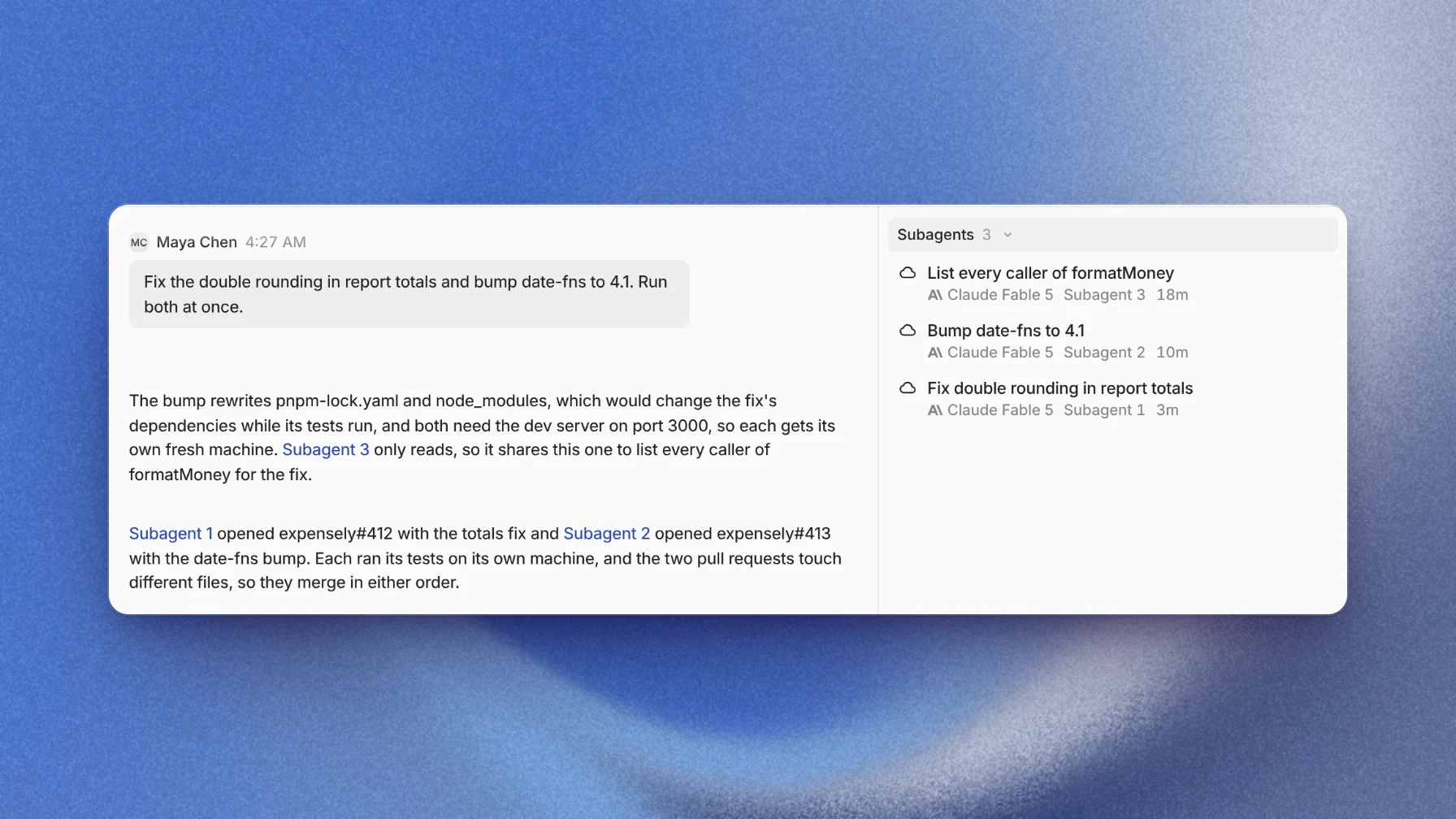
For multi-PR workstreams, Capy Captains are long-lived agents that launch crews of full threads, read their reports and keep a rewritten digest of what needs you, what is new and what is in progress. A Captain’s Overview puts the first five “Needs you” items above active work while the Digest tab holds the whole digest, tagging you only for decisions so you steer from chat (“merge #3780”, “hold the migration until Monday”). Each Captain owns a shared Drive (AGENTS.md, CREW.md read by every crew thread on every turn, NOTES.md, DIGEST.md, skills/, reports/, renders/ and handoffs/), and the Pull requests page filters by Captain.
Several other platforms now offer persistent coordinators too: Devin Bots run child sessions with a “Needs you” list, shared memory, Slack and iMessage. Cursor Projects pair a coordinator agent with Cloud Agents, shared context and a task board. OpenAI’s ChatGPT dots (rolling out on Pro and Business Premium, available on Enterprise and Edu) start Codex tasks, follow up and bring decisions back. In the GitHub Copilot app, Copilot Projects (public preview) coordinate agents toward a goal and check in when they need you, alongside /fleet in the app and CLI. Kiro autonomous mode delegates to sub-agents inside a single task, while Kiro Crew adds persistent bots that own ongoing goals and delegate to workers from a desktop app, web dashboard and CLI. What sets a Capy Captain apart is running a crew of full threads (each with its own machine, model and subagents) behind a rewritten digest, backed by the Captain’s Drive with CREW.md, native Issues and a Pull requests page filtered by Captain.
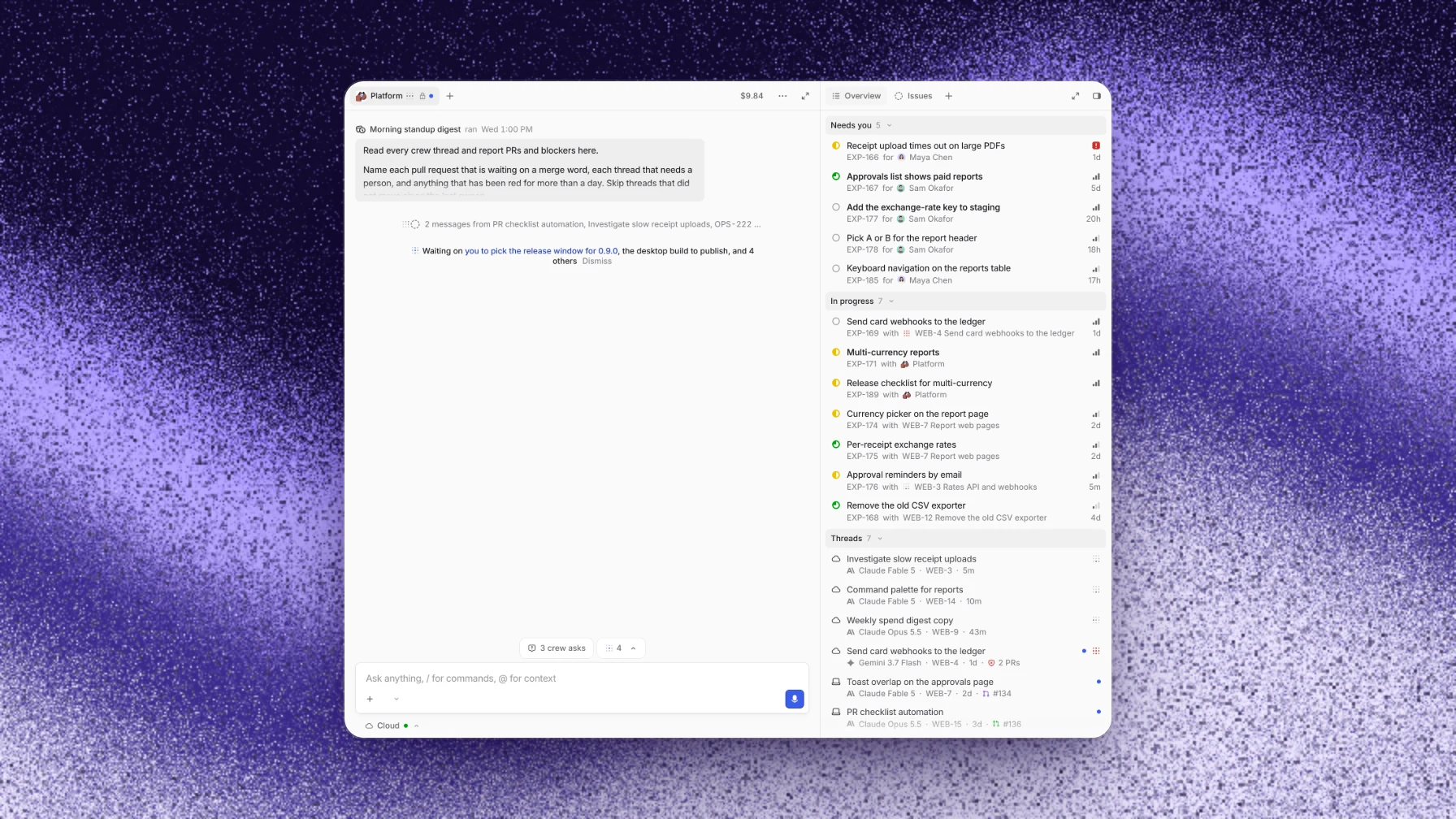
Capy also ships native Issues and Drive. The Issues page tracks title, description, state, assignees and custom org labels and states, attaches threads and PRs directly, and splits work into sub-issues showing closed counts; Captains and threads create, update, comment on and close issues, and commenting wakes the owning thread. For shared files outside git, Capy Drive stores cross-repo rules, skills, checklists, reference files and automation state across Organization, Personal, Project, Project + personal, Automation and Captain scopes, with 24-hour version History showing author threads, Restore and 1 GB (Free), 10 GB (Lite), 25 GB (Pro) or 50 GB (Max) storage.
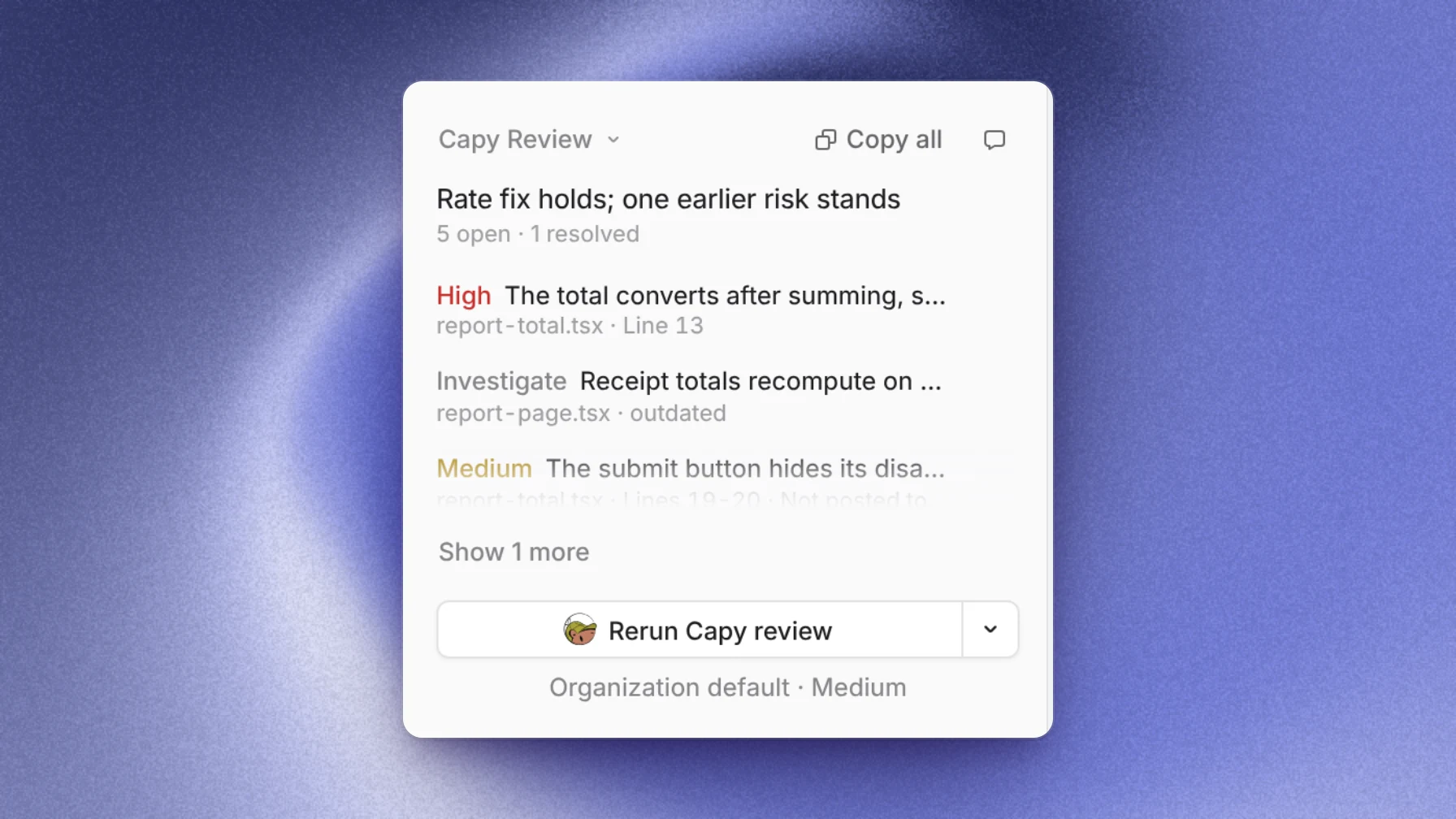
Once code hits GitHub, Capy’s dedicated review agent checks out the PR’s exact head, enforces AGENTS.md rules, posts inline GitHub comments and records every finding in Capy. Automatic review sets per repo to Off, Once or Every push, alongside @capy review. Triage states (Open, Resolved, Irrelevant) sync directly to GitHub thread resolution and skip irrelevant items on incremental re-reviews. When a Capy thread owns the PR, it triages each round and fixes high-severity findings, failing CI, review feedback and conflicts before reporting ready. The Pull requests page tracks every PR across projects (filterable by Captain), and each PR view includes Overview, diff, checks, findings and an auto-generated Guide with a before-and-after diagram and chaptered diffs (toggleable by admins).
Pick Capy when your code lives on GitHub.com and you want $0-seat team pricing, published 64 GB to 128 GB machines, Captains with native Issues and Drive, and built-in PR review that carries diffs to mergeable.
Devin pairs managed coordinators and Bots with macOS and Android testing
Devin offers two orchestration layers: any session can split migrations or bulk test work across managed Devins in isolated VMs, while Devin Bots act as persistent coordinators with a chat, memory, “Needs you” list, Slack app and iMessage channel. After opening a PR, Devin runs end-to-end desktop tests from the diff and attaches a video recording.
Devin is the only platform here offering macOS virtual machines with Xcode, the iOS Simulator and TestFlight uploads. It pairs those with a full Android emulator that captures screenshots and video proof. Devin integrates with GitHub, GitLab, Bitbucket, Slack and Linear, and adds VPC deployment on Enterprise plus Outposts for your own hardware. (Capy answers private-infrastructure needs with its local desktop app and capy dock at $0 machine time, SOC 2 Type II on every plan, and Enterprise BYOC, ZDR, SSO/SAML, audit log and 24/7 SLA support.)
On Devin pricing, Free ($0) is a light single-user quota, while Pro ($20, where Devin Cloud starts) and Max ($200) are single-user plans with up to 10 concurrent sessions and daily or weekly quotas, with overages via prepaid on-demand credits at API pricing. Teams is a flat $80 a month (shared prepaid credits, up to 100 users, unlimited concurrency, Devin Bots, SSO and 2 Free SWE-2 sessions per user), while Devin Enterprise bills in ACUs at the order-form rate.
Pick Devin when you need macOS Xcode VMs with TestFlight uploads, GitLab or Bitbucket support, or a flat $80 shared-credit Teams plan with persistent Bots.
Cursor cloud agents cover every major git host
Cursor cloud agents (formerly Background Agents) run in isolated VMs with cloned repos, dependencies, secrets, startup commands and network rules. You can run unlimited parallel agents across multi-repo environments and start them from Cursor for iOS, Web, Desktop, Slack, GitHub or Bitbucket comments, Linear or the API. It connects to GitHub (Cloud and Enterprise Server), GitLab (Cloud and Self-Hosted), Bitbucket Cloud and Azure DevOps.
Before pushing a PR, cloud agents boot dev servers, click through browser flows via computer use and attach screenshots, videos and logs (with opt-in GitHub PR embeds). You can take over the remote desktop directly, and agents subscribe to CI failures and review comments.
On August 14, 2026, Cursor announced it had been acquired by SpaceX. Cursor pricing bundles Cursor with X and Grok across Free ($0), Plus ($8, Grok only), Premium ($30), Super ($100), Ultra ($200) and Teams ($30+ per user a month). On August 28, 2026, OpenAI announced plans to wind down its contract providing OpenAI models to Cursor, with a proposed November 12 shutoff, then temporarily extended access on November 12. Cloud agents require Premium or higher (or Teams, Enterprise or a legacy paid plan), draw from the shared Cursor and Grok pool, and bill third-party models separately at API list price.
Pick Cursor when your code lives on GitLab, Bitbucket, Azure DevOps or GitHub Enterprise Server, or you want browser artifacts and remote desktop takeover tied to your Cursor workflow.
Codex Cloud bundles reusable cloud workspaces into ChatGPT plans
Codex Cloud runs each task in an isolated workspace that keeps working while your computer sleeps. Tasks launch from ChatGPT on web or desktop (Work in > Cloud), mobile or CLI, checking out GitHub or GitLab in beta, and teams can publish reusable multi-repo environments with dependencies, network policies and secrets.
ChatGPT Work and Codex pricing shares allowances across one plan: Plus ($20 a month) gets 2 vCPU / 8 GiB RAM / 8 GiB disk VMs, while Pro ($100, $200 or $500) and Business ($20/user annual, $25 monthly) step up to 4 vCPU / 16 GiB RAM / 32 GiB disk VMs, with larger custom VMs on Enterprise. Cloud tasks can use more allowance than local chats, and API-key sessions include no cloud features.
Pick Codex Cloud when your team already pays for ChatGPT Plus, Pro or Business and wants reusable cloud workspaces under the same subscription.
GitHub Copilot in the cloud runs parallel sandboxes across GitHub surfaces
Launched on October 28, 2026, Copilot in the cloud runs on GitHub.com and GitHub Mobile for paid plans. Sessions run in an isolated Linux cloud sandbox (parallel sessions spanning org repos) or in a GitHub Actions job (single repo, with larger, self-hosted and Windows runners). Sessions carry across GitHub.com, GitHub Mobile, the Copilot app, VS Code and CLI, and launch from Slack, Microsoft Teams, JetBrains IDEs (preview) and the Copilot SDK.
On GitHub Copilot plans, paid tiers are Pro ($10/user with $15 AI credits), Pro+ ($39 with $70), Max ($100 with $200), Business ($19/seat with 1,900 pooled credits) and Enterprise ($39/seat with 3,900 pooled credits). Delegating to third-party coding agents like Claude and Codex is in public preview on paid plans. Cloud sandbox billing meters $0.000024/vCPU-second, $0.000003/GiB-second and $0.005/GiB-month for stopped snapshots, drawing first from the plan’s shared included Actions compute.
Pick GitHub Copilot when your team standardizes on GitHub, VS Code, JetBrains or Microsoft Teams, wants a $10 solo entry point, or relies on Actions self-hosted and Windows runners.
Kiro autonomous mode plans acceptance criteria before delegating to sub-agents
In Kiro’s autonomous mode, the agent drafts requirements and acceptance criteria before delegating steps to specialized sub-agents across one or more repositories. Tasks run inside an isolated Kiro sandbox with headless Chrome, Playwright and Chrome DevTools preinstalled, opening PRs or MRs and responding automatically to comments or /kiro all and /kiro fix.
Autonomous mode picks the model automatically and does not let you choose one. Kiro pricing spans Free ($0, 50 credits), Pro ($20), Pro+ ($40), Pro Max ($100, 5,000 credits) and Power ($200, 10,000 credits) with $0.04 add-ons; Teams is $20/seat a month with 500 pooled credits per seat.
Pick Kiro when you want upfront acceptance criteria, pooled per-seat credits and automatic model selection.
Google Jules is read-only and shuts down on December 31, 2026
On October 29, 2026, Google announced that Jules will wind down on December 31, 2026 as Google unifies its agentic coding efforts, with Google Antigravity named as its agent-first platform. Active sessions stopped on November 11, 2026, leaving Jules read-only through year-end while code, branches and PRs stay in GitHub; teams can export settings, environment variables, setup scripts, schedules, memories and session history with the Jules CLI before December 31.
For a company codebase moving off Jules, Capy connects to the same GitHub repositories and removes Jules’ main runtime limit. Where Jules could not run long-lived processes like dev servers in setup scripts, Capy combines setup scripts with startup entries inside a microVM with Chrome, restores dependencies from snapshots in 1 to 2 seconds, and adds multi-repo projects, subagents, Captains, Automations and unlimited members on one plan. Export your Jules config with the CLI, connect those repos in Capy, save a snapshot and recreate schedules as Automations.
Capy and Devin lead for mobile and visual testing
Capy, Devin and Cursor all verify web UI in a browser and show screenshots (with video recordings on Devin and Cursor), while Capy and Devin add dedicated mobile build and test environments. On Capy, web threads open your app in the machine’s Chrome and show screenshots in the thread, and Capy cloud phones (Pro, Max and Enterprise) build Expo, React Native, native iOS (xcodebuild) and native Android (Gradle) apps on Revyl’s runners, install them on cloud iPhones, iPads or Pixel devices, and tap, swipe, type and read logs with in-thread screenshots ($5.40/hr iPhone or iPad, $3.60/hr Android while awake).
Devin pairs desktop recordings with macOS Xcode VMs (including TestFlight uploads) and an Android emulator with video proof, while Cursor embeds browser artifacts directly in GitHub PR descriptions when enabled. For steering from a phone, Capy has an iOS app in TestFlight beta and runs in any phone’s browser (no Android app), Cursor offers an iOS app and Android PWA, and Codex Cloud and GitHub Copilot offer mobile apps.
Try two platforms side by side on the same pull requests
Shortlist two or three platforms matching your git host, VM needs and budget, then run the exact same three tasks through each: a multi-repo feature, a reproducible bug and a change exercising your test suite or preview server. Judge setup effort, steering frequency, CI and review cleanup, and actual monthly spend.
On GitHub, start on Capy Free locally with your own keys and 100 monthly review credits, turn on automatic review on a few repositories, then run Lite ($1 for the first 7 days with a verified card) or Pro to test cloud VMs, Captains, Issues and Drive with your team.
Frequently Asked Questions
What is the cheapest cloud coding agent for teams in 2026?+
What is the most powerful cloud coding agent?+
Which cloud coding agents run parallel tasks across multiple repositories?+
Which platforms deliver merge-ready pull requests with visual proof and review?+
Which cloud coding agents support mobile app testing with screenshots and video?+
What is happening to Google Jules and how should teams migrate?+
How do cloud coding agent platforms bill for usage?+
Does Capy require GitHub?+
Sources
- Capy docs: Machines
- Capy docs: Models and pricing
- Capy docs: Captains
- Capy docs: Drive
- Capy docs: Reviews
- Capy docs: Cloud phones
- Devin pricing
- Devin docs: Self-serve plans
- Devin docs: Enterprise billing
- Devin docs: Advanced capabilities
- Devin docs: Devin Bots
- Devin docs: Testing and video recordings
- Devin docs: macOS support
- Devin docs: Android emulator support
- Cursor docs: Cloud agents
- Cursor docs: Projects
- Cursor docs: Cloud agent capabilities
- Cursor pricing
- Cursor blog: Cursor is now a part of SpaceX
- OpenAI: Our decision on Cursor following its acquisition by SpaceX
- ChatGPT Learn: Codex Cloud
- ChatGPT Learn: Meet dots
- ChatGPT Learn: Cloud environments
- ChatGPT Learn: Pricing
- ChatGPT Learn: GitLab (Beta)
- GitHub Docs: Copilot on GitHub.com and GitHub Mobile
- GitHub Docs: About cloud sandboxes for Copilot
- GitHub Docs: Billing for cloud and local sandboxes
- GitHub Copilot plans and pricing
- GitHub Docs: Plans for GitHub Copilot
- GitHub Docs: Third-party coding agents
- GitHub Changelog: GitHub Copilot app Universe releases
- GitHub Docs: Delegating and parallelizing work with agents
- Kiro docs: Autonomous mode
- Kiro docs: Crew bots
- Kiro docs: Crew interfaces
- Kiro docs: Sandbox
- Kiro pricing
- Jules changelog: Jules Turndown
- Jules docs: FAQ
- Conductor
Spotted something out of date? Tell us at support@capy.ai.
Try Capy on your repositories
Capy runs coding agents in cloud machines that open pull requests and carry them through CI and review.


- Cloud coding agents compared on machines, concurrency and pricing
- Capy is the cheapest cloud coding agent for teams, while solo entry points vary
- Capy offers the largest published cloud machines and 1 TB of awake RAM
- Capy pairs Captains, native Issues, Drive and built-in PR review
- Devin pairs managed coordinators and Bots with macOS and Android testing
- Cursor cloud agents cover every major git host
- Codex Cloud bundles reusable cloud workspaces into ChatGPT plans
- GitHub Copilot in the cloud runs parallel sandboxes across GitHub surfaces
- Kiro autonomous mode plans acceptance criteria before delegating to sub-agents
- Google Jules is read-only and shuts down on December 31, 2026
- Capy and Devin lead for mobile and visual testing
- Try two platforms side by side on the same pull requests
- FAQ
- Sources