





Cursor alternatives for cloud agents
How Capy, Codex, GitHub Copilot and Devin compare with Cursor Cloud Agents on VM power, Captains, PR review, git hosts and team pricing.

Cursor’s Background Agents are now Cloud Agents, running parallel coding sessions in isolated cloud VMs with desktop control and multi-repo support. Since August 2026, Cursor has been part of SpaceX, sold to new customers via The X Subscription where Cloud Agents start at Premium ($30 a month) and third-party models bill at API list prices from the first use.
Four active platforms cover the main alternatives. Capy runs multi-model swarms on GitHub.com with Captains, native Issues and Drive, built-in PR review, 64 GB self-serve VMs and $0 per-seat pricing. OpenAI Codex cloud rides on ChatGPT plans across GitHub and GitLab, GitHub Copilot runs inside GitHub.com and GitHub Actions, and Devin spans GitHub, GitLab and Bitbucket (plus GitHub Enterprise Server and Azure DevOps on Enterprise) with GUI computer use on Linux, Windows and Android.
Capy details below were verified on November 23, 2026; competitor details come from each product’s docs, pricing page or changelog, checked on November 20, 2026.
Cursor’s Cloud Agents run full VMs, now under SpaceX
Cursor pairs its editor with isolated Ubuntu VMs that clone repos, install dependencies, load secrets and run while your laptop is offline, configured via agent-led setup or a Dockerfile in .cursor/environment.json with background Builds.
Cloud Agents span multi-repo environments across GitHub (Cloud and Enterprise Server), GitLab (Cloud and Self-Hosted), Bitbucket Cloud and Azure DevOps, with outbound domain rules, Tailscale private networks and self-hosted machines for tool execution. Launch them from Cursor Desktop, Web (cursor.com/agents), iOS, Slack (@cursor), GitHub or Bitbucket PR comments, Linear or the API. Agents support HTTP and stdio MCP servers with OAuth, .cursor/hooks.json hooks, and desktop and browser computer use attaching screenshots, videos and logs to PRs; you can take over the remote desktop and hand control back, and teammates can view shared URLs or post follow-ups when admins enable them.
On August 14, 2026, Cursor announced its acquisition by SpaceX after an April SpaceXAI partnership. New customers start on The X Subscription, sharing a weekly pool across Grok and Cursor (legacy customers can stay on old plans; switching is permanent). Cloud Agents, automations, Origin code hosting and Bugbot start on Cursor Premium ($30 a month), Super ($100), Ultra ($200), Teams ($30+ per user) and Enterprise; Free ($0) and Plus ($8) exclude Cloud Agents. Third-party models bill separately at API list prices from the first use out of prepaid credit up to your spend limit.
Capy adds Captains, native Issues and Drive above parallel swarms
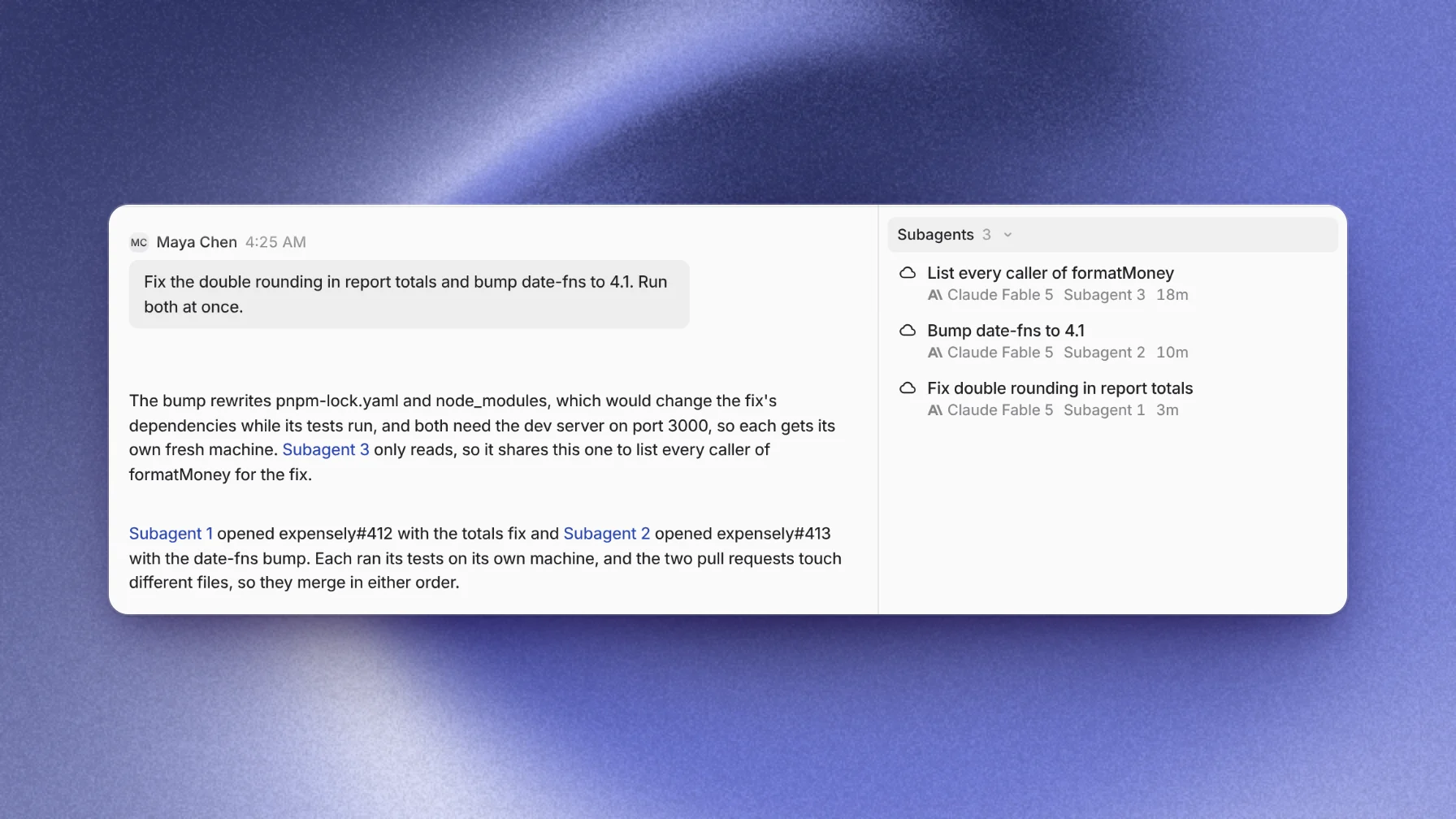
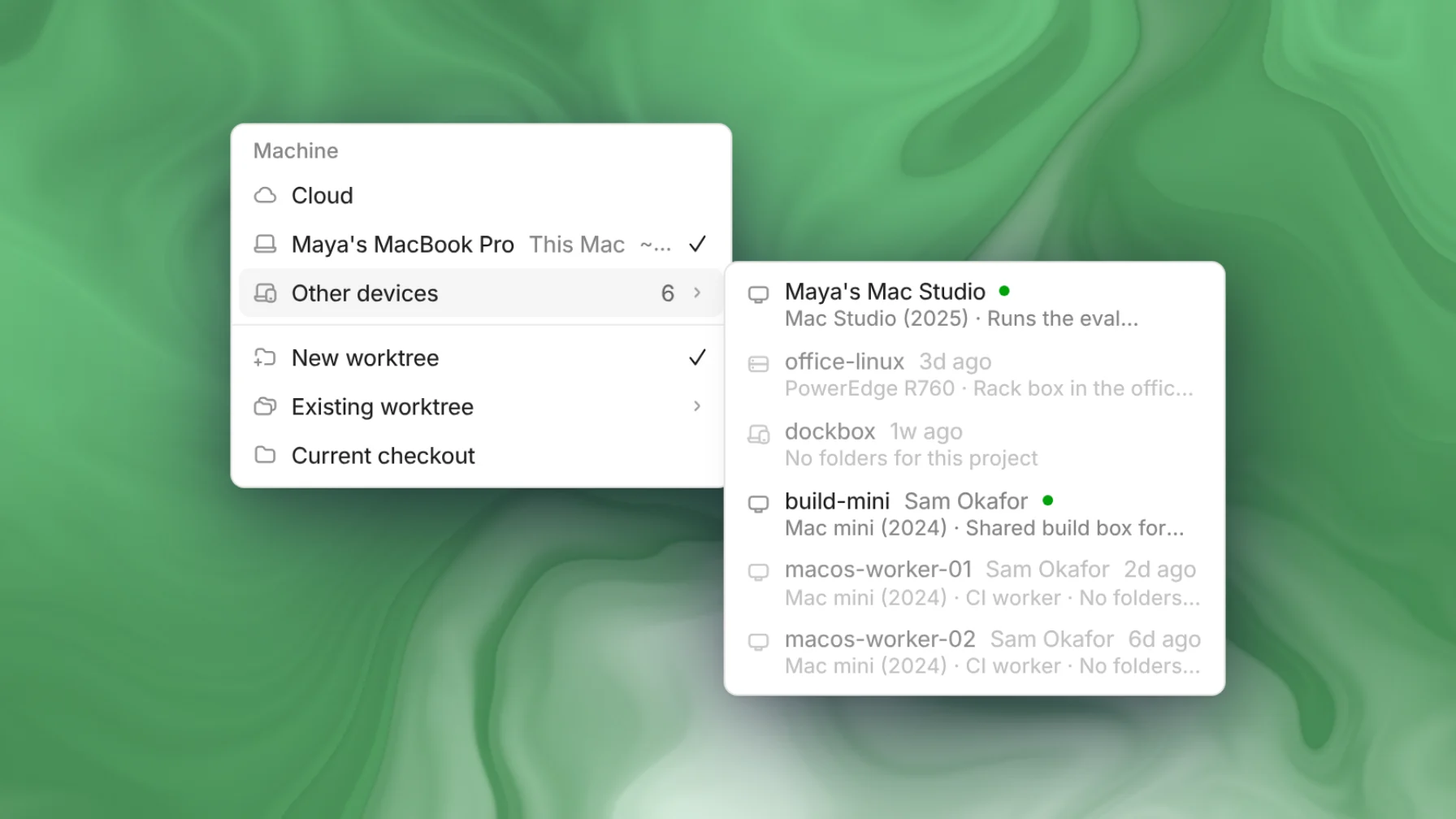
Every Capy cloud thread runs in its own Ubuntu 24.04 Firecracker microVM that clones repositories, runs commands, edits code and streams a Chrome desktop into the thread pane, configured with per-repo setup scripts, startup processes, commands and snapshots. Start threads from the web app, desktop app, Slack (@Capy), a delegated Linear issue or the API; threads outlive your laptop, wake when CI finishes, a review lands or a PR merges, and accept steering mid-turn without stopping. Multi-part work splits across parallel subagents, each with its own conversation and fresh machine while read-only subagents share the parent’s machine.
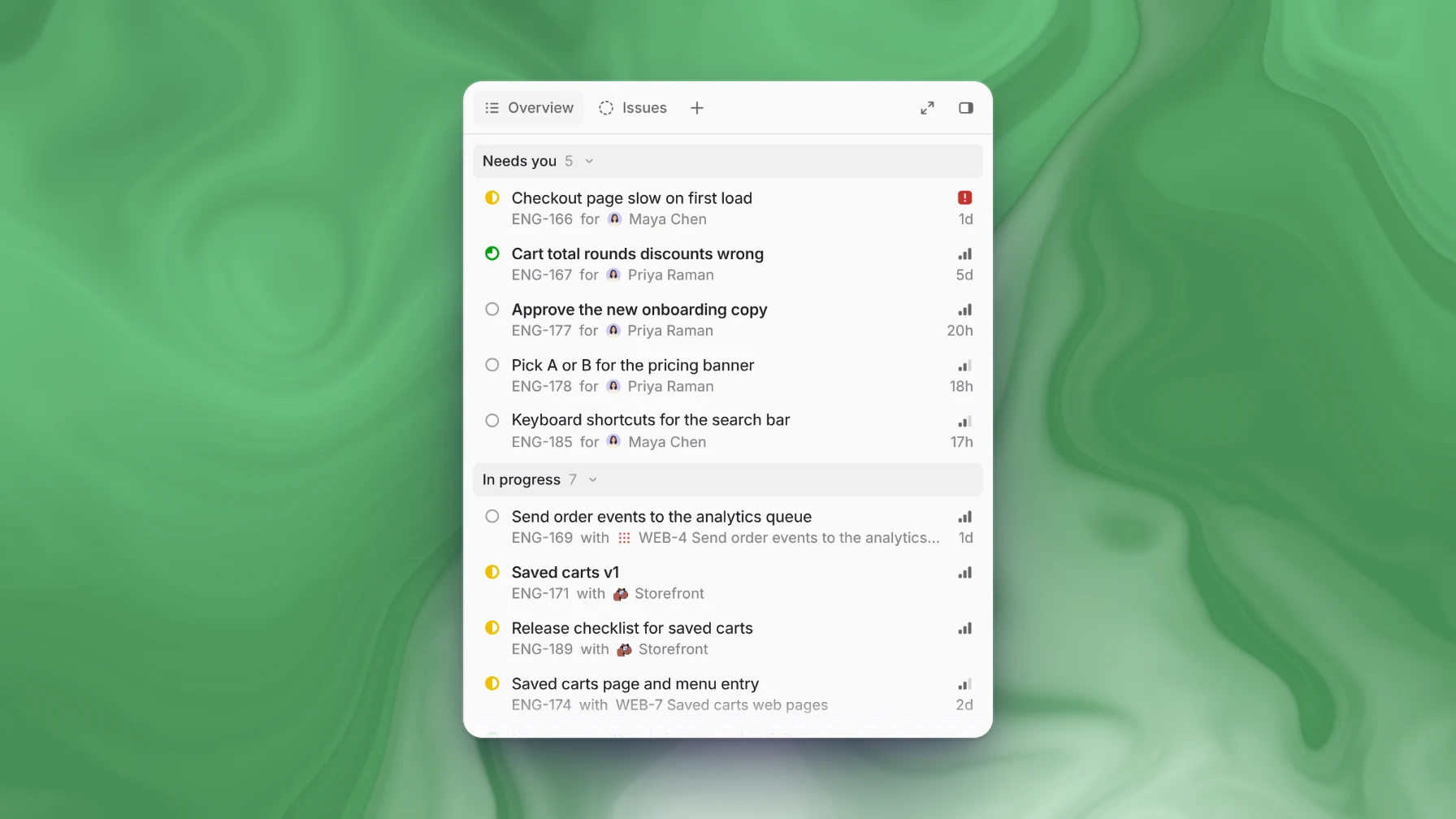
Cursor now has its own coordinator: a Cursor Project runs a coordinator agent that plans work, delegates it to Cloud Agents, keeps shared context and a task board, and follows Slack, schedules or pull requests, and Devin Desktop puts sessions on a Kanban board. Capy Captains run the same kind of layer across Capy’s whole workspace: a long-lived agent launches full crew threads (each with its own machine, model and subagents), reads their reports and rewrites a live digest of what needs you, what is new and what is in progress. Its Overview places the first five “Needs you” decisions above work in progress while the Digest tab holds the full record. The Captain tags you only for decisions, you steer in its chat (“merge #3780”, “hold the migration until Monday”), and each Captain owns a Drive shared with its crew (AGENTS.md, CREW.md read by every crew thread on every turn, NOTES.md, DIGEST.md, skills/, plus reports/, renders/ and handoffs/).
Tracking and shared context live in the same workspace. Capy’s native Issues page holds title, description, state, assignees and custom org states and labels; threads and pull requests attach directly, one parent per issue creates sub-issues showing how many are closed, and Captains and threads create, update, comment on and close issues, with any comment waking the owning thread. Outside git, Capy Drive stores cross-repo rules, skills, checklists, reference files and automation state across Organization, Personal, Project, Project + personal, Automation and Captain scopes, keeping 24-hour History with Restore and storage from 1 GB on Free to 10 GB on Lite, 25 GB on Pro and 50 GB on Max.
Automations run stored prompts on cron schedules in your timezone, GitHub events, Slack messages, incoming webhook URLs or on demand, each launching a normal thread with its own machine and run history. Skills match automatically or trigger explicitly via $skill-name ($ in the composer, $name in Slack). On Pro, Max and Enterprise, Capy also attaches cloud iOS ($5.40 an hour) and Android ($3.60 an hour) phones while awake, building mobile apps on Revyl’s runners and tapping through them.
Capy reviews pull requests in a real checkout and writes a Guide
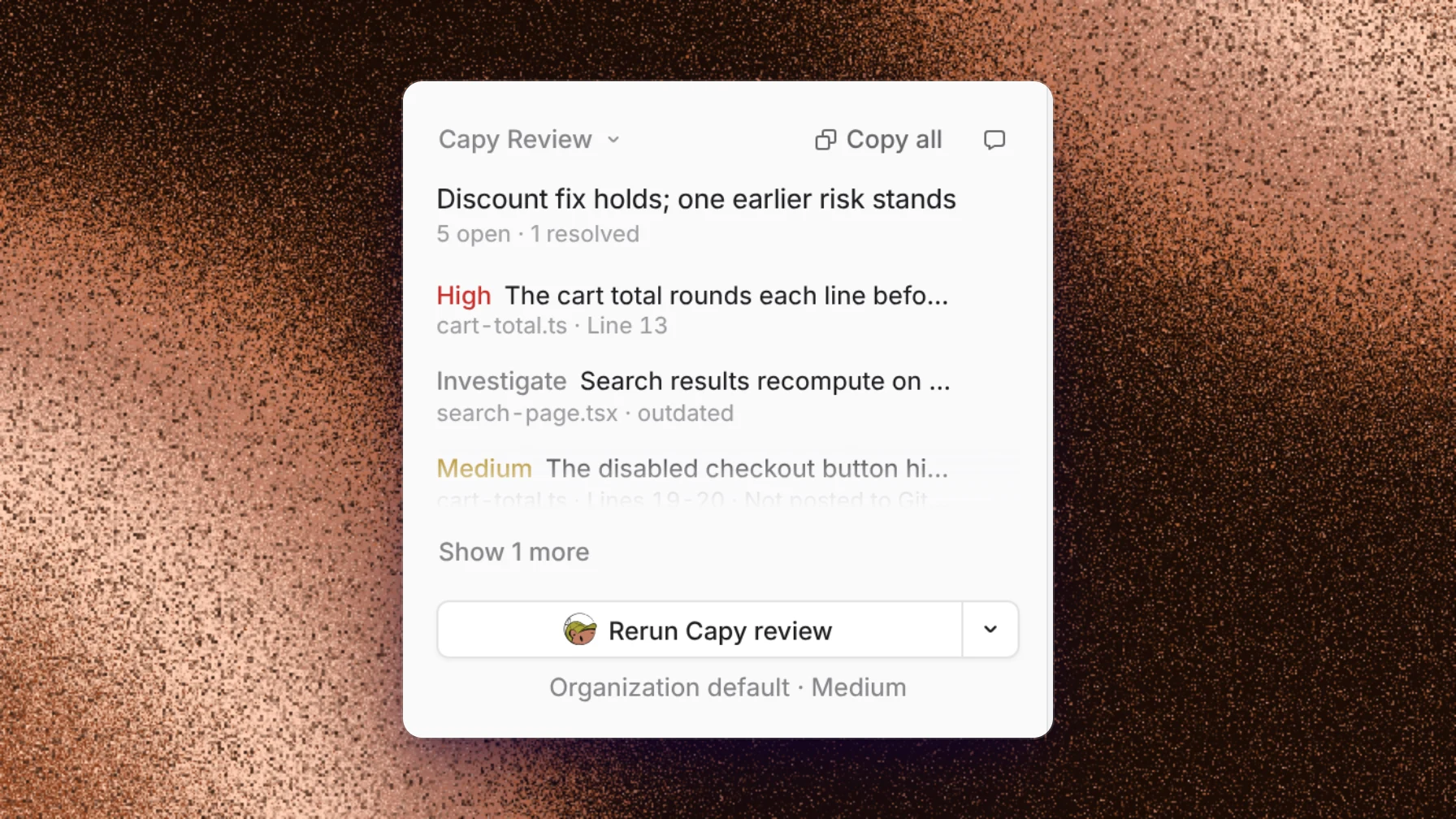
Cursor bundles Bugbot starting on Premium, while Capy pairs a dedicated review agent with its own pull request board and owning-thread fixes. The review agent checks out the PR’s exact head in a real environment, enforces AGENTS.md conventions, posts inline GitHub comments and records every finding in Capy. Per repo, you set automatic review to Off, Once (on open) or Every push, or trigger @capy review on demand.
Each finding tracks severity and triage state (Open, Resolved or Irrelevant); marking one resolved or irrelevant resolves the GitHub thread, and incremental re-reviews skip irrelevant items. When a Capy thread owns the PR, it triages reviews automatically, fixes high-severity findings, resolves failing CI, answers feedback and clears conflicts before reporting ready. The Pull requests page lists every PR across projects, filterable by Captain, and opening any PR shows Overview, diff, checks, findings and an auto-generated Guide: what the change does, a before-and-after diagram of the touched path, and chaptered diffs (toggleable by admins).
Capy publishes VM ceilings up to 64 GB self-serve and 1 TB awake RAM
Cursor runs each Cloud Agent on a default VM profile with limited memory and CPU and publishes no size tiers; Enterprise teams can ask support to raise limits. Capy’s machines list exact hardware, hourly rates and org-wide RAM caps upfront.
| Capy machine | vCPU | RAM | Disk | Per hour | Plans |
|---|---|---|---|---|---|
| Small | 1 | 4 GB | 64 GB | $0.10 | Lite and up |
| Medium | 2 | 8 GB | 64 GB | $0.20 | Lite and up |
| Large (default) | 4 | 16 GB | 64 GB | $0.40 | Lite and up |
| Ultra | 8 | 32 GB | 64 GB | $0.80 | Pro and up |
| Hyper | 16 | 64 GB | 128 GB | $1.60 | Max and up (self-serve) |
| Big Guy | 16 | 128 GB | 256 GB | $3.20 | On request |
Org-wide awake RAM scales from 128 GB on Lite (8 Large at once) to 512 GB on Pro (32 Large) and 1 TB on Max (64 Large), with 1 TB or as agreed on Enterprise, and sleeping machines cost nothing. For local tools or build servers, the Capy desktop app (macOS, Windows and Linux) and the Dock CLI (capy dock) run threads on paired machines with $0 machine time, moving threads between your computer and the cloud as needed. Capy’s iOS app is in TestFlight beta, and Capy runs in any phone’s browser.
One Capy plan covers the team and returns its price as model usage
Under Cursor’s X Subscription, Teams starts at $30+ per user a month and third-party models bill separately at API list prices from the first use out of prepaid credit. Capy’s pricing uses one plan per organization with unlimited members and $0 per seat, returning each paid plan’s full price as included model usage on top of monthly machine minutes and review credits: Free ($0, runs locally with your own keys and 100 review credits), Lite ($20 a month, $16 annually, $1 for the first 7 days with a verified card; $20 model usage, 30,000 machine minutes, 250 review credits), Pro ($100, $80 annually; $100 usage, 150,000 minutes, 1,250 credits), Max ($200, $160 annually; $200 usage, 300,000 minutes, 2,500 credits) and custom Enterprise.
One machine minute equals one minute on 1 vCPU / 4 GB, scaling by RAM (Large 4 per minute, Ultra 8, Hyper 16, Big Guy 32), so Max’s 300,000 minutes cover 1,250 hours on Large or about 312 hours on Hyper. Past included minutes, compute bills at $0.10 per 60 machine minutes. Review credits cost 1 at Low, 5 at Medium and 10 at High; default Flex runs first reviews at Medium (5) and follow-up pushes at Low (1), giving Lite 50 first Medium reviews ($0.40 per Medium review on Lite, Pro and Max with no seats). Extra reviews are usage-based on Capy credits for actual tokens and machine time, and reviews never run on your own keys.
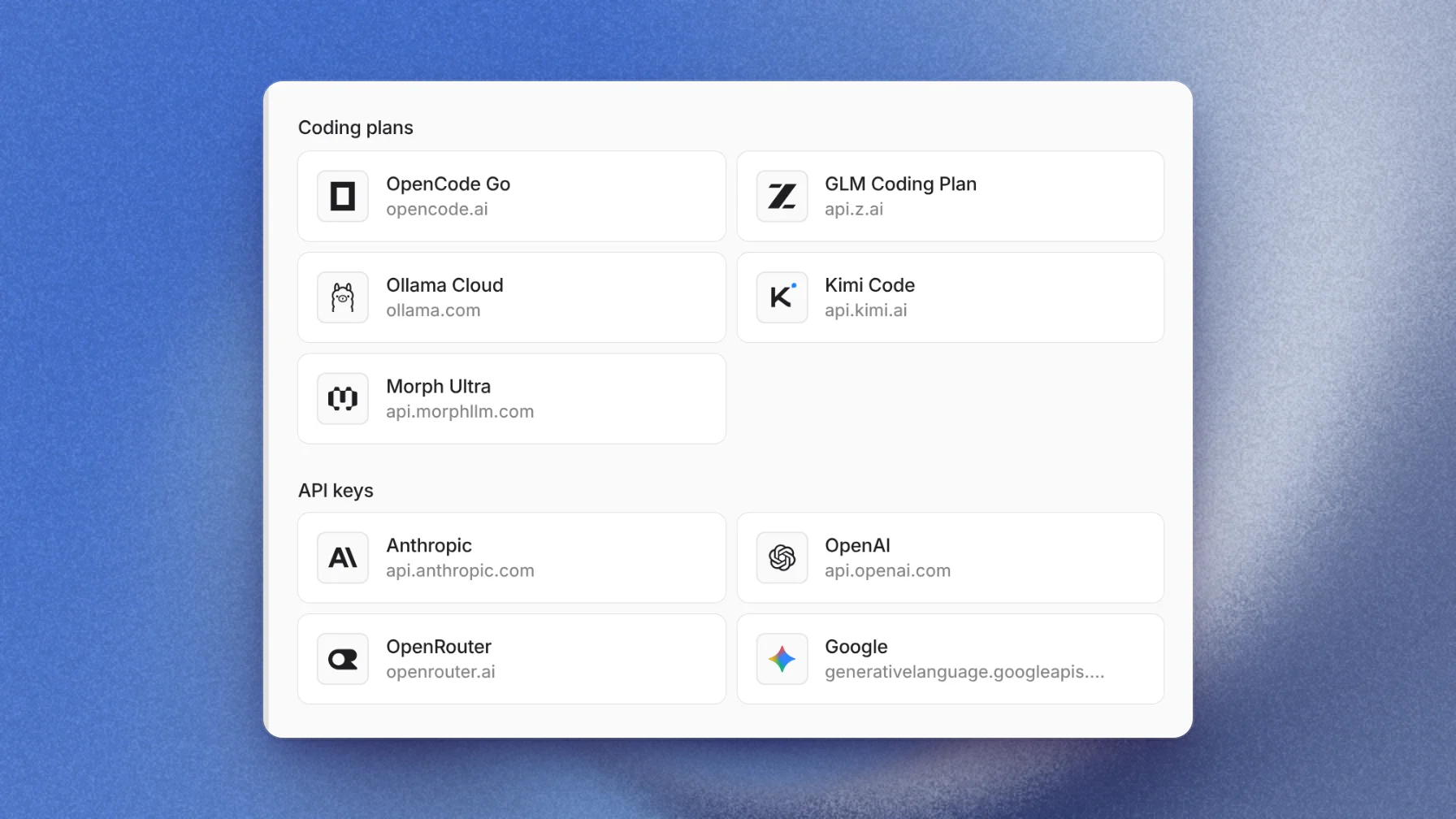
On Capy credits, models from Anthropic, OpenAI, Google and xAI bill at the provider’s list price, and Capy also lists models such as Kimi, DeepSeek and Qwen in its picker. Your own subscriptions (Codex, GitHub Copilot or SuperGrok) and API keys or gateways work on every plan, Free included, with no charge or markup.
Capy is SOC 2 Type II on every plan, and Enterprise adds BYOC on request, zero data retention on request, SSO/SAML (included on Enterprise; $100 a month add-on on Lite, Pro and Max), an admin audit log and 24/7 Slack Connect engineering support backed by an SLA. The boundary is git hosting: Capy supports GitHub.com only.
OpenAI Codex cloud comes with your ChatGPT plan
Codex Cloud runs coding tasks in isolated cloud workspaces while your computer sleeps, accessible from web, mobile or desktop. It connects to GitHub or GitLab, supports reusable team environments with network secrets and allowed destinations, launches from the CLI or ChatGPT (Work in > Cloud), and opens pull requests.
Codex is included across ChatGPT Free, Go, Plus, Pro, Business, Edu and Enterprise plans, sharing pricing and usage limits with ChatGPT Work. ChatGPT Plus ($20 a month) covers web, CLI, IDE extension, iOS, automatic code review and Slack; Pro plans run $100, $200 or $500 a month. Codex runs OpenAI models (Plus lists GPT-6.1 Sol and GPT-6 Luna), cloud tasks may consume more allowance than local messages, and API-key use excludes cloud features like GitHub review and Slack.
GitHub Copilot runs cloud sessions inside GitHub.com
Copilot on GitHub.com researches repositories, runs tests and linters in cloud environments and opens pull requests. Since October 28, 2026, paid plans include “Copilot in the cloud”, moving sessions between web or mobile and the Copilot app, VS Code or Copilot CLI.
Environments span an org-wide cloud sandbox, a GitHub Actions environment (custom compute, networking and self-hosted runners) or a Remote custom environment. Agent Merge fixes failed GitHub Actions workflows and merge conflicts, Copilot code review reviews PRs, and Automations trigger on schedules or repo events. Copilot cloud sessions run on GitHub.com (not GitHub Enterprise Server) and bill GitHub AI Credits across Copilot plans: Pro ($10 a month), Pro+ ($39), Max ($100), Business ($19 per granted seat) and Enterprise ($39 per granted seat).
Devin adds GUI computer use across GitHub, GitLab, Bitbucket and Azure DevOps
Devin Cloud runs parallel agents in isolated cloud VMs (“Close your laptop, come back to finished PRs”) with browser, terminal and GUI computer use on Linux, Windows or Android. It routes across Anthropic, OpenAI, Google and Cognition models and includes PR review plus automations from Slack, Linear, CI failures, Snyk or PagerDuty.
In the CLI, devin --cloud starts a cloud VM session, /handoff moves sessions between local and cloud, and /ssh opens a shell on the VM. On June 2, 2026, Cognition renamed Windsurf to Devin Desktop, an IDE with a Kanban command center that also runs ACP-compatible agents like Codex and OpenCode. Integrations cover Slack, Teams, Linear, Jira, GitHub, GitLab and Bitbucket, and Devin Enterprise adds GitHub Enterprise Server and Azure DevOps. Devin pricing lists Free ($0), Pro ($20 a month with Devin Cloud, extra usage at API pricing and ChatGPT plan support), Max ($200), Teams ($80 a month for up to 100 users) and Enterprise with VPC deployment and SCIM, with daily and weekly allowance refreshes.
Google Jules is winding down on December 31, 2026
Google announced on October 29, 2026 that Jules winds down on December 31, 2026. Active sessions ended November 11, leaving Jules read-only through year-end; Google points to its agent-first platform, Google Antigravity, and settings and sessions export via Jules Tools while code stays in GitHub.
Where Cursor fits better
Cursor fits better when local editing and cloud execution belong in one IDE, or when repositories live outside GitHub.com.
- Editor continuity and VM takeover. Jumping between Cursor Desktop and Cloud Agents, inspecting PR recordings and taking over a VM’s remote desktop stay inside one editor.
- Non-GitHub hosts. Cursor supports GitHub Enterprise Server, GitLab (Cloud and Self-Hosted), Bitbucket Cloud and Azure DevOps and runs tool execution on self-hosted machines; both Cursor and Capy can reach private networks through Tailscale. For GitHub.com teams needing local or private execution, Capy pairs its desktop app and Dock CLI (
capy dock, $0 machine time) with SOC 2 Type II on every plan plus Enterprise BYOC, ZDR on request, SSO/SAML, audit log and 24/7 Slack Connect SLA support. - Legacy plans and the X bundle. Existing customers can keep legacy plans, and teams on The X Subscription share weekly usage with Grok alongside Origin and Bugbot from $30 a month.
You can run Capy beside Cursor on the same repo
Both platforms work on the same GitHub.com repo without disrupting your editor. Start on Capy Free locally with your Codex, GitHub Copilot or SuperGrok subscription or API keys plus 100 monthly review credits, turn on Once or Every push review (or @capy review), then try Lite ($1 for 7 days) or Pro to run threads and Captains on cloud VMs across your team, with more Drive storage and review credits, while editing locally in Cursor.
Frequently Asked Questions
What is the best Cursor cloud agents alternative?+
Does Cursor still have Background Agents?+
What do Cursor Cloud Agents cost compared with Capy?+
How large are Capy’s cloud machines?+
Is Cursor owned by SpaceX?+
Can I use my ChatGPT, Codex or GitHub Copilot subscription in Capy?+
Does Capy work with GitLab or Bitbucket?+
Is Google Jules shutting down?+
Sources
- Cursor docs: Cloud Agents
- Cursor docs: Cloud agent setup
- Cursor docs: Cloud agent capabilities
- Cursor pricing
- Cursor help: What is The X Subscription?
- Cursor blog: Cursor is now a part of SpaceX
- Cursor docs: Projects
- ChatGPT docs: Codex Cloud
- ChatGPT docs: Pricing for ChatGPT Work and Codex
- GitHub docs: Copilot on GitHub.com
- GitHub docs: Plans for GitHub Copilot
- GitHub Changelog: GitHub Copilot app Microsoft Ignite releases
- Devin Cloud
- Devin docs: Devin Cloud in the CLI
- Devin pricing
- Cognition: Windsurf is now Devin Desktop
- Devin docs: Enterprise Git integrations
- Jules changelog: Jules Turndown
- Capy docs: Captains
- Capy docs: Drive
- Capy docs: Reviews
- Capy docs: Machines
- Capy docs: Models and pricing
Spotted something out of date? Tell us at support@capy.ai.
Try Capy beside Cursor
Connect a GitHub.com repository and run threads with your own Codex, GitHub Copilot or SuperGrok subscription.


- Cursor’s Cloud Agents run full VMs, now under SpaceX
- Capy adds Captains, native Issues and Drive above parallel swarms
- Capy reviews pull requests in a real checkout and writes a Guide
- Capy publishes VM ceilings up to 64 GB self-serve and 1 TB awake RAM
- One Capy plan covers the team and returns its price as model usage
- OpenAI Codex cloud comes with your ChatGPT plan
- GitHub Copilot runs cloud sessions inside GitHub.com
- Devin adds GUI computer use across GitHub, GitLab, Bitbucket and Azure DevOps
- Google Jules is winding down on December 31, 2026
- Where Cursor fits better
- You can run Capy beside Cursor on the same repo
- FAQ
- Sources