





How coding agents work in Slack

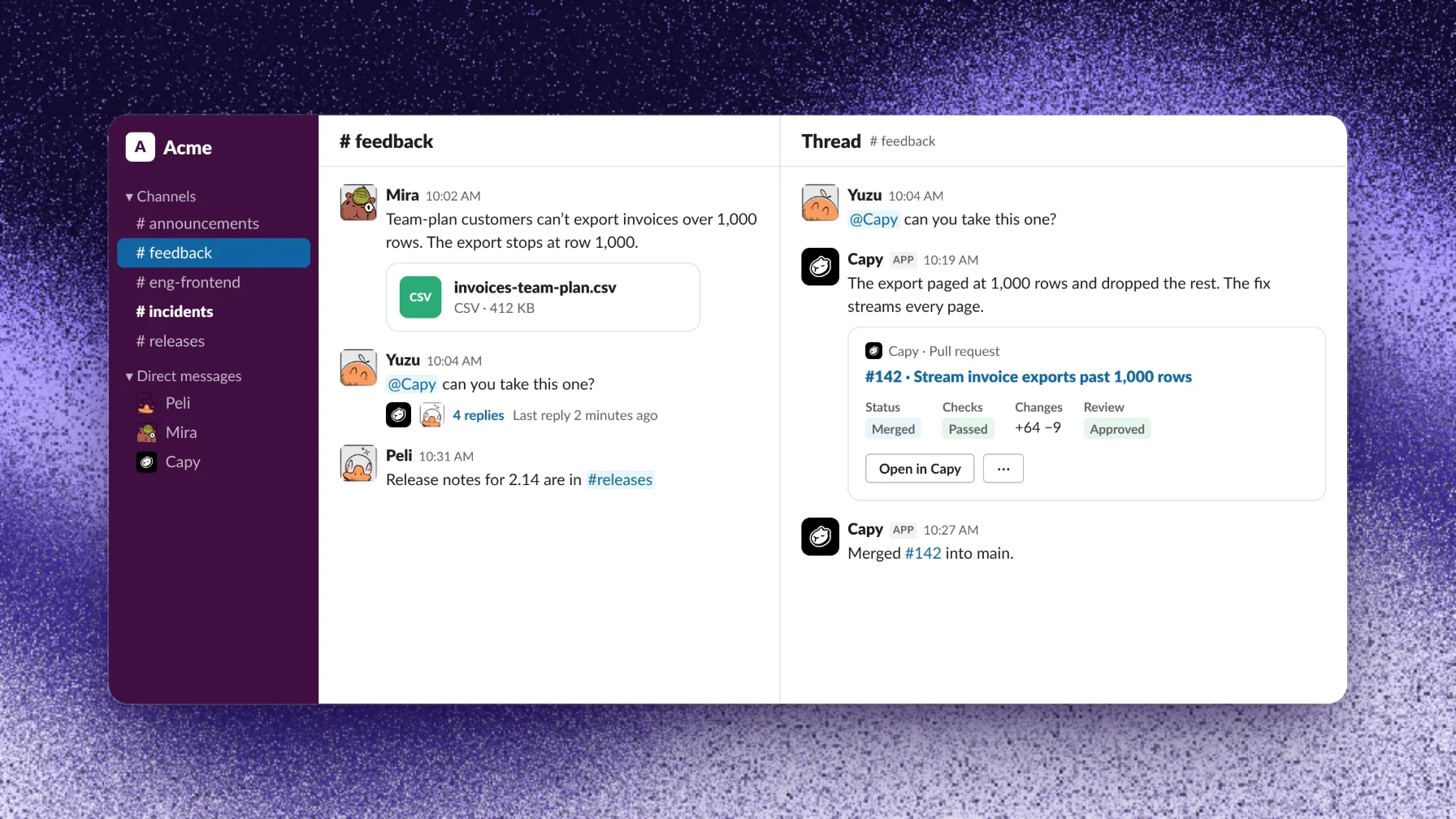
A coding agent in Slack lets engineers turn a bug report, customer thread or quick fix request into a pull request without leaving the conversation where the context lives. In Capy, mentioning @Capy in a channel or direct message starts a Capy thread, pulls in the thread's messages and attached images or files, routes to the mapped project, and posts live pull request cards back into Slack. Built-in controls like aside messages, mute, stop, archive and separate web threads keep noisy channels from triggering unwanted runs. People still review every diff and decide what merges.
Why teams run coding agents in Slack
Bug reports, deploy alerts and customer questions usually land in Slack first, carrying screenshots, stack traces and replies from support or on-call engineers. Copying that context into another tool slows down small fixes and drops detail.
Running a coding agent from Slack keeps the handoff where the discussion happened. Mentioning the bot starts a coding session on a cloud machine, posts updates and pull request links back to the thread, and lets teammates follow along. Because channels are noisy, safe Slack usage relies on predictable routing, identity linking, explicit permissions and thread controls.
What happens when you mention @Capy in Slack
- You start a thread. Mention @Capy in a channel where the app is installed (run
/invite @Capyfirst if needed), send a direct message, or use the Ask with Capy message shortcut. Attached images and files come along as context. - Capy checks your identity. Linking your account under Personal Slack account in Settings → Integrations → Slack attributes threads you start to your Capy user and adds your name to context. Capy also links automatically when your Slack email matches your Capy email, and prompts on mention. Unlinked teammates can still reply in threads, though their messages aren't tied to a Capy account.
- Capy picks a project. It checks Channel mappings in Settings → Integrations → Slack and falls back to the default project for unmapped channels and DMs. If neither is set, Capy asks you to pick a project instead of guessing, and offers an admin a one-time option to save that choice as a channel or global default. You can also override routing inline with
project="Payments platform". - The thread runs on its own machine. Capy clones the project's repos on an isolated Linux VM, loads repo instructions and works while syncing replies to Slack.
- Live pull request cards appear. When the thread opens or takes over a pull request, Capy posts one card per PR with Open in Capy and View on GitHub buttons. Status, checks, branches and diff totals update in place, and merging or closing posts one follow-up line.
- Replies continue the thread. Slack replies sync to the Capy thread, interrupting an active run by default unless you add
!steerto guide the next step or!queueto wait until the current turn ends. - CI and review close the loop. CI results and Capy review findings wake the thread, which pushes fixes and updates the same Slack card until an engineer merges.
A worked example: a bug reported in #support
At 11:10 AM, support posts a screenshot in #support showing an empty CSV export when a date filter spans two years. #support maps to billing-app in Settings → Integrations → Slack.
- 11:14 AM. Mention in thread. An engineer replies:
@Capy reproduce the cross-year CSV filter bug from this screenshot, add a regression test and open a pull request. Capy reads the thread and screenshot, starts a thread inbilling-appand replies with its link. - 11:18 AM. Side talk stays out of context. Two engineers discuss whether to backfill failed exports by starting their replies with
aside. Capy ignores those messages completely and leaves them out of history. - 11:24 AM. Fix and live card. The agent finds a year-boundary bug in the date parser, adds a regression test, verifies it on its Linux VM and opens a pull request. A pull request card appears in
#supportshowing checks running. - 11:31 AM. Checks and review pass. CI turns green and Capy review clears with no open findings. The card updates in place and the agent posts a short summary.
- 11:40 AM. Human merge. The engineer clicks Open in Capy, checks the diff and merges. One line confirms the merge in
#support, and the engineer repliesarchiveto close the session.
Thread controls, directives and permissions
Channels mix teammate chat with agent work, so Capy gives every thread explicit controls:
- Exclude side talk with
aside. Prefix a message withasideor!aside(case-insensitive) and Capy ignores it completely, excluding it from thread context. - Control runs with
mute,stop,archiveandunlink.mutestops replies to regular messages while direct@Capymentions and DMs still work and existing PR cards keep updating.stophalts the active run without closing the thread.archivestops work and closes the session so later replies and mentions are ignored until someone typesunarchive.unlinkpauses Slack sync while the Capy thread keeps running on web. - Move off Slack with
!web. Adding!webstarts a separate web thread from a snapshot of the conversation and posts a Started on web card, keeping follow-up noise out of the channel. - Steer inline with directives. Strip-before-prompt directives like
project=,folder=,channel=,title=,machine=andcaptain=<name>configure routing, machine size or a Captain from a mention. - Keep channel access explicit. The bot reads only channels it is a member of and DMs sent to it. It never joins channels in bulk on install, and private channels need
/invite @Capy. Turning on Read Slack as you in Settings → Integrations → Slack lets Capy read a conversation the app isn't in after you approve it in the thread, and Capy never posts as you.
For channel-wide triage without mentions, a Slack-triggered automation groups message bursts into one run, filters fuzzy intent with a free run_when sentence like "the message reports a bug", and runs under a chosen user or service user rather than the Slack sender.
What belongs in Slack and what doesn't
Slack fits intake, triage, quick investigations, small fixes and short directives to a Captain (@Capy captain=Mobile ...).
It shouldn't replace specification docs, secret stores or code review. Keep API keys and passwords out of channels, move long back-and-forth engineering threads onto web with !web or unlink, and read the full diff in Capy or GitHub before merging. See A security checklist for coding agents for team-wide controls.
Where Capy fits
Capy is a platform that orchestrates agent swarms, and its Slack integration works like this:
- Any member installs Capy with Connect Slack in Settings → Integrations → Slack, and mentions, DMs and Ask with Capy work on every Slack plan (Installing the Slack app).
- Channel mappings route channels to Capy projects, falling back to the default project for unmapped channels and DMs, and asking instead of guessing when no default exists.
- Thread controls (
aside,mute,unmute,stop,archive,unarchive,unlink,!web) and message directives (project=,channel=,machine=,!steer,!queue,!new,captain=) keep runs predictable inside busy channels. - Pull request cards update status, checks, branches and diff totals in place, with one card per pull request and Open in Capy and View on GitHub buttons.
- Bot permissions cover only channels Capy is in and DMs sent to it, with optional Slack canvases and personal Read Slack as you permissions added only if enabled.
- Capy never merges a pull request unless you ask for that merge.
And where it doesn't:
- Slack's AI assistant panel requires a paid Slack plan, though mentions, DMs and Ask with Capy work on every plan (Installing the Slack app).
- Threads started in a Slack channel are shared with everyone who can see the routed project, and a private Captain accepts
captain=messages only in a direct message with Capy (Good to know, Steer a Captain from Slack). - Steering a Captain with
captain=<name>posts a button in Slack that opens the Captain, and the Captain replies in the Capy app rather than in Slack.
Follow-up questions
Can Capy read private Slack channels?
Only private channels where someone invited it with /invite @Capy, or a conversation you approve after turning on Read Slack as you in Settings → Integrations → Slack (Permissions). Capy never joins channels in bulk on install.
How do teammates talk in a Capy Slack thread without waking the agent?
Start a message with aside (or !aside), and Capy ignores it completely and leaves it out of context (Aside messages). Type mute to pause regular replies across the thread; direct @Capy mentions still go through until you unmute or archive.
Who owns a thread started from Slack?
When your Slack account is linked under Personal Slack account in Settings → Integrations → Slack (or matched by email), threads you start belong to your Capy user and run on your connected subscriptions and keys. Channel threads are shared with everyone who can see the project, while DMs follow your default sharing setting (Good to know).
Can Slack trigger automated coding runs without mentioning @Capy?
Yes. An automation triggers on Slack channel messages (grouped into bursts) or emoji reactions, filters with exact conditions plus a free run_when check, and runs either a fresh thread per event or one standing thread across reports.
Ship your next feature with Capy