





Capy vs Codex
Where each coding agent runs, which models it uses, and how each one bills.

OpenAI Codex cloud and Capy both run coding agents in isolated cloud environments, keep working while your computer is asleep, and turn finished work into pull requests.[1][2][3][4] They’re built around different shapes. Codex is OpenAI’s coding agent across ChatGPT’s desktop app, web, mobile, editor extensions and terminal, running OpenAI’s GPT models inside ChatGPT plans.[5][6][1][7][8] Capy is a platform for running coding agents on models from Anthropic, OpenAI, Google, xAI and other providers across Firecracker Linux microVMs and your own computer, with unlimited members on every plan and a pull request loop where the thread that opened a PR fixes failing CI, answers review feedback and resolves conflicts.[9][10][2][3][4]
Pick Codex if you want one OpenAI agent tied into ChatGPT’s desktop app, IDE extensions and open-source CLI, or if your repositories live on GitLab.[6][11][12][13] Pick Capy as an OpenAI Codex cloud alternative if you work on GitHub.com, want cross-provider model choice alongside Captains and nested subagents, and prefer plans with no per-seat price where you can also plug in your existing Codex subscription.
Every fact below comes from each product’s docs and product pages, checked on November 20, 2026. The numbers in brackets link to the sources at the end.
OpenAI merged the Codex app into ChatGPT, while Capy spans cloud VMs and local folders
OpenAI positions Codex as “the same agent everywhere you code”, connecting ChatGPT, your editor and your terminal through one ChatGPT account.[5] On July 9, 2026, OpenAI merged the standalone Codex app (originally launched in February 2026 with parallel project chats, built-in Git review, worktrees, skills and scheduled tasks) into the ChatGPT desktop app for macOS and Windows.[6] Available on every ChatGPT plan including Free, Codex keeps its coding experience beside ChatGPT’s Chat and Work, with inline editing in diffs, pull request review in the side panel, Computer Use and multi-repository projects.[6]
Outside the desktop app, Codex reaches into editors and terminals.[5] The Codex IDE extension runs in VS Code, Cursor and Windsurf, while Xcode and JetBrains IDEs have their own integrations so you can review edits in place and hand longer tasks off to the cloud.[11] In the terminal, the Codex CLI inspects, edits and runs code in a local repository with configurable model, reasoning effort and permissions, supports MCP servers, runs scripts and CI through codex exec, and sends tasks to the cloud with codex cloud.[16] Both the Codex CLI and SDK are open source at github.com/openai/codex, while the IDE extension and Codex cloud aren’t open source.[12]
Capy is a platform for running agent swarms across the cloud and your own machines.[9] You start a thread from the Capy web or desktop app (macOS, Windows and Linux), by mentioning @Capy in Slack, by delegating a Linear issue, or through the API, and Automations run a prompt on a schedule, a webhook, or a GitHub or Slack event.[9] When a task needs your local setup, the Capy desktop app runs a thread in a folder on your own computer and can move that thread to a cloud machine and back; once in the cloud, it keeps working when you close your laptop.[3]
Git host coverage splits the two tools cleanly. Codex cloud checks out any repository available through a connected GitHub or GitLab account, with GitLab support in beta across all ChatGPT plans since August 2026 so you can start tasks from issues or merge requests with @codex and request merge request reviews.[1][6] Capy works with repositories on GitHub.com only; GitHub Enterprise Server and other git hosts aren’t supported.[13] Codex cloud environments don’t currently support self-hosted GitHub Enterprise Server either.[17]
Capy pairs isolated Firecracker microVMs with Captains and nested subagents
Codex cloud gives each task its own workspace that keeps running while your computer is asleep, and you can review and continue it from web, mobile or the desktop app before committing or opening a pull request.[1] Teams create and publish reusable cloud environments with repositories, dependencies, tools and access settings; each new task starts from that prepared filesystem and keeps its own saved files, with saved VM state recoverable for up to seven days.[17] You can toggle all public internet access or allow a package-manager preset plus extra domains, supply HTTP secrets and environment variables, configure private networking over VPN, and authenticate to cloud providers with OIDC.[17] Each task gets 2 vCPU, 8 GiB of memory and 8 GiB of disk on Plus, or 4 vCPU, 16 GiB of memory and 32 GiB of disk on Pro, Business and Enterprise, with larger VMs available for Business cloud chats and Enterprise.[17][7] Computer use isn’t available inside Codex cloud environments.[17]
Codex handles parallel and recurring work through subagents and scheduled tasks.[18][19] Codex runs many agents in parallel and can spawn specialized subagents in parallel to collect their results, a feature enabled by default in current releases that consumes more tokens.[5][18] Scheduled tasks run recurring work in the background, eligible plans can trigger web and mobile tasks from supported events in Gmail, Slack or GitHub, and in the desktop app scheduled tasks can run in a local project directory or an isolated worktree while your computer stays on.[19]
Capy gives every cloud thread its own Linux VM: a Firecracker microVM with its own kernel running Ubuntu 24.04.[2] The default Large machine provides 4 vCPU and 16 GB of memory at $0.40 an hour after included machine minutes, and sizes scale up to Hyper (16 vCPU, 64 GB) on Max, with Big Guy (16 vCPU, 128 GB) on request.[2] Plans allow up to 8 Large machines awake at once on Lite, 32 on Pro and 64 on Max, and you pay only while a machine is awake.[2]
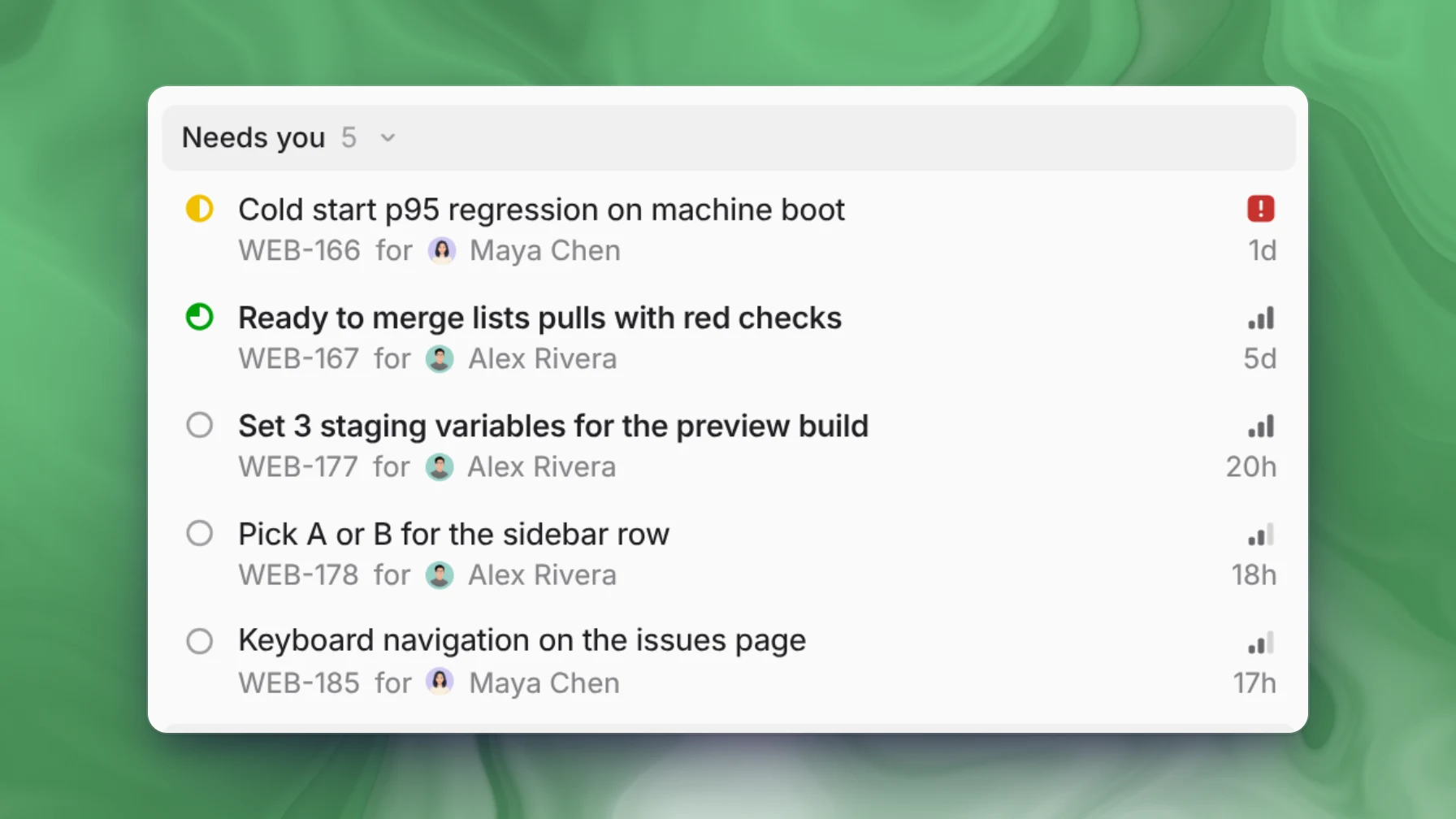
On top of individual threads, Capy adds two layers of orchestration. A thread can spawn subagents, each a full child agent with its own conversation and usually its own machine, up to three levels deep.[14] Above them sits a Captain: a long-lived agent that runs a crew of threads for you, reads their reports, keeps a digest of what needs you, and tells you only what needs you, whether running in the cloud or on a paired device.[15]
Codex runs OpenAI’s GPT models, while Capy puts models from many providers in one picker
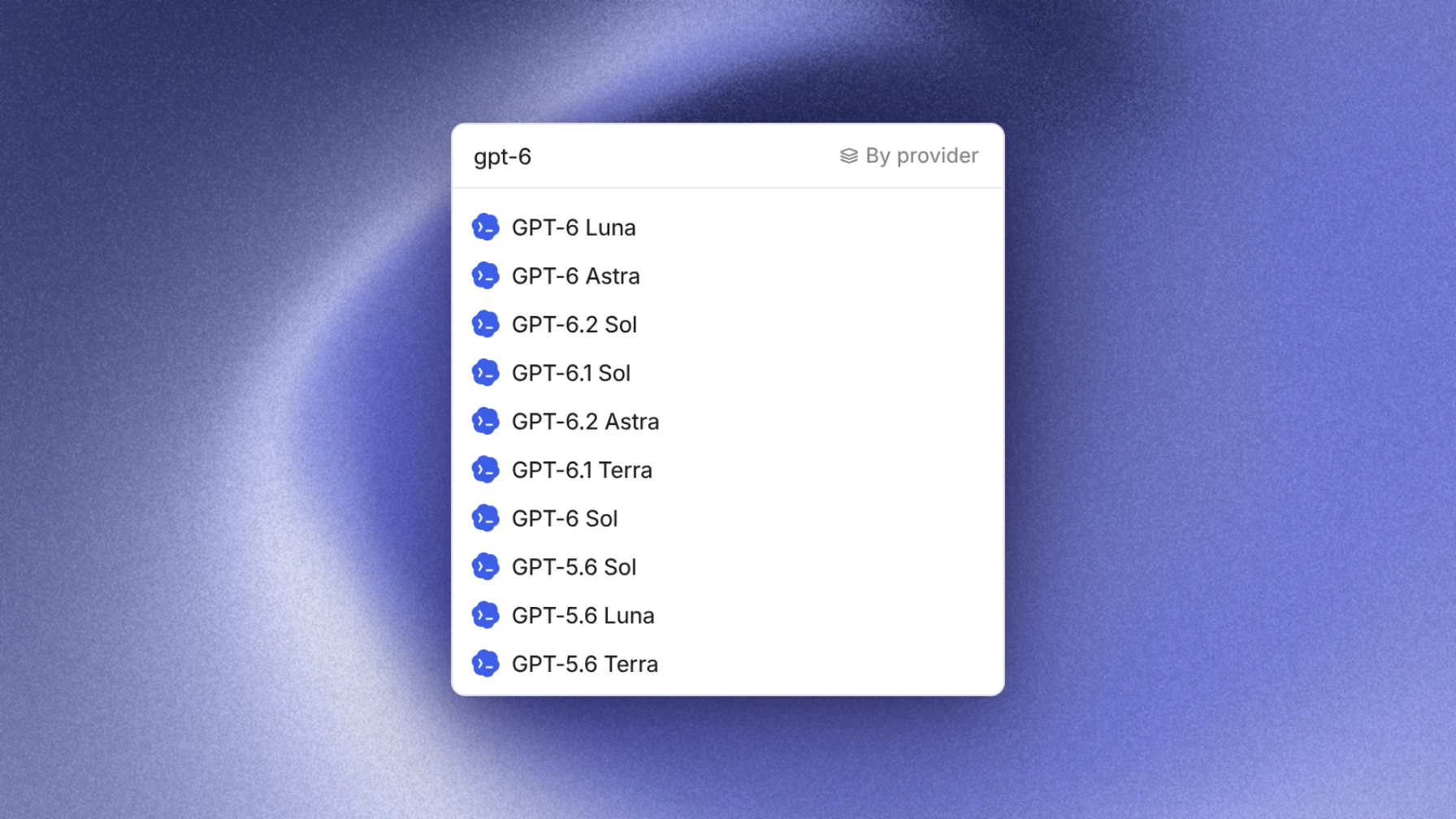
Codex runs OpenAI’s GPT model family: GPT-6.2 Astra and GPT-6.2 Sol (launched November 17, 2026), GPT-6.1 Sol and Terra, and GPT-6 Luna.[8][6] Which models and speeds you get depends on your ChatGPT plan: Free and Go include GPT-6 Luna at Standard speed in the desktop app (subject to rollout), Plus includes GPT-6.1 Sol and GPT-6 Luna, and Pro $500 adds Ultrafast mode.[7] Local Codex clients can also point at a custom model provider if it exposes a compatible Responses API endpoint.[8]
Capy keeps model choice open across providers.[10] One model picker gives every thread access to models from Anthropic, OpenAI, Google, xAI, Moonshot, Z.ai, DeepSeek, Qwen, MiniMax and others.[10] When models run on Capy credits, they bill at each provider’s list price with no markup, and you can also route threads through your own subscriptions or API keys.[10]
Capy’s owning thread fixes review findings and CI failures before calling a PR ready
In Capy, the thread that opened a pull request stays attached to it through merge: it fixes failing CI, answers review feedback, resolves conflicts and wraps up after the merge.[4] A thread never pushes to the base branch or main, and it can build stacked pull requests when a change belongs across dependent branches.[4]
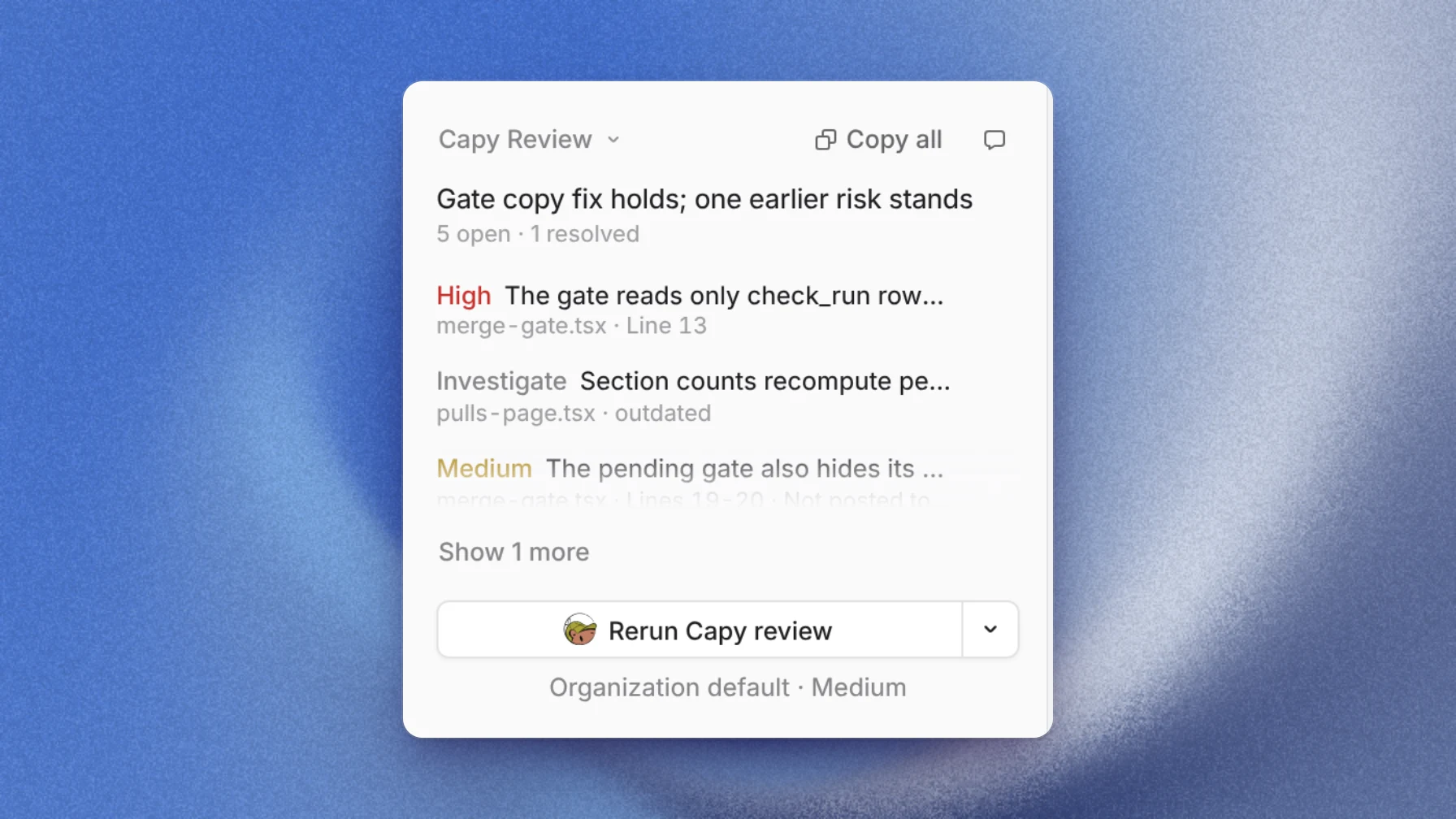
Capy’s review agent reads the diff in a real checkout at the pull request’s exact head and posts inline GitHub comments, each carrying a category, severity, confidence (confirmed or investigate) and file and line.[20] It enforces conventions in your AGENTS.md files as findings, runs incrementally on re-reviews, and lets you configure each repository to Off, Once or Every push in Settings → Review or trigger a round with @capy review and optional instructions.[20] When a Capy thread owns the pull request, it triages each review and fixes high-severity findings before reporting the pull request ready.[20] Capy reviews pull requests on GitHub.com only.[20]
Codex reviews pull requests automatically or when you comment @codex review, posting a standard GitHub review that flags only P0 and P1 issues.[21] It follows ## Code Review Rules sections in AGENTS.md files, offers Security Review (@codex security review) in research preview, runs local reviews via /review in the CLI against a base branch, uncommitted changes or a commit, and supports GitLab merge request reviews in beta.[21][16][6] OpenAI notes that “Codex Cloud (Legacy)” still runs Code Review alongside the Linear and GitHub integrations, and OpenAI plans to deprecate it.[17]
Both products connect to Slack and Linear, with different workflows.[22][23][24][25] In Slack, you now mention @ChatGPT (previously @Codex); with Cloud delegation enabled in the workspace, repository work runs as a separate Codex Cloud task from a published, workspace-shared environment and returns to the thread.[22] On paid Codex plans, assigning a Linear issue to Codex or mentioning @Codex in a comment creates a cloud chat, posts progress, and finishes with a summary and a link to the chat so you can create a pull request.[23] Capy starts threads from Slack messages while letting agents read and search your Slack workspace for context, and delegating a Linear issue starts a Capy thread as a native Linear agent session that streams progress, the plan and a link back to the issue.[24][25]
Codex bundles coding into ChatGPT plans, while Capy charges no per-seat price
Codex is included in ChatGPT Free, Go, Plus, Pro, Business, Edu and Enterprise plans, and ChatGPT Work and Codex share pricing, credits and usage limits.[7] Free ($0) and Go ($8 a month) include GPT-6 Luna at Standard speed in the desktop app, subject to rollout.[7] Plus ($20 a month) unlocks Codex on the web, CLI, IDE extension and iOS, plus cloud integrations such as automatic code review and Slack.[7] Pro plans run at $100, $200 or $500 a month with no five-hour limit currently (and Ultrafast mode on Pro $500), Business is $20 per user a month billed annually for two or more users ($25 per user month to month) with larger VMs for cloud chats, SAML SSO and MFA, and Enterprise and Edu are priced through sales with SCIM, EKM, RBAC, audit logs via the Compliance API, and data retention and residency controls.[7]
Included Codex usage works as an allowance.[7] Plus and Standard Business have estimated local messages per five-hour period, weekly limits may also apply, and cloud tasks may use more of the allowance than local messages.[7] Code Review usage applies when Codex runs reviews through GitHub (@codex review or automatic reviews), while local reviews count toward general usage limits.[7] Past those limits, Plus and Pro users buy credits, and Business, Enterprise and Edu plans with flexible pricing buy workspace credits.[7] Signing in with an API key works in the CLI, SDK or IDE extension only at API pricing, with no cloud features such as GitHub code review or Slack.[7]
Capy has no per-seat price and includes unlimited members on every plan.[10] Plans are Free, Capy Lite at $20 a month, Pro at $100, Max at $200 and custom Enterprise, with 20% off on annual billing.[10] Each plan includes monthly allowances: Free includes 100 review credits; Lite includes 30,000 machine minutes, 250 review credits and $20 of model usage; Pro includes 150,000 machine minutes, 1,250 review credits and $100 of model usage; Max includes 300,000 machine minutes, 2,500 review credits and $200 of model usage.[10]
For Capy reviews, each review credit covers both the model and the machine: Low effort uses 1 credit, Medium uses 5 and High uses 10.[20] Flex is the default review mode, running a pull request’s first review at Medium and follow-ups at Low.[20] Reviews past the monthly allowance bill Capy credits and never run on connected subscriptions or API keys, while models past included usage on Capy credits bill at providers’ list prices with no markup.[20][10]
You can run Capy threads on your existing Codex subscription
Moving threads into Capy doesn’t require leaving a ChatGPT plan your team already pays for.[10] Your own subscriptions (Codex, GitHub Copilot and SuperGrok) and API keys work on every Capy plan, the Free plan included, with no charge or markup on their tokens.[10]
In Settings → Models, choose Add a connection → Codex and sign in to ChatGPT with a device code.[10] Capy then runs the GPT models your ChatGPT plan includes (GPT-6.2 Astra, GPT-6.2 Sol, GPT-6.1 Sol, GPT-6.1 Terra, GPT-6 Luna and others) against that plan’s limits instead of your Capy balance.[10] You can connect more than one Codex account, and threads use connections in the order you set.[10] When a subscription is used up, the run-out setting decides whether the thread stops and asks (you can wait for the reset or continue) or moves to the next connection, posting a note such as “Codex is used up until 11:08 PM. Running on OpenAI team key.”[10]
Cloud machine time still bills Capy credits even when a thread’s model runs on a connected subscription.[10] If you run a thread on your own computer through the Capy desktop app on a model your subscription serves, it spends no Capy credits.[10] Automated pull request reviews always draw on review credits or Capy credits and never run on connected subscriptions or keys.[20]
Pick Codex when you want ChatGPT’s stack, GitLab or an open-source CLI
Codex is the better choice when your team wants one OpenAI coding agent built into the ChatGPT products you already use.[5] The ChatGPT desktop app puts Codex right beside Chat and Work with inline diff editing, pull request review in the side panel, Computer Use and multi-repository projects on every ChatGPT plan, Free included.[6] Engineers who spend most of their day in VS Code, Cursor, Windsurf, Xcode, JetBrains IDEs or the terminal also get the Codex IDE extension (VS Code, Cursor, Windsurf), built-in Codex support in Xcode and JetBrains IDEs, plus an open-source CLI and SDK (github.com/openai/codex) with codex exec for scripts and CI, local /review, and custom Responses API provider support.[11][16][12][8]
Codex is also the clear pick when your repositories live on GitLab, where Codex cloud supports @codex tasks from issues and merge requests plus merge request reviews in beta on all ChatGPT plans, while Capy supports GitHub.com only.[6][13]
Teams with enterprise governance requirements built on ChatGPT get those controls in Codex too. ChatGPT Enterprise and Edu add SCIM, EKM, RBAC, Compliance API audit logs, and data retention and residency controls.[7]
You can run Capy beside Codex
Both tools connect to GitHub.com repositories independently, so you can test Capy on a few repositories without turning Codex off.[13][1] Install the Capy GitHub App, open Settings → Models, choose Add a connection → Codex and sign in with a ChatGPT device code so your Capy threads run GPT models against your existing ChatGPT plan limits.[10]
Keep your repository conventions in AGENTS.md (with a ## Code Review Rules section if Codex reviews there too), and turn on Capy reviews in Settings → Review as Once or Every push, or trigger a round with @capy review.[20][21] If you want to test Capy without spending Capy credits, run a thread in a folder on your own computer through the Capy desktop app on your connected Codex subscription, then move it to a cloud machine when you want it to keep going while your laptop is closed.[10][3]
Run the same task or review on both tools for a week, compare the pull requests they ship, and decide which repositories stay in Codex and which move to Capy.
Frequently Asked Questions
Is Capy an OpenAI Codex cloud alternative?+
Can I use my ChatGPT or Codex subscription in Capy?+
How do Capy and OpenAI Codex pricing compare?+
Which models do Capy and Codex run?+
Do Capy and Codex support GitLab or GitHub Enterprise Server?+
Can I run Capy and Codex on the same repository?+
When is OpenAI Codex the better choice?+
Sources
Checked against each product's own docs and pricing on November 20, 2026.
- 1ChatGPT docs: Codex Cloud
- 2Capy docs: Machines
- 3Capy docs: Desktop app and devices
- 4Capy docs: Pull requests
- 5OpenAI: Codex
- 6ChatGPT docs: What’s new
- 7ChatGPT docs: Pricing for ChatGPT Work and Codex
- 8ChatGPT docs: Models
- 9Capy docs: Welcome
- 10Capy docs: Models and pricing
- 11ChatGPT docs: Codex IDE extension
- 12ChatGPT docs: Open Source
- 13Capy docs: GitHub
- 14Capy docs: Subagents
- 15Capy docs: Captains
- 16ChatGPT docs: Codex CLI
- 17ChatGPT docs: Cloud environments
- 18ChatGPT docs: Subagents
- 19ChatGPT docs: Scheduled tasks
- 20Capy docs: Reviews
- 21ChatGPT docs: Review GitHub pull requests with Codex
- 22ChatGPT docs: Use ChatGPT in Slack
- 23ChatGPT docs: Use Codex in Linear
- 24Capy docs: Slack
- 25Capy docs: Linear
Spotted something out of date? Tell us at support@capy.ai.
More comparisons
- 1Code alternatives for parallel coding agents1Code’s repository is archived and 1code.dev is offline. How Capy, Conductor, Devin Desktop, Codex, Claude Code desktop and Cursor replace it.
- Aider alternativesSeven coding agents compared with Aider: where each one runs, how each one charges, and when Aider is still the right tool.
- Best AI code review toolsEleven AI pull request reviewers compared on git hosts, automatic reviews, fix loops and pricing, from each product’s own docs.
- Best AI coding agents in 2026: 12 tools comparedWhere twelve hosted and open-source AI coding agents run, how each charges, and when to pick each one.
- Best cloud coding agents in 2026How Capy, Devin, Cursor, Codex Cloud, GitHub Copilot, Kiro and Jules handle cloud machines, parallel work, pull requests, testing and pricing.
- Capy vs AmpWhat Amp is after its Sourcegraph spin-out, how both run parallel cloud agents, and how their pricing, models and pull request loops compare.
- Capy vs CodeRabbitWhere each one reviews, how each one charges, and what happens to a finding after it posts.
- Capy vs ConductorWhere each one runs your agents, how they handle GitHub pull requests, and how each scales past a single Mac.
- Capy vs DevinHow each one runs teams of coding agents, where they execute, what they cost, and which git hosts and models each supports.
- Capy vs GitHub CopilotWhere each coding agent runs, what happens after a pull request opens, and how each one bills.
- Cursor alternatives for cloud agentsHow Capy, Codex, GitHub Copilot and Devin run cloud coding agents, what each costs, and when to stay with Cursor.
- Roo Code alternativesSeven coding agents that replace Roo Code after its May 2026 shutdown, across VS Code, terminals and cloud machines.
- Capy CaptainsLong-lived agents that run a crew of threads, read their reports and bring you only what needs you.
Run coding agents on any model
Install the Capy GitHub App, connect your Codex subscription, and run cloud threads with no per-seat price.


- OpenAI merged the Codex app into ChatGPT, while Capy spans cloud VMs and local folders
- Capy pairs isolated Firecracker microVMs with Captains and nested subagents
- Codex runs OpenAI’s GPT models, while Capy puts models from many providers in one picker
- Capy’s owning thread fixes review findings and CI failures before calling a PR ready
- Codex bundles coding into ChatGPT plans, while Capy charges no per-seat price
- You can run Capy threads on your existing Codex subscription
- Pick Codex when you want ChatGPT’s stack, GitLab or an open-source CLI
- You can run Capy beside Codex
- FAQ
- Sources