





How to roll out coding agents to a large engineering team

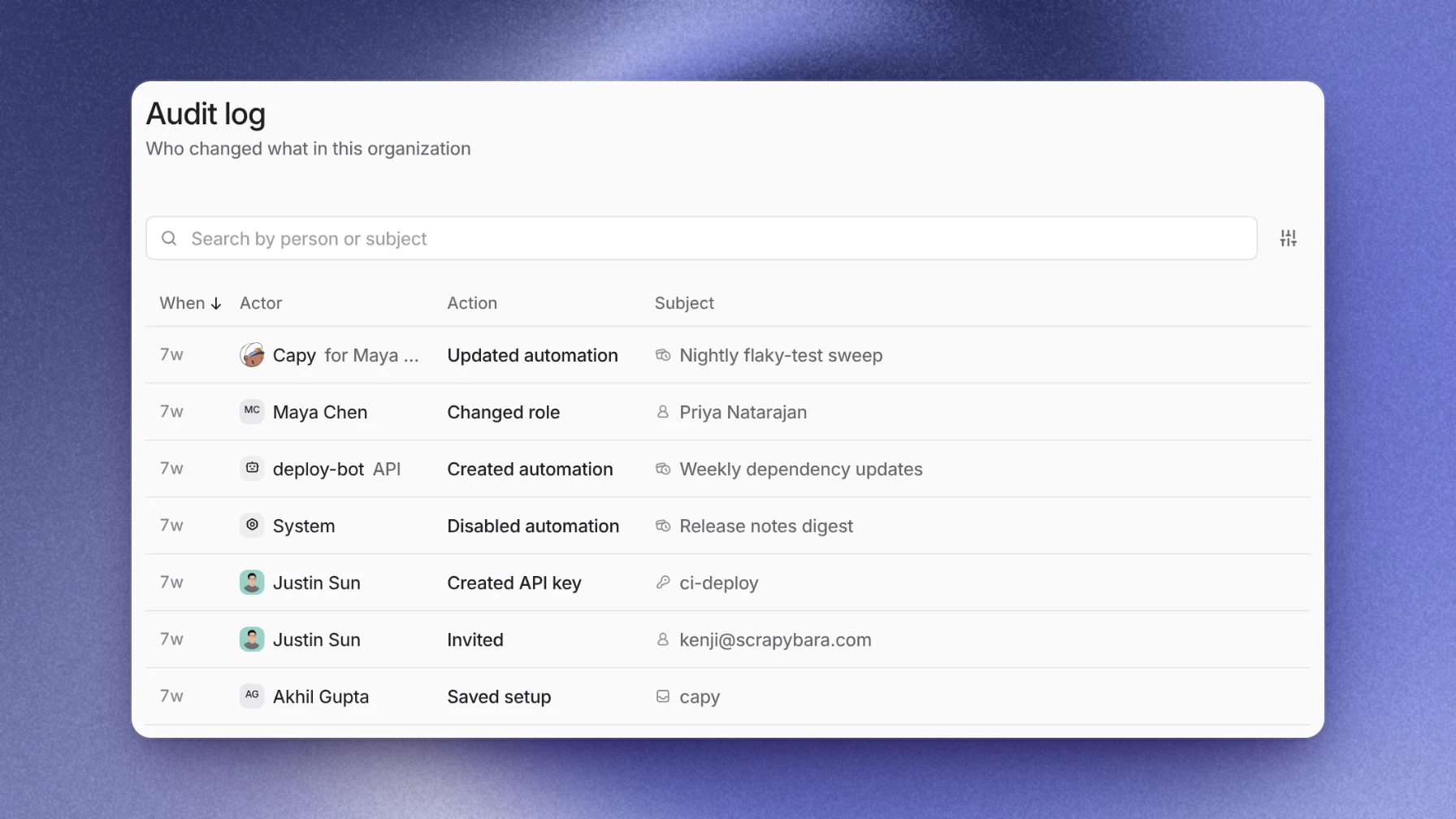
Roll coding agents out in three stages: a pilot team on a few repositories, then the guardrails your security review asks for, then everyone. The controls that matter are where each agent runs, which credentials it holds, who merges its work, how people sign in, and what you can audit afterwards. In Capy that means a separate VM per thread, no GitHub token on the machine, a person merging every pull request, enforced single sign-on and an admin audit log.
Three stages
| Stage | Who | Done when |
|---|---|---|
| Pilot | One team | Agent PRs pass review cleanly |
| Guardrails | Admins, security | Security signs off |
| Everyone | Every engineer | Steady state |
Pilot. Give one team of 5 to 10 engineers a project with their repositories, an environment that runs the tests, and review on every push. Start with scoped tasks a reviewer can verify fast, such as bug fixes with a failing test, dependency updates and small migrations. The real value of the pilot is the rules it produces, because most of our own guardrails started when an agent got something wrong in real use. We read production analytics an hour at a time, one statement per thread and never from a subagent, because wide scans from agents made the store's own writes time out. Bulk changes outside a thread's scope need the owner's word and a dry run, a rule we added after an agent took a broad instruction literally. Write each rule down with the reason behind it before you onboard the next 200 engineers.
Guardrails. Turn on single sign-on, set roles, make confidential projects private, set the model policy and scope secrets to each project. The steps are below.
Everyone. Open joining by domain, give each team or product its own project, and move recurring work into automations. We put every standing rule in AGENTS.md with its reason beside it so every thread sees why the limit exists. Our rule: a procedure that drives a privileged tool is read from the repository's protected branch at run time, not from a folder any agent can edit.
What a security review asks
- Isolation: a separate machine per task. Every cloud thread runs on its own Linux VM. A machine asleep for 14 days is deleted with everything that wasn't pushed. For each design, our security Captain asks what one compromised machine, pod or key exposes, and prefers the option where the answer is one customer.
- Git access: no long-lived token on the machine. Cloud machines hold no GitHub token. Machines that run reviews can read a repository but can't push. Our security Captain removes a credential instead of guarding it, which is why GitHub tokens stay on our server-side proxy and never reach an agent's cloud machine.
- Merging: a person approves every change. Capy never merges or turns on auto-merge unless someone asks for that merge in the conversation. The one standing exception is a merge rule committed to the repository's root
AGENTS.mdon its default branch. Your branch protection on GitHub still applies. - Identity: single sign-on, enforced. Google Workspace, Okta, Microsoft Entra ID or any SAML 2.0 provider, with Require single sign-on for your verified domain.
- Roles: least privilege. Owner, admin and member roles. Automations and API integrations run as service users with their own project access, so unattended work never runs as a person.
- Visibility: confidential code stays with its team. A private project limits every thread in it to the people added.
- Data: no training, clear retention. Capy is SOC 2 Type II and doesn't train models on your non-public code or chats. Zero data retention for Capy's own storage is available on Enterprise.
- Secrets: values stay out of the model's view. Environment variables are encrypted at rest, and the agent sees their names, not their values. Code the agent runs can still read them, so scope each one to the job.
- Audit: who changed what. Settings → Organization → Audit log records changes to members, roles, single sign-on, domains, API keys, devices, service users, automations and projects. Only admins and owners can open it.
- Spend: cost per person and per model. Settings → Organization → Usage breaks spend down by member, model and thread.
In our own security reviews, approvers ask three questions every time: what one compromised component exposes; what breaks, for whom and for how long if a change goes wrong, and how fast rollback is; and whether this is the end state or a patch. Proof is a run, not an argument, so claims get sent back without a local run that reproduces the attack before the fix, shows it refused after, and lists what isn't proven beside it. The security checklist for coding agents goes through the threat model behind these controls.
Set up the guardrails
- Turn on single sign-on in Settings → Organization → Identity & access. Verify your domain with a DNS record, connect your identity provider, then turn on Require single sign-on.
- Let people join by domain. An allowed email domain lets engineers join as members without an invitation. Promote the people who run projects to admin.
- Split work into projects. One project per team or product keeps each team's repositories, environment, secrets and automations together. Make a project private when its code shouldn't be visible to the rest of the company.
- Set the model policy on the Models page. Admins can keep a model on a company key, turn a model off for everyone, or stop members from connecting their own subscriptions and keys. Using your company's OpenAI or Anthropic contract walks through it.
- Write the house rules down. An
AGENTS.mdin each repository tells every agent how to build, test and open a pull request there. Review enforces the same file. - Create service users for automations, so scheduled jobs keep running after the person who set them up leaves.
We are moving the riskiest gates into tooling rather than leaving them in prose alone. Production migrations wait for a named person's go, and changes to busy tables must go through online schema-change requests. Agents can read infrastructure, while every apply, secret write and key change requires a person's typed confirmation, with our apply kit stopping on any unexpected plan line. Our coordinating Captains verify from their own reads, never from a thread's claim that something is done.
How many agents run at once
Your plan sets how much machine memory your organization's awake cloud machines can use together. On the default Large machine that's 8 at once on Lite, 32 on Pro and 64 on Max or Enterprise. Machine pricing lists the limits for every size. Members are unlimited on every plan, so adding engineers never adds a seat charge.
Follow-up questions
Does Capy train on our code?
No. Capy doesn't use your non-public code, messages or files to train models it develops or controls. On your own API key, model requests go under your agreement with the provider, including any zero data retention terms in it.
Can it run in our own cloud?
Running Capy in your own cloud is available on Enterprise plans. Book a call to scope it.
What support comes with Enterprise?
24/7 support from the engineers who build Capy, in Slack Connect and backed by an SLA. The enterprise page lists the rest.
How do we see what agents changed?
Every change arrives as a pull request on GitHub, reviewed and merged by a person. Each thread keeps its full transcript, and the Pulls page shows every pull request on the repositories your projects use.
Ship your next feature with Capy