





Aider alternatives
Seven coding agents compared with Aider: where each one runs, how each one charges, and when Aider is still the right tool.


Aider is an open-source terminal tool for AI pair programming in your git repository, connecting to almost any LLM with your own API keys.[1][2] Developers looking at Aider alternatives usually want a different workflow: delegating parallel tasks to cloud machines and pull requests, using a lab’s native CLI and editor surfaces, or running an approval-gated agent inside VS Code or JetBrains.
Pick Capy if you want a platform that runs parallel threads on cloud machines or your own computers and carries pull requests through CI and review, with no per-seat price.[3][4][5] Pick OpenCode, Cline, goose or Codex CLI if you want open-source local tooling with your own keys.[6][7][8][9] Pick Claude Code and Amp if their surfaces and pricing match your setup.[10][11][12][13] Stay with Aider if you’d rather steer every edit in one terminal session with local models and one commit per change.[1][14][15]
Every fact about each product below comes from its own docs, pricing page or repository, checked on November 20, 2026. The numbers in brackets link to the sources at the end.
Aider pairs with you in the terminal, one conversation at a time
Aider puts AI pair programming in your terminal so you can start a new project or build on an existing codebase.[1] Setup is minimal: install it with python -m pip install aider-install followed by aider-install (or one of its one-line installers), then launch aider inside your repository with a model and API key.[1][25] Aider is open-source software under the Apache License 2.0 that you run yourself with your own model API keys.[2][1]
To orient the model in larger codebases, Aider builds a repository map: a concise summary of the repo’s most important classes, functions and signatures sent with each change request.[24] On large repositories, a graph algorithm ranks the most relevant parts to fit inside a configurable token budget that defaults to 1k tokens via --map-tokens.[24]
Its git integration and chat modes are designed around tight human oversight. Whenever Aider edits a file, it creates a descriptive commit using Conventional Commits by default, commits any pre-existing dirty changes separately first, and marks its commits with (aider) in the author and committer name.[14] You can inspect edits with /diff and revert the last change with /undo.[14] Four chat modes cover different steps of a session: code (the default), ask (for discussion that never edits files), architect (where an architect model proposes changes and an editor model turns them into file edits) and help, with the docs recommending that you bounce between /ask and /code.[26]
Aider works across 100+ programming languages, supports voice-to-code, accepts images and web pages in chat, can be used from your IDE by adding comments to code, and runs linters and tests after each change so it can fix what they report.[1] It connects to almost any LLM, including local models through Ollama and OpenAI-compatible APIs as well as free API providers such as OpenRouter’s free models.[1][15] Created by Paul Gauthier, Aider is open source under the Apache License 2.0 with about 50,000 GitHub stars.[2] Its latest release on PyPI is aider-chat 0.86.2, published on February 12, 2026.[27]
People usually start evaluating an Aider alternative when single-thread terminal pairing becomes the bottleneck: when they want several tasks running at once on isolated machines, pull requests opened and maintained automatically, or triggers from Slack, Linear or an editor interface.
Capy delegates parallel threads across cloud machines and your own hardware
Capy is a platform for running coding agents.[16] You start a thread from the web or desktop app, from Slack by mentioning @Capy, from Linear by delegating an issue, or through the API.[16] In an Aider vs Capy comparison, the core difference is workflow shape: Aider is an interactive terminal conversation where you steer every edit, while Capy is closer to delegation, where you hand off a task and review the finished pull request.
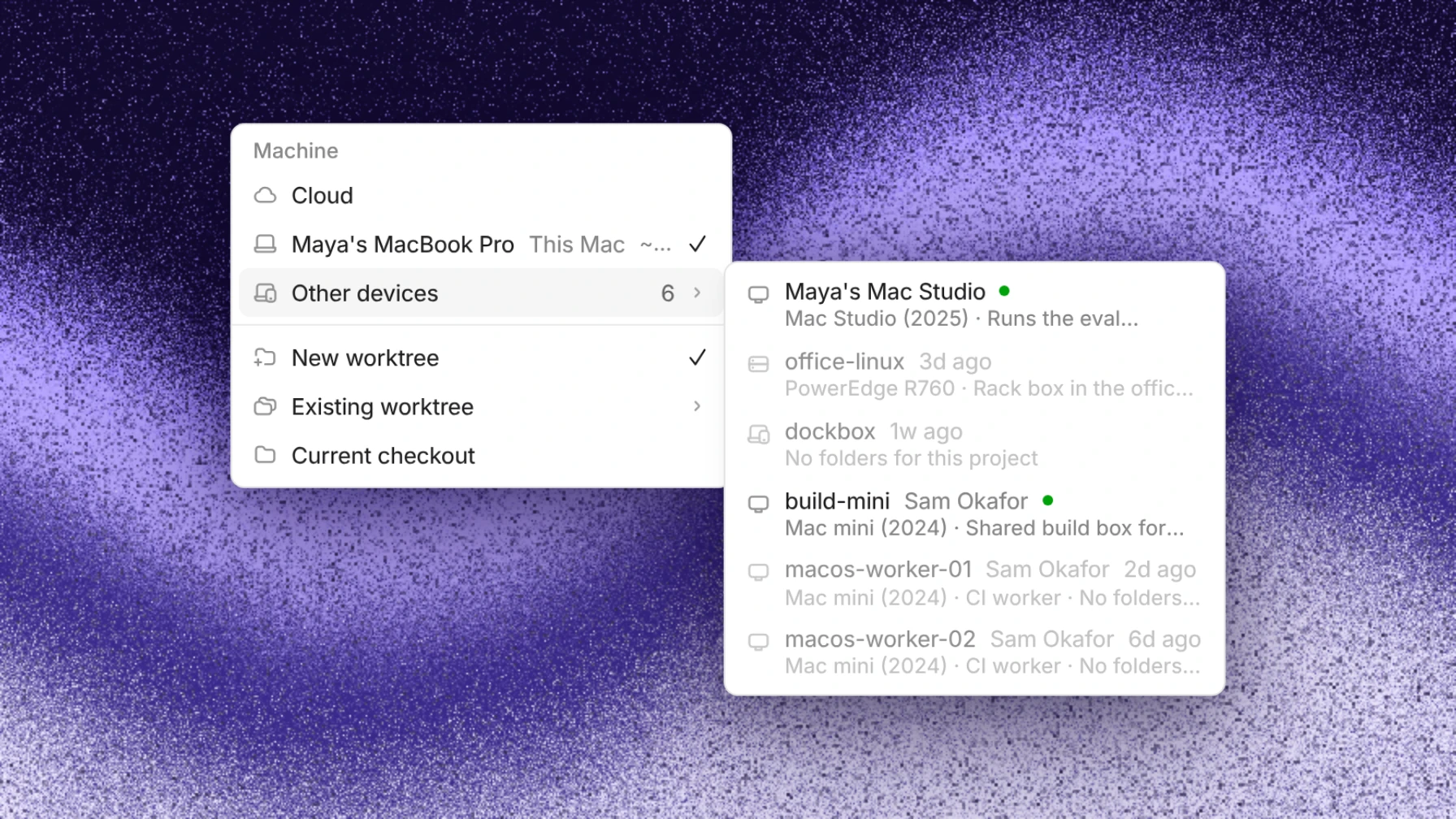
Threads run on cloud machines or on your own computers. From the Machine menu, you can start a thread in the cloud, on another paired device, or on your own computer, where it works in a new git worktree by default, an existing worktree, or your current checkout.[3] You can move a thread between your computer and the cloud as needed, and threads running on your own computer carry no machine-time charge.[3] Cloud machines run Ubuntu 24.04 with common runtimes, Docker Engine with Compose, and the GitHub CLI preinstalled, and the agent installs anything else with sudo.[28]
What Capy CLI means: running threads on your own servers with Dock
Capy’s CLI is the Dock CLI (capy dock), which is Capy without the desktop app.[17] It turns a Linux, macOS or Windows machine (a build server, a cloud VM or a spare Mac) into a device that Capy threads run on, using the tools, credentials and services already installed there.[17] You start and follow those threads from any browser.[17]
Install it on macOS or Linux with this command (or use the PowerShell installer on Windows), then run capy dock to pair the machine.[17]
curl -fsSL https://downloads.capy.ai/stable/dock/install.sh | sh
Threads on a Dock machine work in git worktrees under ~/.capy/worktrees, capy dock --dir ~/src/api links repository folders, and capy dock status, capy dock doctor and capy dock dirs let you inspect and diagnose the host.[17]
Parallel subagents, Captains and pull request follow-through
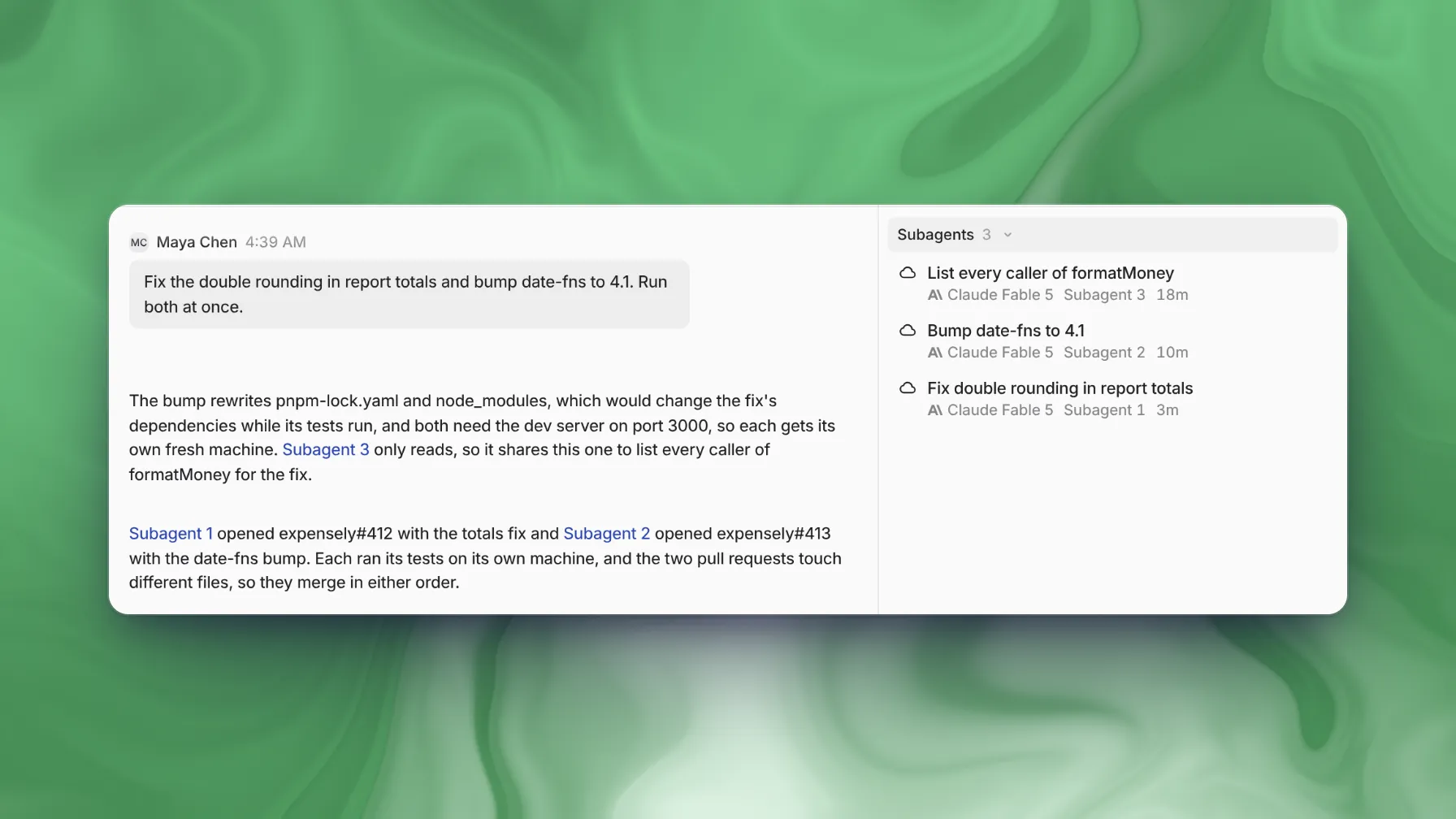
When a task has independent parts, a Capy thread can split work into subagents: full child agents with their own conversations, tools and usually their own machines.[18] Parallel subagents work on disjoint files and each ships its own pull request.[18] Plans cap concurrent cloud machines by memory: 8 Large machines at once on Lite, 32 on Pro and 64 on Max, and threads on your own computers don’t count toward that limit.[28] For larger bodies of work, a Captain is a long-lived agent that starts other threads for you, reads their reports, and tells you only what needs your input.[29]
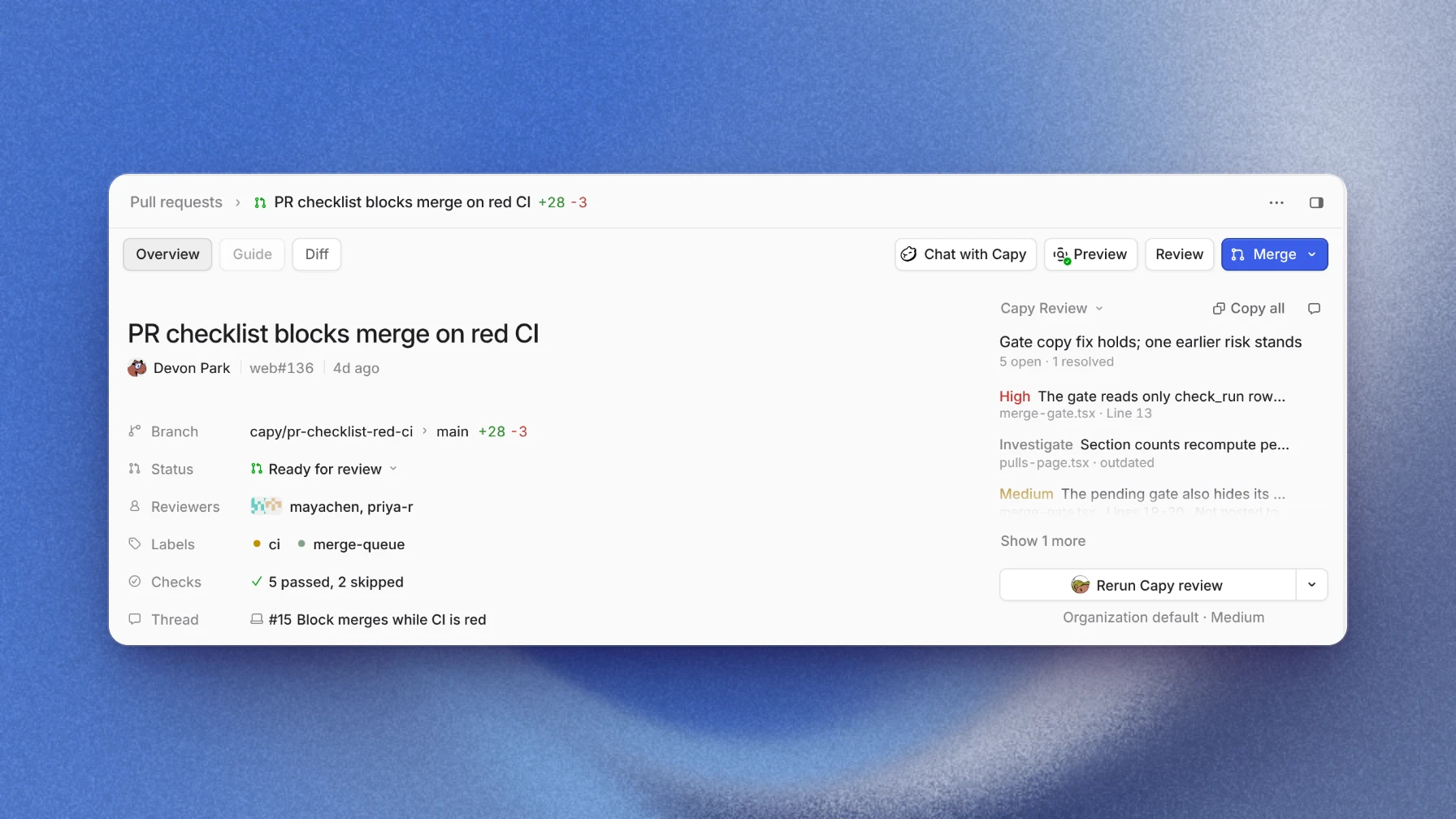
Ask for a pull request and Capy commits, pushes and opens it on GitHub, never pushing to the base branch, main, master, develop or release/*.[4] The thread that owns a pull request fixes failing CI, answers review feedback, resolves merge conflicts and wraps up after the merge.[4] Capy also runs a review agent that posts findings on GitHub.com pull requests, and when a Capy thread opened the pull request, that thread triages every review and fixes high-severity findings before reporting the pull request ready.[30]
Pricing, models and where Aider still wins
Capy runs models from Anthropic, OpenAI, Google, xAI and others.[5] Models billed on Capy credits pass through providers’ list prices with no markup, and your own subscriptions (Codex, GitHub Copilot and SuperGrok) and API keys work on every plan, including Free, with no charge or markup on their tokens.[5] Every plan includes unlimited members with no per-seat price: Free runs locally with your own subscriptions and keys and includes 100 review credits a month, while paid plans include monthly machine minutes, review credits and model usage at $20 a month for Lite, $100 for Pro, $200 for Max and custom pricing for Enterprise, with 20% off on annual billing.[5]
Aider still has clear advantages in several areas. Capy is closed source, and Aider is open source under the Apache License 2.0.[2] Aider requires no account, runs wholly on your own machine with almost any model, including local models through Ollama, and keeps you directly in the loop on every edit in the terminal.[1][15]
Pick Capy when you want to delegate work to parallel cloud machines or paired servers via capy dock, hand bigger streams of tasks to a Captain, and let owning threads handle CI failures, review feedback and merge conflicts with no per-seat fees.[17][29][4][5]
Claude Code brings Anthropic’s coding agent to the terminal, IDE and browser
Claude Code is Anthropic’s agentic coding tool for reading a codebase, editing files, running commands and integrating with your development tools.[10] It runs across the terminal, VS Code and JetBrains IDE extensions, a desktop app and the browser.[10]
Most Claude Code surfaces require a Claude subscription or an Anthropic Console account, while the terminal CLI, VS Code and JetBrains extensions also support third-party providers.[10] Claude Code is included from the Claude Pro plan at $20 a month billed monthly, or $17 a month on annual billing, and isn’t included on the Free plan.[11]
Pick Claude Code when you want Anthropic’s agent directly in your terminal, editor, desktop app or browser, and a Claude Pro plan, Anthropic Console account or supported third-party provider fits how you pay for tokens.[10][11]
Codex CLI pairs an open-source terminal agent with OpenAI’s tooling and ChatGPT plans
Codex CLI inspects code, edits files and runs commands from your terminal against your local repository.[19] You choose the model, reasoning effort and permissions, and codex exec runs the agent from scripts and CI pipelines.[19] It is open source under the Apache License 2.0.[9]
You can sign in with ChatGPT or use another sign-in method.[19] ChatGPT plans include a Codex usage allowance shared with ChatGPT Work across Codex on the web, in the CLI, in the IDE extension and on iOS.[31] Using an API key instead runs Codex in the CLI, SDK or IDE extension billed at API pricing, without cloud features such as GitHub code review or Slack.[31]
Pick Codex CLI when you want an Apache 2.0 terminal agent that also scripts cleanly into CI through codex exec, and you prefer using an existing ChatGPT plan allowance or OpenAI API key.[19][31][9]
OpenCode stays MIT-licensed across 200+ model providers
OpenCode is an open-source coding agent released under the MIT license.[6] It ships as a terminal interface, a desktop app or a web app.[20][32]
Like Aider, OpenCode emphasizes model choice: you can start with free models or bring any of 200+ providers.[20][32] If you’d rather use a single subscription for coding models, OpenCode Go is $10 a month.[20]
Pick OpenCode when you want an MIT-licensed coding agent with terminal, desktop and web interfaces, 200+ providers, free starter models, or a $10 a month model plan.[20][32][6]
Cline puts an approval-gated open-source agent in your editor, terminal and Kanban board
Cline is an Apache 2.0 coding agent that reads and writes files, runs commands and uses a browser, requiring your explicit approval before every action.[21][7] It ships as a VS Code extension, a JetBrains plugin, a CLI (npm i -g cline) with a headless mode for CI, a desktop app and an SDK.[21] For parallel tasks, its Kanban feature runs many agents at once from a web task board with a worktree per card.[21]
Cline is free for individual developers, so you pay only for AI inference using your own API keys or the Cline provider.[33] ClinePass adds a flat $9.99 a month subscription for open coding models, and Enterprise plans add SSO, an SLA and team management.[21][33]
Pick Cline when you want explicit step-by-step approval on every edit, command and browser action inside VS Code, JetBrains or the CLI, or a parallel Kanban worktree board under Apache 2.0.[21][7]
goose runs locally as a Linux Foundation open-source agent with MCP extensions
goose is a general-purpose open-source AI agent built to run on your machine for coding and other work.[22] It ships as a desktop app for macOS, Linux and Windows and a CLI, and you can build it into your own apps through ACP or the Open Intelligence Kit.[22] The project is part of the Agentic AI Foundation at the Linux Foundation and uses the Apache License 2.0 at github.com/aaif-goose/goose.[22][8]
goose connects to 85+ providers, including Anthropic, OpenAI, Gemini, OpenRouter and Amazon Bedrock, runs local models directly, and can use ACP agents such as Claude Code and Codex as providers.[22] You can capture repeatable workflows as YAML Recipes, delegate parallel tasks to subagents, and plug into 70+ documented MCP extensions.[22]
Pick goose when you want an Apache 2.0 local agent for both code and general work, with built-in local models and 85+ providers, YAML Recipes and a broad catalog of MCP extensions.[22][8]
Amp pairs a local CLI and multi-platform apps with hosted cloud orbs
Amp is a coding agent and development environment with apps on Mac, Windows, Linux, iPhone, iPad and Android.[12] Its Orbs are cloud machines created per thread with your code and tools set up, so the agent keeps working after you close your laptop.[12] The Amp CLI runs on macOS, Linux and Windows through WSL, targeting your local machine, an orb or a connected runner.[23]
Amp’s Hobby tier is free and includes pay-as-you-go Amp-hosted orbs alongside your own keys and existing ChatGPT, Claude and other subscriptions.[13] Individual is $20 a month with 45,000 minutes of Amp-hosted orbs, Teams carries no extra charge, Enterprise is custom, and self-hosted orbs and runners are free.[13]
Pick Amp when you want cloud orbs that keep running after your laptop closes, desktop and mobile apps alongside a WSL-compatible CLI, and free self-hosted orbs or runners.[12][23][13]
Two tools from older Aider lists have shut down or changed scope
If you’re working from an older Aider alternatives roundup, two frequent picks changed in 2026:
- Roo Code shut down its extension on May 15, 2026; its documentation now directs users to ZooCode (a community fork) and Cline.[34]
- Gemini CLI moved free individual access as well as Google AI Pro and Ultra accounts to Antigravity CLI on June 18, 2026, leaving Gemini CLI for Gemini Code Assist Standard and Enterprise and Code Assist for GitHub on Google Cloud.[35]
Stay with Aider when you want interactive terminal pairing and zero platform overhead
Aider remains a strong choice when your priority is staying in the loop on every edit from the command line. Setup takes two install commands, there’s no account to create, and you control model spend directly with your own API keys, free tiers such as OpenRouter’s free models, or local models through Ollama.[1][15]
Its git workflow keeps history clean and auditable, committing each edit with Conventional Commits messages and letting you back out with /undo.[14] Bouncing between /ask and /code or pairing an architect model with an editor model gives you precise control over every diff, backed by Apache 2.0 open-source code running locally.[26][2]
You can run Capy beside Aider on the same git repositories
Both Aider and Capy work directly on standard git repositories, so adopting one never forces you to drop the other. You can keep Aider open in your terminal for focused, interactive edits while sending multi-part tasks, background fixes and pull requests to Capy threads on cloud machines or on your own hardware via capy dock.[14][17][18]
Because Capy’s Free plan runs locally with your own keys and subscriptions and includes 100 review credits a month, you can try both tools side by side on the same repository and decide which tasks belong in an interactive terminal session and which ones to delegate.[5]
Frequently Asked Questions
What is the best Aider alternative?+
How do Aider and Capy compare?+
Does Capy have a CLI?+
Which Aider alternatives are open source and free to run with your own keys?+
Can I use Aider and Capy together?+
What happened to Roo Code and Gemini CLI?+
When should I stay with Aider?+
Sources
Checked against each product's own docs and pricing on November 20, 2026.
- 1Aider homepage
- 2Aider on GitHub
- 3Capy docs: Desktop app and devices
- 4Capy docs: Pull requests
- 5Capy docs: Models and pricing
- 6OpenCode on GitHub
- 7Cline on GitHub
- 8goose on GitHub
- 9Codex on GitHub
- 10Claude Code docs: Overview
- 11Claude pricing
- 12Amp docs: Introduction
- 13Amp pricing
- 14Aider docs: Git integration
- 15Aider docs: Connecting to LLMs
- 16Capy docs: Welcome
- 17Capy docs: Dock CLI
- 18Capy docs: Subagents
- 19OpenAI docs: Codex CLI
- 20OpenCode docs
- 21Cline docs: Overview
- 22goose homepage
- 23Amp docs: CLI
- 24Aider docs: Repository map
- 25Aider docs: Installation
- 26Aider docs: Chat modes
- 27aider-chat on PyPI
- 28Capy docs: Machines
- 29Capy docs: Captains
- 30Capy docs: Reviews
- 31OpenAI docs: Codex pricing
- 32OpenCode homepage
- 33Cline pricing
- 34Roo Code docs
- 35Gemini CLI on GitHub
Spotted something out of date? Tell us at support@capy.ai.
More comparisons
- 1Code alternatives for parallel coding agents1Code’s repository is archived and 1code.dev is offline. How Capy, Conductor, Devin Desktop, Codex, Claude Code desktop and Cursor replace it.
- Best AI code review toolsEleven AI pull request reviewers compared on git hosts, automatic reviews, fix loops and pricing, from each product’s own docs.
- Best AI coding agents in 2026: 12 tools comparedWhere twelve hosted and open-source AI coding agents run, how each charges, and when to pick each one.
- Best cloud coding agents in 2026How Capy, Devin, Cursor, Codex Cloud, GitHub Copilot, Kiro and Jules handle cloud machines, parallel work, pull requests, testing and pricing.
- Capy vs AmpWhat Amp is after its Sourcegraph spin-out, how both run parallel cloud agents, and how their pricing, models and pull request loops compare.
- Capy vs CodeRabbitWhere each one reviews, how each one charges, and what happens to a finding after it posts.
- Capy vs CodexWhere each coding agent runs, which models it uses, and how each one bills.
- Capy vs ConductorWhere each one runs your agents, how they handle GitHub pull requests, and how each scales past a single Mac.
- Capy vs DevinHow each one runs teams of coding agents, where they execute, what they cost, and which git hosts and models each supports.
- Capy vs GitHub CopilotWhere each coding agent runs, what happens after a pull request opens, and how each one bills.
- Cursor alternatives for cloud agentsHow Capy, Codex, GitHub Copilot and Devin run cloud coding agents, what each costs, and when to stay with Cursor.
- Roo Code alternativesSeven coding agents that replace Roo Code after its May 2026 shutdown, across VS Code, terminals and cloud machines.
- Capy CaptainsA long-lived agent that starts threads for bigger work, reads their reports, and tells you only what needs you.
Run coding agents on your repos
Start free on your own computer with your existing keys, or move threads to cloud machines that open and maintain pull requests.


- Aider pairs with you in the terminal, one conversation at a time
- Capy delegates parallel threads across cloud machines and your own hardware
- Claude Code brings Anthropic’s coding agent to the terminal, IDE and browser
- Codex CLI pairs an open-source terminal agent with OpenAI’s tooling and ChatGPT plans
- OpenCode stays MIT-licensed across 200+ model providers
- Cline puts an approval-gated open-source agent in your editor, terminal and Kanban board
- goose runs locally as a Linux Foundation open-source agent with MCP extensions
- Amp pairs a local CLI and multi-platform apps with hosted cloud orbs
- Two tools from older Aider lists have shut down or changed scope
- Stay with Aider when you want interactive terminal pairing and zero platform overhead
- You can run Capy beside Aider on the same git repositories
- FAQ
- Sources