





Capy vs Conductor
Where each one runs your agents, how they handle GitHub pull requests, and how each scales past a single Mac.

Conductor (conductor.build) is a Mac app that runs parallel coding agents in isolated git worktrees, alongside hosted sandboxes in Conductor Cloud.[1][2][3] It wraps Claude Code, Codex, Cursor and OpenCode with your own accounts and API keys, connects to GitHub to open pull requests and track checks, and charges nothing for the app today.[4][5][6] Capy is a platform for running parallel coding agents across macOS, Windows, Linux and isolated Linux cloud VMs.[7][8][9] You start threads on your own computer or in the cloud, move active threads between them without pushing to GitHub, and let the owning thread carry its pull request through CI and review.[8][10][11]
Pick Conductor if you work on a Mac, want a free desktop app around Claude Code, Codex, Cursor or OpenCode, and want local chats to stay on your device with requests going straight to your provider. Pick Capy if your team also runs Windows or Linux, wants active threads that move between a laptop and cloud VMs, wants Captains to run a crew of threads, or wants each thread to see its GitHub pull request through CI and review.
Every fact about either product below comes from its own docs, checked on November 20, 2026. The numbers in brackets link to the sources at the end.
Conductor is a Mac app, while Capy runs on Mac, Windows and Linux
Conductor (conductor.build) is built around a macOS desktop app; its installation docs note that Conductor is not available for Windows or Linux yet.[1] Each local workspace is a git worktree with its own branch, usually created under ~/conductor/workspaces, sharing the repository’s history so nothing is re-cloned.[2] New worktrees start from tracked files, and a “Files to copy” setting carries over gitignored files such as .env.[2] Conductor’s docs state that local workspace isolation is development isolation: agents and commands run directly on your Mac with your user account’s permissions and without sandboxing.[2][16]
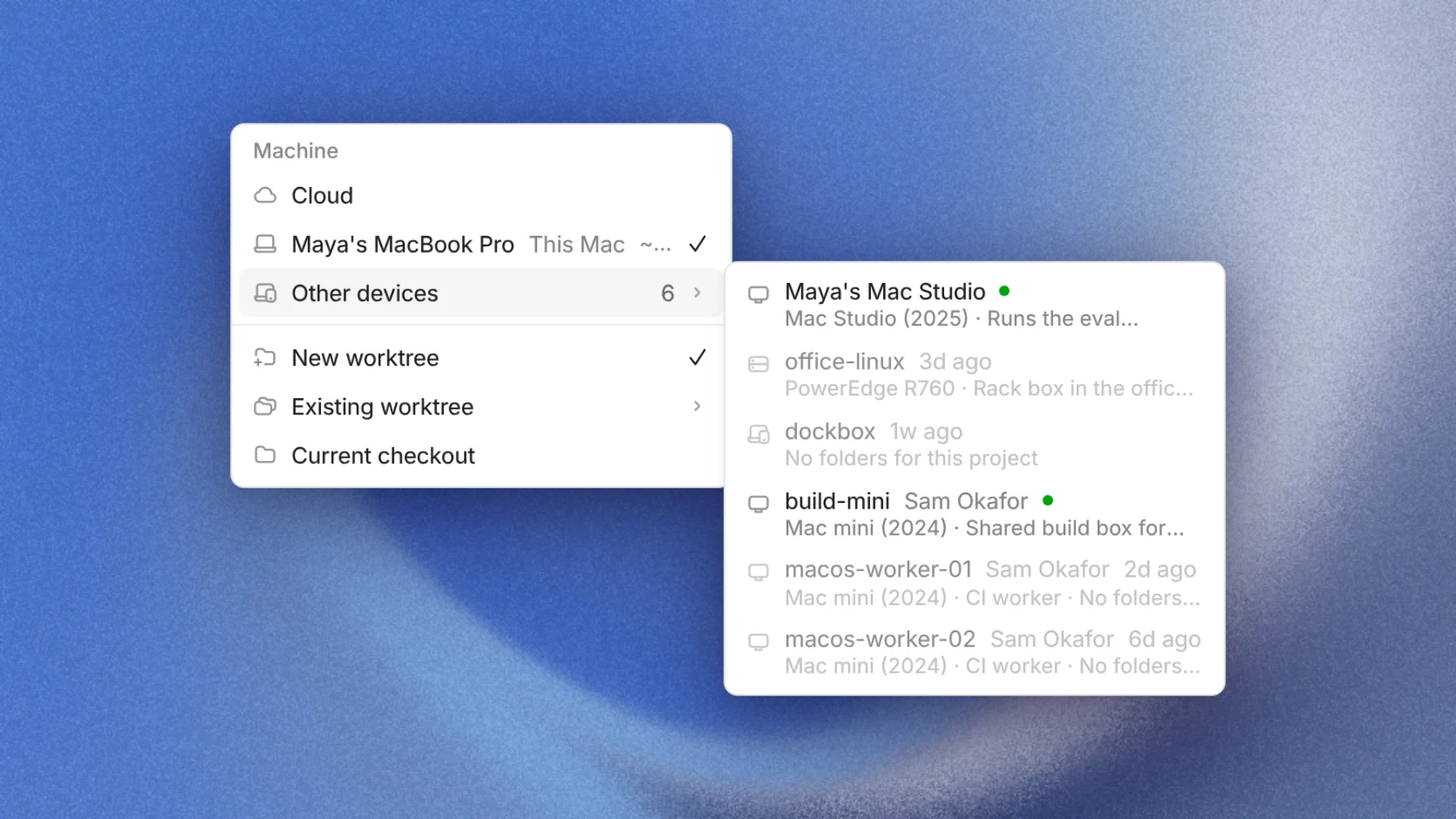
Capy’s desktop app runs on macOS, Windows and Linux, and you can also start threads from the web app, Slack, Linear or the API.[7][8] A thread on your own computer works in a local folder with the tools, credentials and services you already have, and “Scan a folder” links clones already on disk.[8] From the Machine menu, you choose the cloud, another paired device or this computer, and pick New worktree (the default, a fresh git worktree from the latest remote base branch that leaves your current branch and edits alone), Existing worktree or Current checkout.[8]
Local threads on Capy have no machine-time charge, and model usage costs the same as in the cloud.[8] Local work stops when your laptop does in both apps: Conductor’s local sessions end when you close the app or shut down your Mac, while a Capy thread on your computer waits up to 24 hours and continues once the computer reconnects.[14][8]
Capy moves active threads between your computer and the cloud
Conductor Cloud runs each agent in its own isolated Vercel sandbox in us-east-1 with 8 vCPUs, 16 GB of RAM and 32 GB of storage on Amazon Linux 2023, with repositories and dependencies preinstalled so agents keep working after you close your laptop.[3][14] Cloud workspaces are available on Pro, invite-only Teams and Enterprise plans, and they support GitHub repositories only, while local workspaces handle repositories hosted elsewhere.[14] You can conduct cloud workspaces from the macOS app, the Conductor API or Conductor for iOS, which lets you chat with agents and merge pull requests from your phone.[4][15]
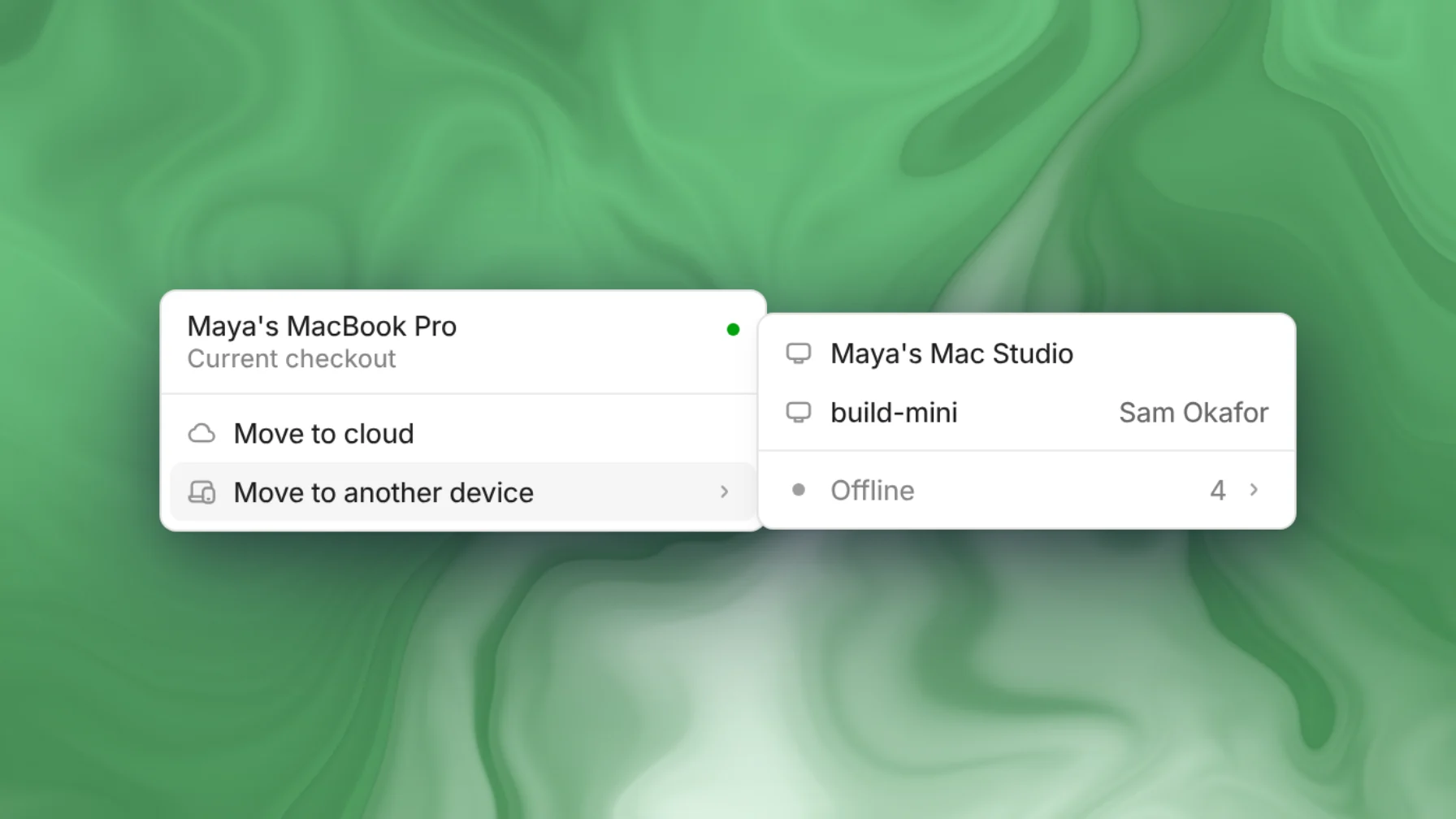
Every Capy cloud thread runs inside its own Ubuntu 24.04 Firecracker microVM with its own kernel, isolated from every other machine.[9] Machine sizes scale from Small (1 vCPU, 4 GB) through the default Large (4 vCPU, 16 GB) up to Big Guy (16 vCPU, 128 GB), and plans run up to 8 Large machines at once on Lite, 32 on Pro and 64 on Max.[9] When you want to hand an active thread off your laptop or bring a cloud thread back down, “Continue on” moves the thread between your computer and the cloud along with its branch, commits (including unpushed ones), and staged, unstaged and untracked changes, without pushing to GitHub.[8] Capy also keeps a cloud checkpoint of uncommitted work so an offline thread can still move to the cloud.[8]
Capy does not ship a native mobile app: you open capy.ai in your phone’s browser to start, follow and reply to both cloud threads and threads running on your computer, and on iPhone or iPad you can add it to your Home Screen for push notifications.[8][17]
Both open GitHub pull requests, and Capy threads follow them through CI and review
Conductor integrates directly with GitHub: setup checks your GitHub authentication in your terminal environment (which you can verify yourself with gh auth status), and you can open a workspace from a branch, pull request, GitHub issue or Linear issue.[1][6] The branch is the unit you review and ship.[2] Inside the app, you inspect changes in the Diff Viewer where inline comments attach back to the agent, run a Review action for an agent review, track git status, CI, deployments, comments and todos in the Checks tab, and draft the pull request with Create PR.[6] Once the pull request is open, Conductor follows GitHub Actions and status checks until you merge and archive the workspace.[6]
Capy ships code as GitHub pull requests and can stack dependent pull requests.[10] After a Capy thread opens a pull request, that same thread stays attached to it: a failing CI check wakes the thread to fix it, and the thread answers review feedback, resolves merge conflicts and wraps up after the merge.[10] Capy’s review agent also reviews pull requests on GitHub.com with inline comments; when a Capy thread opened the pull request, the thread triages those findings and fixes high-severity issues before reporting the pull request ready.[11]
Capy isolates parallel writers on separate machines
Conductor gives you two ways to run work in parallel.[18] Separate workspaces give independent tasks their own branch, files, running environment and review path, while multiple agents inside one workspace share the same branch and context when one agent implements and another reviews, with the caveat that agents in the same workspace can edit the same files.[18] Since version 0.95.0 on November 16, 2026, agents in local workspaces can also start and manage other agents: creating a workspace for a task, starting a chat, waiting for a reply, sending follow-ups and archiving workspaces when they finish.[19]
A Capy thread can split work across parallel subagents, each with its own conversation and usually its own machine.[12] A writing subagent receives a fresh machine with a clean checkout so parallel writers can’t overwrite each other’s files.[12]
Captains run a crew of threads so you review decisions
In Conductor, you steer workspaces directly, and in a Conductor Cloud organization workspaces and chats are multiplayer: teammates open the same workspaces and chats live, see who is active, prompt agents together in real time, follow a workspace or hand one off with Reassign to.[4][3][20]
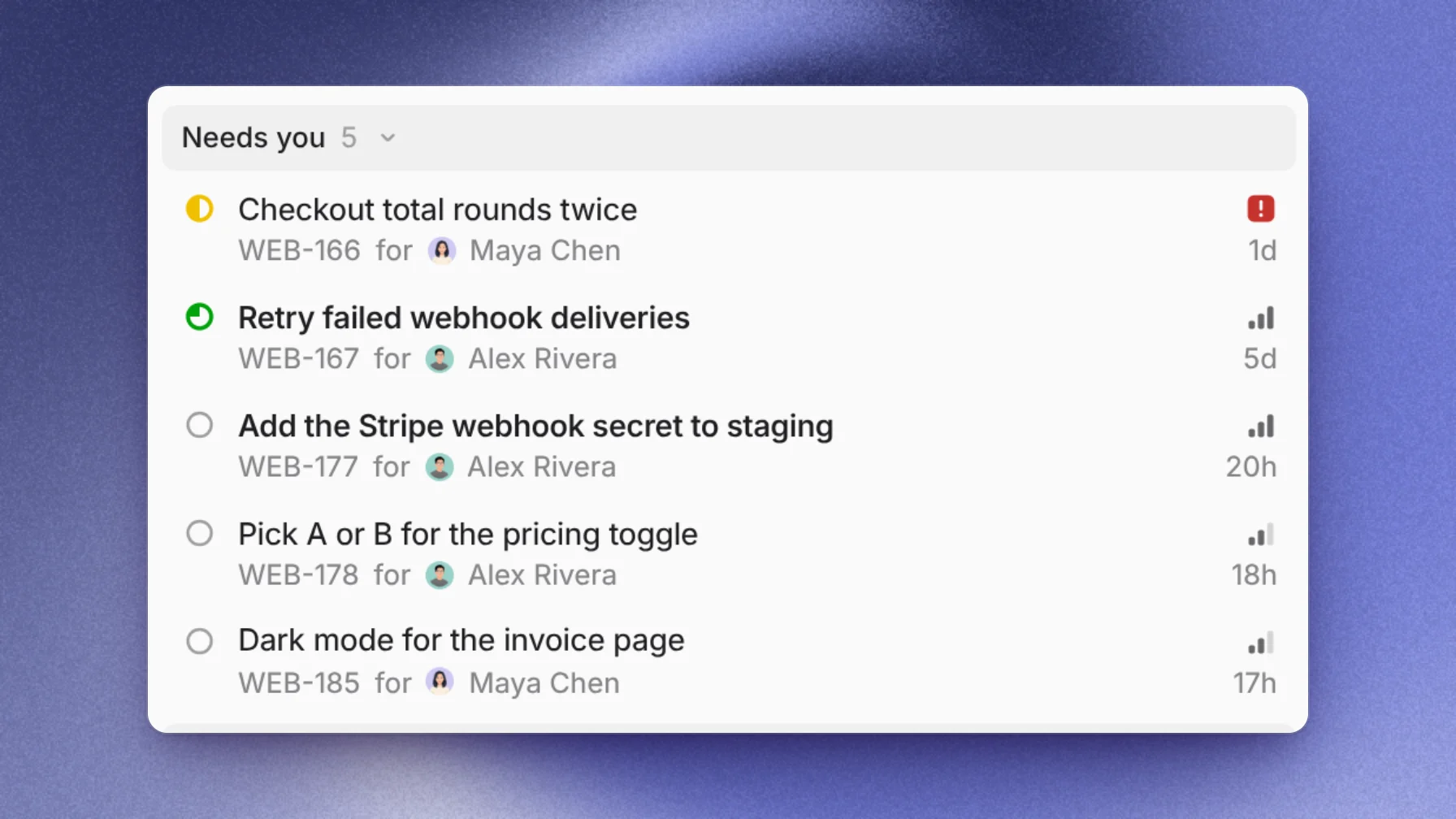
Capy adds a management layer above individual threads through Captains.[13] A Captain is a long-lived agent that runs a crew of threads for you, starting threads for incoming work, reading their reports, keeping its plan and rules in its own Drive, and maintaining a digest of what needs you, what’s new and what’s in progress.[13] Crew threads can run in the cloud or on a paired device, and a Captain can run on your computer too.[13][8]
Conductor runs four coding harnesses, while Capy gives you one model picker
Conductor runs the first-party Claude Code, Codex, Cursor and OpenCode agents.[4] Claude Code, Codex and OpenCode come bundled with the app, while Cursor runs through the Cursor API with a Cursor API key, and by default Conductor picks up the auth tokens already on your Mac such as your Claude Code API key or your Claude Pro or Max login.[16][5] With local Conductor, chat history lives on your Mac and messages go straight to your model provider; with Conductor Cloud, chat messages are stored on Conductor’s servers, and a self-hosted cloud is being built.[16][14]
Capy gives you models from many providers, including Anthropic, OpenAI, Google and xAI, in a single picker.[21] Your existing subscriptions (Codex, GitHub Copilot and SuperGrok) and API keys connect on every plan, including the free plan, with no charge or markup on their tokens, and models run on Capy credits bill at providers’ list prices with no markup.[21] When a thread runs on your computer, your repository files stay on your disk while the thread’s messages and tool output are stored in Capy’s cloud so the same thread opens in the web app, desktop app and Slack.[17]
Conductor is free today, while Capy prices shared plans with unlimited members
Conductor is free to use today and does not bill or resell model usage, so harness usage bills directly through your provider account or API key.[5] Its FAQ states that Conductor does not make money yet and plans to charge for team collaboration features later, and its Cloud FAQ notes no extra fee for cloud workspaces right now with usage-based pricing for cloud compute planned.[16][14] Conductor’s /pricing URL currently redirects to its homepage, which lists no plans or prices.[4] On November 4, 2026, Conductor announced it was joining Meta and published a wind-down schedule that set Cloud to read-only on November 13, shut Cloud down on November 20 and kept local app updates running until early 2027.[22] On November 13, Conductor struck that plan through, announced it was back and building again, and resumed shipping releases.[22][23][19]
Capy publishes five plans, all with unlimited members and no per-seat fee: Free, Lite at $20 a month, Pro at $100, Max at $200 and custom Enterprise, with 20% off on annual billing.[21] The Free plan runs threads locally with your own subscriptions and API keys and includes 100 review credits a month.[21] Paid plans include monthly machine minutes, review credits and model usage shared across your organization.[21]
Pick Conductor when you want a free, Mac-native workbench
Conductor is a strong, polished choice if your engineering workflow centers on a Mac and you want zero platform bill.[1][5] It costs nothing to run today, works straight on top of your local repositories, and lets you steer Claude Code, Codex, Cursor or OpenCode in parallel worktrees with a built-in diff viewer and GitHub checks tab.[5][2][6]
Conductor is also the better fit if keeping local chat history on your Mac with model traffic going directly to your provider is a requirement, if your team wants Cursor or OpenCode as the harness, or if a native iOS app for chatting with cloud agents and merging pull requests matters to how you work.[14][4][15] And if you prefer driving each agent workspace yourself inside a polished desktop UI, Conductor keeps that loop tight and direct.[6]
You can try Capy beside Conductor without moving your repos
You don’t have to give up your Conductor setup to test Capy on the same repositories. Install the Capy desktop app on macOS, Windows or Linux, sign in on the Free plan, and connect your Codex, GitHub Copilot or SuperGrok subscription or an API key.[8][21] Use “Scan a folder” to link the local clones already on disk, and import your local Codex sessions if you want their history in Capy.[8][17]
Because Capy’s default New worktree mode branches from your remote’s latest base branch, it leaves your current checkout and Conductor’s worktrees untouched.[8] Run a few threads locally at no machine-time cost, move one to a cloud VM with Continue on, which uses machine minutes or credits, or start a Captain to run a crew of threads on a larger project.[8][13] If Capy fits how your team ships, you can keep using the Free plan on your computer with unlimited members, or upgrade to Lite, Pro or Max when you want hosted cloud VMs plus monthly machine minutes, review credits and model usage.[21][9]
Frequently Asked Questions
What is Conductor (conductor.build)?+
Does Conductor run on Windows or Linux?+
How does Conductor work with GitHub?+
Is Conductor shutting down or joining Meta?+
How much do Conductor and Capy cost?+
Can both Conductor and Capy run agents in the cloud?+
When is Conductor the better choice?+
Sources
Checked against each product's own docs and pricing on November 20, 2026.
- 1Conductor docs: Install
- 2Conductor docs: Git worktrees
- 3Conductor docs: What is Conductor Cloud?
- 4Conductor homepage
- 5Conductor docs: Harnesses
- 6Conductor docs: Workflow
- 7Capy docs: Welcome
- 8Capy docs: Desktop app and devices
- 9Capy docs: Machines
- 10Capy docs: Pull requests
- 11Capy docs: Reviews
- 12Capy docs: Subagents
- 13Capy docs: Captains
- 14Conductor docs: Cloud FAQ
- 15Conductor changelog 0.90.0: Conductor for iOS
- 16Conductor docs: FAQ
- 17Capy docs: FAQ
- 18Conductor docs: Parallel agents
- 19Conductor changelog 0.95.0: Agents that manage your local workspaces
- 20Conductor docs: Multiplayer
- 21Capy docs: Models and pricing
- 22Conductor changelog 0.93.0: Conductor is joining Meta
- 23Conductor changelog 0.94.2: Conductor is back
Spotted something out of date? Tell us at support@capy.ai.
More comparisons
- 1Code alternatives for parallel coding agents1Code’s repository is archived and 1code.dev is offline. How Capy, Conductor, Devin Desktop, Codex, Claude Code desktop and Cursor replace it.
- Aider alternativesSeven coding agents compared with Aider: where each one runs, how each one charges, and when Aider is still the right tool.
- Best AI code review toolsEleven AI pull request reviewers compared on git hosts, automatic reviews, fix loops and pricing, from each product’s own docs.
- Best AI coding agents in 2026: 12 tools comparedWhere twelve hosted and open-source AI coding agents run, how each charges, and when to pick each one.
- Best cloud coding agents in 2026How Capy, Devin, Cursor, Codex Cloud, GitHub Copilot, Kiro and Jules handle cloud machines, parallel work, pull requests, testing and pricing.
- Capy vs AmpWhat Amp is after its Sourcegraph spin-out, how both run parallel cloud agents, and how their pricing, models and pull request loops compare.
- Capy vs CodeRabbitWhere each one reviews, how each one charges, and what happens to a finding after it posts.
- Capy vs CodexWhere each coding agent runs, which models it uses, and how each one bills.
- Capy vs DevinHow each one runs teams of coding agents, where they execute, what they cost, and which git hosts and models each supports.
- Capy vs GitHub CopilotWhere each coding agent runs, what happens after a pull request opens, and how each one bills.
- Cursor alternatives for cloud agentsHow Capy, Codex, GitHub Copilot and Devin run cloud coding agents, what each costs, and when to stay with Cursor.
- Roo Code alternativesSeven coding agents that replace Roo Code after its May 2026 shutdown, across VS Code, terminals and cloud machines.
- CaptainsLong-lived agents that run a crew of threads and surface the decisions waiting on you.
Run parallel agents anywhere
Start threads on your computer or in cloud VMs, move work between them, and let every thread carry its pull request through CI and review.


- Conductor is a Mac app, while Capy runs on Mac, Windows and Linux
- Capy moves active threads between your computer and the cloud
- Both open GitHub pull requests, and Capy threads follow them through CI and review
- Capy isolates parallel writers on separate machines
- Captains run a crew of threads so you review decisions
- Conductor runs four coding harnesses, while Capy gives you one model picker
- Conductor is free today, while Capy prices shared plans with unlimited members
- Pick Conductor when you want a free, Mac-native workbench
- You can try Capy beside Conductor without moving your repos
- FAQ
- Sources