





Best AI code review tools
Eleven AI pull request reviewers compared on git hosts, automatic reviews, fix loops and pricing, from each product’s own docs.


Picking an AI code reviewer comes down to how it fits your repositories and your bill: where your code lives, what happens after a finding posts, and whether pricing tracks seats or review volume. Current tools fall into two groups: standalone pull request reviewers built to work across git hosts, and review agents built into coding platforms. This comparison sticks to documented features and pricing so you can narrow the field to a couple of tools worth testing on real pull requests.
This guide walks through eleven AI code review tools: Capy, CodeRabbit, GitHub Copilot code review, Cursor Bugbot, Greptile, Gitar, Qodo, Graphite, Devin Review, Codex code review and Sourcery. Each section covers which git hosts the product supports, how reviews trigger, whether it applies fixes, how it charges, and when to pick it, with no benchmark numbers or quality rankings.
Every fact about each product below comes from its own docs, pricing page or changelog, checked on November 20, 2026. The numbers in brackets link to the sources at the end.
Five practical differences separate AI code review tools
Where your code lives narrows the list first. Some reviewers connect to GitHub.com only, while others cover GitHub Enterprise Server, GitLab, Bitbucket, Azure DevOps, Gitea or Perforce, and offer self-hosted deployment inside your own network.[4][6][13]
Fixing behavior is the next split. Older bots stop at inline comments, while newer reviewers offer one-click committable suggestions, agent handoff buttons, autofix commits to your branch or a stacked pull request, or an automated fix loop tied to CI checks.[17][6][15][12]
Context and workflow matter day to day. Look at what each tool reads beyond the diff (a full checkout, a code graph, pull request history, or rules in AGENTS.md), and whether you want reviews strictly on pull requests, inside a stacked-PR review app, or inside your editor and CLI before you push.
Finally, look at how billing behaves as review volume grows. Per-developer seats are easy to forecast when engineers open most pull requests, while pooled credit and per-review plans follow how many reviews run when coding agents open a growing share of your changes.
Capy reviews GitHub.com pull requests automatically and bills per review
Capy is a platform for running coding agents, and code review is built into it through a dedicated review agent.[1] You can run reviews automatically per repository by setting each repository’s mode in Settings → Review to Off, Once (the first review when a pull request opens) or Every push.[1] You can also trigger a round from the pull request page in Capy, by commenting @capy review on the pull request (trailing text becomes extra instructions, such as @capy review focus on the migration), or through the API at POST /api/v1/reviews.[1] Pushing commits while a review is running starts a fresh round against the new head.[1]
The review agent reads the diff in a real checkout of your repository at the pull request’s exact head and posts findings at or above the repository’s posting threshold (medium by default) as inline GitHub comments.[1] Each finding names a failure scenario with a category (Bug, Risk, Maintainability or Refactor), a severity (High, Medium or Low), a confidence (confirmed when the diff and traced context prove the defect, or investigate when it is a concrete risk with a verification target), and a file and line.[1]
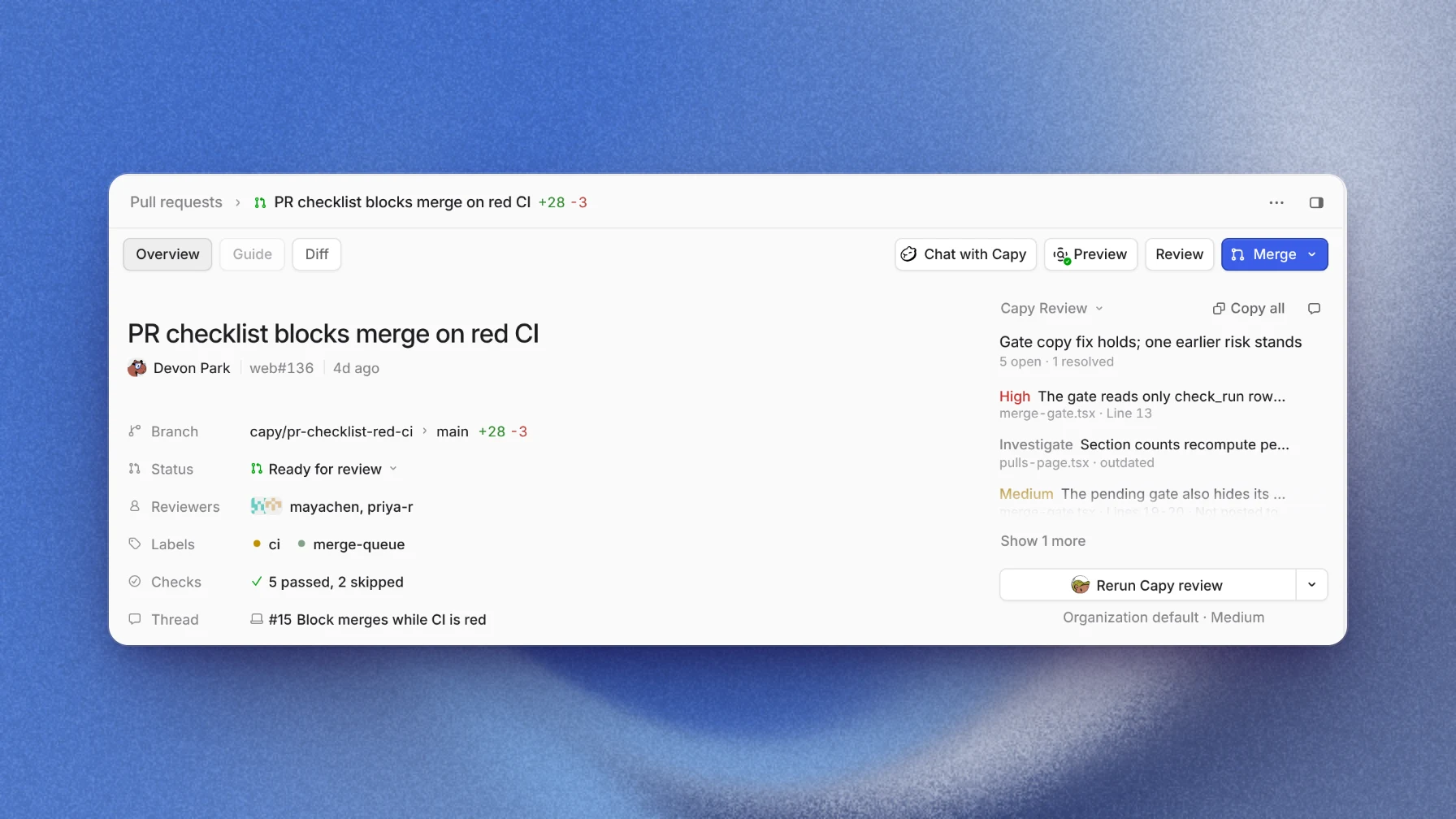
When a Capy thread opened the pull request, that thread receives every review round and triages it: it marks false positives irrelevant, confirms fixed findings resolved, and fixes high-severity findings before reporting the pull request ready, and you can override any triage decision.[1] On pull requests people opened, Capy reviews and posts findings; once a Capy thread owns the pull request (because it pushed to it or someone mentioned @capy), that thread also triages and fixes high-severity findings.[1] Re-reviews are incremental, scoping to code changed since the last reviewed head with the whole pull request as context; findings marked irrelevant stay suppressed, and a resolved finding whose fix didn’t hold returns as a new finding.[1]
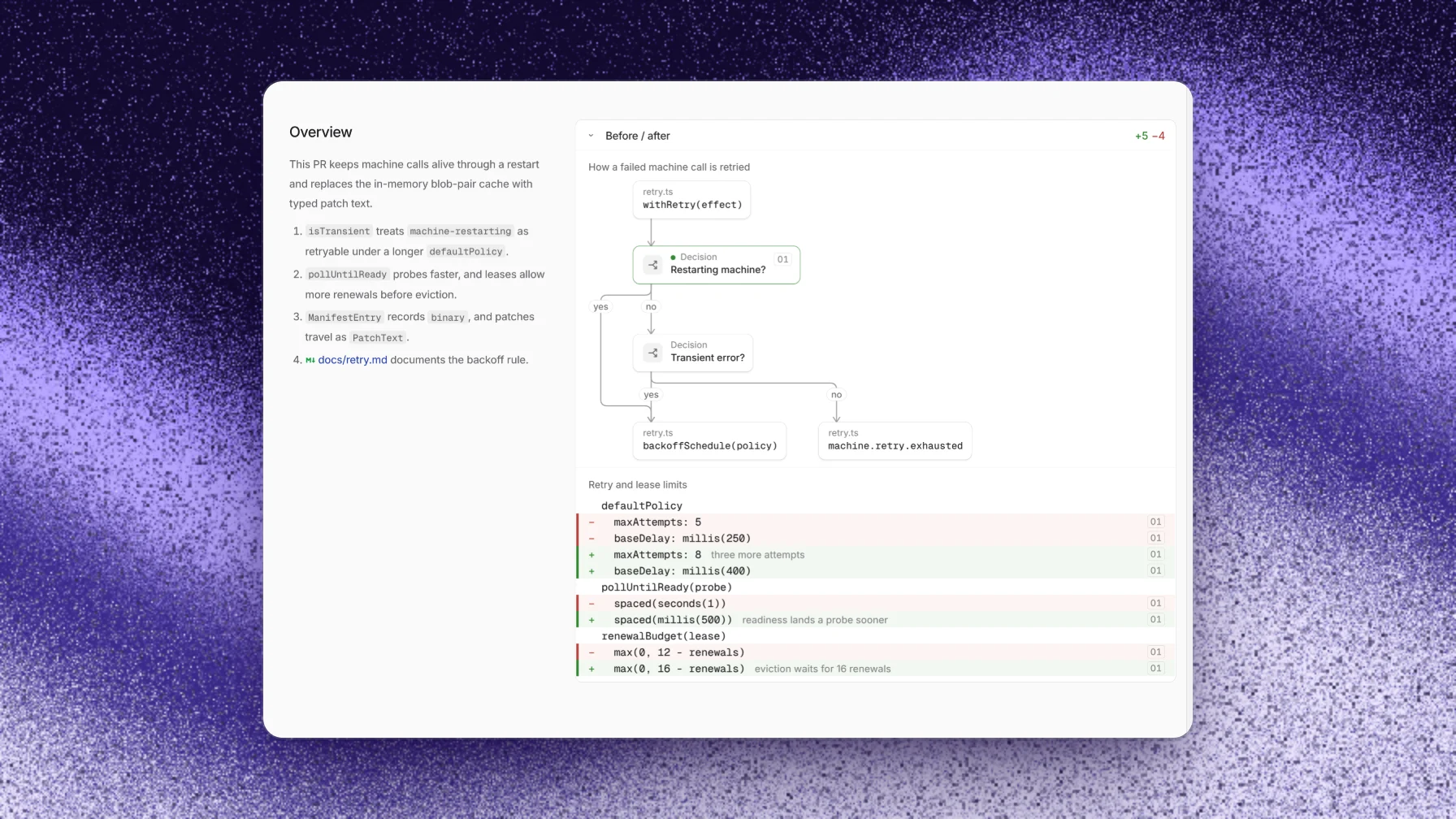
Capy’s review agent reads AGENTS.md files and enforces the conventions written there as findings on the same footing as logic bugs, while repository filters skip pull requests by label, author, title or base branch and ignore paths such as lockfiles.[1][20] Opening a pull request in Capy also produces a guide: what the change does, a before and after diagram of the path it touches, and the change broken into chapters with their own diffs.[20]
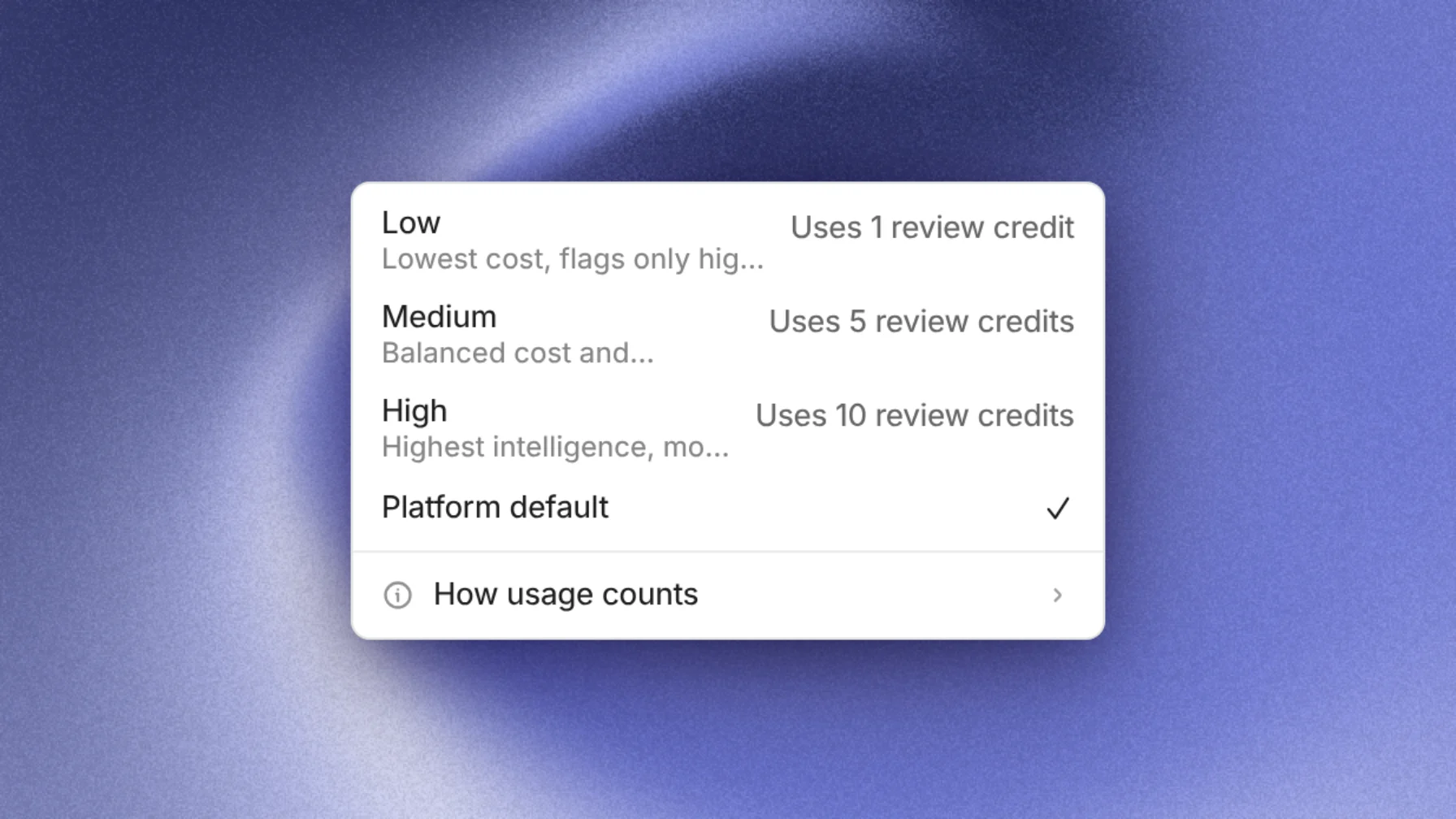
Capy supports GitHub.com only, and does not connect to GitHub Enterprise Server or other git hosts.[3] Plans are Free, Capy Lite ($20 a month), Pro ($100), Max ($200) and custom Enterprise, with 20% off on annual billing and unlimited members with no per-seat price on every plan.[2] Free includes 100 review credits a month with no machine minutes or model usage, while Lite, Pro and Max include monthly machine minutes, model usage and review credits: 250 review credits on Lite, 1,250 on Pro and 2,500 on Max.[2] Every review spends 1 credit at Low effort, 5 at Medium (the default) or 10 at High, covering both the model and the machine, and Flex is the default mode that runs a pull request’s first review at Medium and follow-up reviews at Low.[2][1]
Past the monthly allowance, reviews bill your organization’s Capy credits and never run on connected subscriptions or API keys.[2][1] Connected Codex, GitHub Copilot and SuperGrok subscriptions, along with your own API keys, run your coding agents on every plan, including Free, with no markup, while models on Capy credits bill at providers’ list prices.[2] For a direct comparison with CodeRabbit, see Capy vs CodeRabbit.
Pick Capy when your code lives on GitHub.com, you want per-review credit pricing with unlimited members and no seat fees, and you want coding agents that fix findings on the pull requests they own, both ones they opened and people’s pull requests they joined via a push or an @capy mention.[3][2][1]
CodeRabbit covers every major git host and charges per developer
CodeRabbit is a standalone review product that connects to GitHub, GitHub Enterprise Server, GitLab, Bitbucket Cloud, Bitbucket Data Center and Azure DevOps.[4] It can reach private-network GitHub Enterprise Server, self-managed GitLab and Bitbucket Data Center without opening inbound network access.[4] Reviews also run before a pull request opens through a VS Code extension, a JetBrains plugin in beta, and a CLI, and CodeRabbit picks up repository guideline files including AGENTS.md.[21][22]
On Essentials and up, Fix comments applies code changes for unresolved findings and pushes a commit to the current branch, or opens a stacked pull request when you comment @coderabbitai fix comments stacked pr.[15] On GitHub, a Fix comments checkbox sits directly in the review comment, and for ongoing automatic fixes you can turn on Autofix with @coderabbitai autofix or the Autofix checkbox in the pull request walkthrough; fixing works on GitHub, GitLab, Azure DevOps and Bitbucket Cloud.[15]
CodeRabbit charges per developer: Essentials is $24, Team is $48 and Advanced is $72 per developer a month billed annually ($30, $60 and $90 month to month), with Enterprise priced through sales.[11] The Free plan provides pull request summarization plus reviews via the VS Code extension and CLI, open-source projects receive Team features with no paid subscription, and usage-based reviews can be enabled past included limits.[11] Self-hosting is available for Enterprise customers with 500 or more user seats.[23]
Pick CodeRabbit when your repositories live on GitLab, Bitbucket, Azure DevOps or GitHub Enterprise Server, when you want reviews in your IDE or CLI, when you need Enterprise self-hosting at 500+ seats, or when you maintain an open-source project.[4][21][23][11]
GitHub Copilot code review runs inside GitHub, IDEs and Azure DevOps
GitHub Copilot reviews pull requests, flags issues and suggests fixes you can apply in a couple of clicks across GitHub.com, GitHub CLI, GitHub Mobile, VS Code, Visual Studio, Xcode, JetBrains IDEs and Azure DevOps.[18] Automatic code review can be enabled per repository. On Copilot Business and Enterprise, an admin can also let members without a Copilot license use code review on GitHub.com by enabling AI credits paid usage and the unlicensed-member code review policy; automatic reviews then cover their pull requests too.[18] In public preview, you can also pass review suggestions to Copilot cloud agent, which opens a new pull request against your branch with those fixes applied.[18]
Review effort can be set to Lite, Balanced, Max or Adaptive (where Copilot chooses within a configured maximum).[18] GitHub publishes estimated per-review AI credit costs of about $0.25 on average for Lite ($0.05 to $1), $1.50 for Balanced ($0.25 to $5) and $10 for Max ($1.50 to $25), excluding Actions minutes.[18]
Since June 1, 2026, each Copilot code review on Pro, Pro+, Business and Enterprise bills as AI credits under usage-based billing and also consumes GitHub Actions minutes from your plan on private repositories, with overages billed at standard Actions rates.[24] Agentic code reviews run on GitHub Actions runners, and self-hosted runners consume no Actions minutes.[18] Individual plans are Free ($0, without code review), Pro ($10 per user a month, including code review and $15 of monthly AI credits), Pro+ ($39 with $70 in credits) and Max ($100 with $200 in credits).[25][18]
Pick GitHub Copilot code review when your team already pays for GitHub Copilot, wants reviews inside GitHub, Azure DevOps and desktop IDEs under one vendor, or already runs self-hosted GitHub Actions runners.[18][25]
Cursor Bugbot reviews across five git hosts and spawns cloud autofix agents
Cursor, which SpaceX acquired in a transaction that closed on August 14, 2026, includes Bugbot for reviewing pull requests for bugs, security issues and code quality problems.[26][5] Bugbot runs on every pull request update or when you comment cursor review or bugbot run, posting explanations, fix suggestions, and Fix in Cursor or Fix in Web links that open the issue in Cursor or at cursor.com/agents.[5]
It connects to Cursor’s own Origin, GitHub (including GitHub Enterprise Server), GitLab (including self-hosted), Bitbucket (including Data Center) and Azure DevOps.[5] Repositories can check in .cursor/config/bugbot.yaml to set review effort (low, default, high or smart) and autofix mode (disabled, newBranch or existingBranch).[5] Bugbot Autofix, out of beta and available to all Bugbot users since February 26, 2026, spawns cloud agents in their own virtual machines to test changes and propose fixes on the pull request.[16]
Bugbot code review is included on Cursor’s Premium ($30 a month), Super ($100), Ultra ($200) and Teams ($30+ per user a month) plans, while Free and Plus ($8) exclude it.[27]
Pick Cursor Bugbot when your engineers already pay for Cursor Premium or Teams, want one-click handoff into Cursor or cloud autofix VMs, or work across GitHub Enterprise Server, self-hosted GitLab, Bitbucket Data Center or Azure DevOps.[5][16][27]
Greptile builds a repository graph, self-hosts on Enterprise and bills per credit
Greptile is an AI code review agent that builds a graph of your entire repository (functions, classes and dependencies) to trace how pull request changes affect the rest of the system.[6] It reviews every pull request, posts findings as pull request comments with suggested fixes, and learns from your team’s thumbs-up and thumbs-down reactions and replies.[6] Every comment carries a Fix with your Agent button that sends the issue, file paths, line numbers and suggested code to Claude Code, Codex, Conductor, Cursor or Devin, while a Fix All button in the review summary sends every finding at once.[6]
Greptile supports GitHub (Cloud, Enterprise Server and Enterprise Cloud with data residency), GitLab (Cloud and Self-Managed), Bitbucket (Cloud and Data Center), Gitea, Cursor Origin (beta), and Perforce with P4 Code Review on on-premises deployments.[6] Self-hosting is available on Enterprise through Docker Compose, Kubernetes or air-gapped deployments.[6][9]
Pricing uses shared credits with no seat fees on Pro: Starter is free for one developer with 50 credits a month, Pro bills $1 per credit shared across the organization (a Base review uses 1 credit, Plus uses 3 and Apex uses 10), Enterprise is custom, and qualified non-commercial open-source projects are free.[9]
Pick Greptile when you want no-seat credit pricing on GitHub, GitLab or Bitbucket cloud, when you need Gitea, Perforce or self-hosting on Enterprise, or when you want one-click handoff into Claude Code, Codex, Conductor, Cursor or Devin.[6][9]
Gitar pairs pull request review with an autonomous CI fix loop
Gitar is now Sonar’s product, presented on sonarsource.com as Sonar’s code change verification agent.[14] Alongside reviewing pull requests, Gitar separates real CI failures from flaky tests, applies fixes under your supervision, and iterates until your CI passes, committing only on green.[14]
Plans are priced per user a month for up to 50 users.[12] Core costs $20 per user a month billed annually ($25 monthly) and includes pull request summaries, on-demand fixes when you ask Gitar to repair an issue on your pull request, and CI failure diagnosis for GitHub Actions and GitLab Pipelines.[12] Pro costs $40 per user a month billed annually ($50 monthly) and adds the autonomous fix loop that iterates until CI passes and commits on green, auto-approval and merge blocking under rules you define, and CI analysis for CircleCI, Buildkite and Bitrise.[12] Enterprise is custom and adds self-hosted code hosting and bringing your own LLM key, while open-source projects on GitHub or GitLab get Pro features for free.[12]
Pick Gitar when flaky or failing CI runs stall your pull requests and you want an agent that diagnoses build failures and iterates until CI turns green before committing.[14][12]
Qodo runs multi-agent reviews on a shared monthly credit pool
Qodo reviews pull requests with specialized AI agents that read your full repository, history and standards, triggering automatically when a pull request is published or on every push.[17] Each finding explains what needs attention, why and how to fix it, ranked by severity; you can discuss or dismiss a finding, apply small changes through one-click committable suggestions, or let Qodo apply fixes directly through Remediate findings.[17]
Qodo installs on GitHub, GitLab, Bitbucket Cloud, Bitbucket Data Center and Azure DevOps.[7] Pricing is credit-based at $0.015 per credit pooled across the team.[10] Pro Team bills monthly with no annual commitment and a customer-set overage cap, after a free trial that needs no credit card.[10] There is no permanent free tier, though qualified open-source projects can apply for free access through Qodo for Open Source, and Enterprise adds SSO/SAML, bring-your-own LLM keys, and single-tenant SaaS or on-premises deployment.[10]
Pick Qodo when you want pooled monthly credit billing with a self-set overage cap across GitHub, GitLab, Bitbucket or Azure DevOps, or when your organization requires single-tenant SaaS, on-premises deployment or BYOK on Enterprise.[7][10]
Graphite bundles AI reviews with stacked pull requests and a merge queue
On December 19, 2025, Cursor announced that Graphite had entered into a definitive agreement to be acquired by Cursor and would continue to operate independently, and Cursor is now part of SpaceX.[28][26] Its AI reviews, powered by Graphite Agent, review every pull request and suggest fixes as part of a GitHub code review platform built around stacked pull requests (with a CLI and VS Code extension), an inbox and a merge queue.[29][13]
Graphite supports GitHub only, with GitHub Enterprise Server available on the Enterprise plan.[13] On annual billing, Hobby is free for personal-account repositories with limited AI reviews, Starter is $20 per user a month with limited AI reviews, Team is $40 per user a month with unlimited AI reviews and AI review customizations, and Enterprise is custom.[13]
Pick Graphite when your GitHub team wants stacked pull requests, a pull request inbox and a merge queue alongside unlimited AI reviews on the Team plan.[29][13]
Devin Review groups diffs into an interactive guide and hands edits to Devin
Devin Review groups related changes in a pull request, explains them alongside the diff, and highlights potential bugs and security issues through its Bug Catcher (categorized as Bugs, Flags and Security).[19] You can trigger a review by commenting /devin review on a GitHub pull request or GitLab merge request, turn on automatic reviews, open pull requests from Devin (including GitHub Enterprise or Azure DevOps by pasting the URL), or swap github.com for devinreview.com in a pull request URL, where public pull requests are viewable without an account.[19]
When you want a finding fixed, you can edit the code yourself, ask Devin to make an edit from the review chat, or post a comment such as /devin fix the failing test to start a Devin session on the pull request.[19] Pricing follows Devin’s platform plans: Free is $0, Pro is $20 a month, Max is $200 a month, Teams starts at $80 a month for up to 100 users, and Enterprise is custom.[30]
Pick Devin Review when your team already pays for Devin, wants grouped diff walkthroughs across GitHub and GitLab, or wants to read public GitHub pull requests quickly through a URL swap.[19][30]
Codex code review flags P0 and P1 issues inside ChatGPT plans
OpenAI’s Codex reviews GitHub pull requests when you comment @codex review or automatically when you enable Automatic review in Codex settings.[31] It posts a standard GitHub code review and, on GitHub, flags only P0 and P1 issues.[31] Codex follows Code Review Rules sections written in root and nested AGENTS.md files, and offers a deeper Security Review pass in research preview.[31]
Automatic code review is a cloud integration included in ChatGPT plans from Plus ($20 a month) and up, while API-key Codex sessions include no GitHub code review.[32]
Pick Codex code review when your developers already hold ChatGPT Plus or higher subscriptions, host code on GitHub, and want automatic reviews scoped to P0 and P1 issues without adding a separate tool.[31][32]
Sourcery reviews GitHub and GitLab pull requests from $12 per developer
Sourcery reviews pull requests with summaries and diagrams, one-click fixes, custom review rules, auto-approval of low-risk pull requests and security checks.[8] It supports GitHub and GitLab (both GitLab.com and self-managed GitLab on every plan), while GitHub Enterprise Server and self-hosting are included on Enterprise.[8]
Public repositories are free under the Open Source plan.[8] For private repositories, Pro is $12 per developer a month billed annually ($15 monthly), and Team is $24 per developer a month billed annually ($30 monthly), adding nightly security scans of 50 repositories.[8]
Pick Sourcery when you want a low per-developer price on private GitHub or self-managed GitLab repositories, free reviews on public repositories, or nightly security scans bundled with pull request review.[8]
Which AI code review tools apply fixes automatically like Gitar
If you want a reviewer that applies fixes after flagging issues, the tools on this list take three distinct approaches: autonomous fix loops, repository autofix commits, and one-click or agent handoffs. Gitar’s Pro plan runs an autonomous fix loop that edits your pull request, iterates until CI passes and commits on green, while its Core plan applies fixes on demand when you ask.[14][12] Cursor Bugbot Autofix spawns cloud agents in their own virtual machines to test changes and propose fixes on the pull request, configurable in .cursor/config/bugbot.yaml as disabled, newBranch or existingBranch.[16][5] CodeRabbit’s Fix comments (Essentials and up) pushes a commit to the current branch or opens a stacked pull request with @coderabbitai fix comments stacked pr, and its Autofix mode keeps applying repairs automatically once turned on with @coderabbitai autofix or the GitHub walkthrough checkbox.[15]
Other platforms tie fixing to an owning coding agent or explicit trigger. On Capy, the thread that owns a pull request (one it opened, or a person’s pull request after a thread pushes to it or someone mentions @capy) receives every review round, triages the findings and fixes high-severity issues before reporting the pull request ready. Other pull requests receive inline review comments.[1] Qodo lets you apply small edits as one-click committable suggestions or have Qodo apply fixes directly through Remediate findings.[17] GitHub Copilot code review supports applying suggested changes in a couple of clicks and passing suggestions to Copilot cloud agent (public preview) to open a pull request against your branch.[18] Devin Review edits code when you ask in the review chat or post a /devin command on the pull request, Greptile’s Fix with your Agent and Fix All buttons hand issues with file paths, line numbers and suggested code to Claude Code, Codex, Conductor, Cursor or Devin, Sourcery offers one-click fixes, and Graphite Agent suggests fixes directly on the pull request.[19][6][8][29]
Run two AI code reviewers side by side before you switch
Docs and pricing pages tell you where a tool connects and how it bills, while your own pull requests show how it fits your workflow. Install a second reviewer on a handful of active repositories and leave your existing reviewer turned on for a week or two. Each tool posts under its own reviewer account on GitHub or your git host, so their comments sit side by side on the same pull request.[1]
Keep your team’s conventions in AGENTS.md while you test. Capy, CodeRabbit and Codex all read AGENTS.md files, so the tools you compare enforce the same rules on the same diffs.[1][22][31] Once your team sees which workflow, fix loop and billing model fits your repositories, turn off the extra bot and roll your chosen tool out across the rest of your organization.
Frequently Asked Questions
Does Capy AI review pull requests automatically?+
Does Capy support GitLab or only GitHub?+
What are the closest CodeRabbit alternatives?+
What AI code review tools automatically apply fixes like Gitar?+
What is AI code review?+
How does per-review pricing differ from per-seat pricing?+
Can AI code review replace human reviewers?+
Can you run two AI code review tools on the same repository?+
Why isn’t Ellipsis on this list?+
Sources
Checked against each product's own docs and pricing on November 20, 2026.
- 1Capy docs: Reviews
- 2Capy docs: Models and pricing
- 3Capy docs: GitHub
- 4CodeRabbit docs: Git platforms
- 5Cursor docs: Bugbot
- 6Greptile docs: Overview
- 7Qodo docs: Install Qodo in your Git provider
- 8Sourcery pricing
- 9Greptile pricing
- 10Qodo pricing
- 11CodeRabbit docs: Plans
- 12Gitar pricing
- 13Graphite pricing
- 14Sonar: Gitar
- 15CodeRabbit docs: Fix comments
- 16Cursor blog: Bugbot Autofix
- 17Qodo docs: Code review
- 18GitHub Docs: Copilot code review
- 19Devin docs: Devin Review
- 20Capy: Code review
- 21CodeRabbit docs: FAQ
- 22CodeRabbit docs: Code guidelines
- 23CodeRabbit docs: Self-hosted CodeRabbit
- 24GitHub changelog: Copilot code review and Actions minutes
- 25GitHub Copilot plans
- 26Cursor blog: Cursor is now a part of SpaceX
- 27Cursor pricing
- 28Cursor blog: Graphite is joining Cursor
- 29Graphite docs: AI reviews
- 30Devin pricing
- 31OpenAI: Review GitHub pull requests with Codex
- 32OpenAI: Codex pricing
Spotted something out of date? Tell us at support@capy.ai.
More comparisons
- 1Code alternatives for parallel coding agents1Code’s repository is archived and 1code.dev is offline. How Capy, Conductor, Devin Desktop, Codex, Claude Code desktop and Cursor replace it.
- Aider alternativesSeven coding agents compared with Aider: where each one runs, how each one charges, and when Aider is still the right tool.
- Best AI coding agents in 2026: 12 tools comparedWhere twelve hosted and open-source AI coding agents run, how each charges, and when to pick each one.
- Best cloud coding agents in 2026How Capy, Devin, Cursor, Codex Cloud, GitHub Copilot, Kiro and Jules handle cloud machines, parallel work, pull requests, testing and pricing.
- Capy vs AmpWhat Amp is after its Sourcegraph spin-out, how both run parallel cloud agents, and how their pricing, models and pull request loops compare.
- Capy vs CodeRabbitWhere each one reviews, how each one charges, and what happens to a finding after it posts.
- Capy vs CodexWhere each coding agent runs, which models it uses, and how each one bills.
- Capy vs ConductorWhere each one runs your agents, how they handle GitHub pull requests, and how each scales past a single Mac.
- Capy vs DevinHow each one runs teams of coding agents, where they execute, what they cost, and which git hosts and models each supports.
- Capy vs GitHub CopilotWhere each coding agent runs, what happens after a pull request opens, and how each one bills.
- Cursor alternatives for cloud agentsHow Capy, Codex, GitHub Copilot and Devin run cloud coding agents, what each costs, and when to stay with Cursor.
- Roo Code alternativesSeven coding agents that replace Roo Code after its May 2026 shutdown, across VS Code, terminals and cloud machines.
- Capy code reviewAutomatic pull request reviews on GitHub.com with inline findings, AGENTS.md rules, pull request guides and per-review credits.
Review your pull requests with Capy
Turn on automatic reviews per repository in Settings → Review, and your next GitHub pull request gets findings on the exact changed line.


- Five practical differences separate AI code review tools
- Capy reviews GitHub.com pull requests automatically and bills per review
- CodeRabbit covers every major git host and charges per developer
- GitHub Copilot code review runs inside GitHub, IDEs and Azure DevOps
- Cursor Bugbot reviews across five git hosts and spawns cloud autofix agents
- Greptile builds a repository graph, self-hosts on Enterprise and bills per credit
- Gitar pairs pull request review with an autonomous CI fix loop
- Qodo runs multi-agent reviews on a shared monthly credit pool
- Graphite bundles AI reviews with stacked pull requests and a merge queue
- Devin Review groups diffs into an interactive guide and hands edits to Devin
- Codex code review flags P0 and P1 issues inside ChatGPT plans
- Sourcery reviews GitHub and GitLab pull requests from $12 per developer
- Which AI code review tools apply fixes automatically like Gitar
- Run two AI code reviewers side by side before you switch
- FAQ
- Sources